
Trending Lyricist I
November 1, 2022
Answered

Would a boost make much difference here?

  • November 1, 2022
  • 13 replies
  • 249 views

After a fair months with various issues, the main sources of which being:

  1. Wireless DECT baby monitor, replaced with an non DECT one
  2. DECT cordless home phones, never used so replaced with a basic phone just for line checks
  3. Neighbours mesh hopping networks and sometimes choosing same channel as my Sonos. I spoke with my neighbour who set a permanent channel and it has improved his experience too with their streaming etc

I now have a fairly stable Sonosnet, I have also moved a couple of speakers around based on what I have learned over the last few months about causes of interference etc.  Due to this movement I now have a Sonos Boost doing nothing. My network matrix is currently:
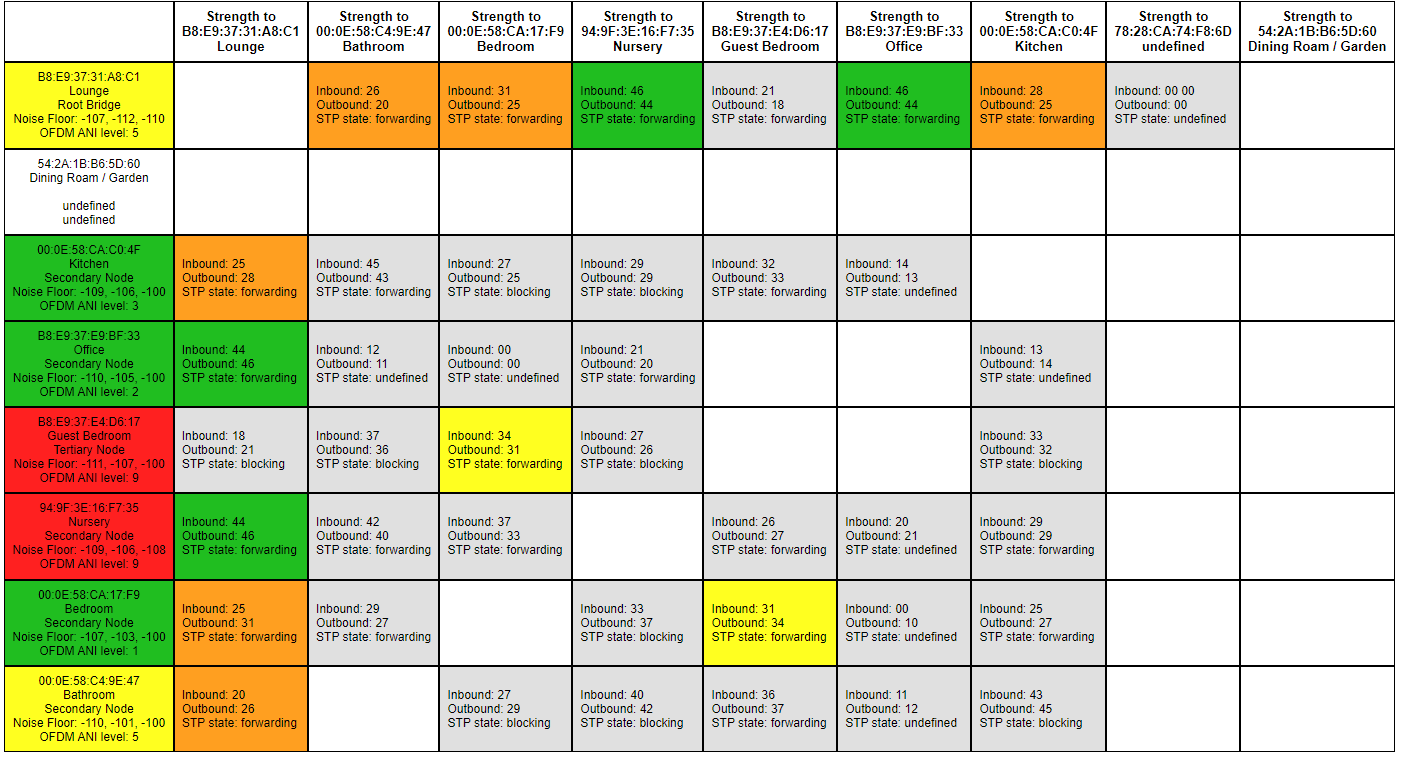


Everything seems to be working as we want, local files, online streaming etc


The two upstairs speakers that are red I have very limited options on where I can move them to and I cannot work out what is causing the interference, but they seem to be working as we like.


However I have some questions:

  1. Would replacing the Lounge with the unused Boost give any benefit? Is the boost more powerful to handle the amount of devices connecting to it as root?
  2. Does the boost give off any interference to a speaker right next to it? i.e if I replaced the Lounge with the boost, and then put the Lounge and Boost next to each other. Boost hardwired and Lounge on Sonosnet?
This topic has been closed for further comments. You can use the search bar to find a similar topic, or create a new one by clicking Create Topic at the top of the page.
Best answer by Stanley_4

I had a lot of frustration with my Sonos setup from having speakers too close to each other. Moving them as far apart as possible helped a great deal. The one that surprised me was a dining room and bathroom speaker, in different rooms but right next to each other’s back with a wall between them.

When looking at the red speakers do not just test devices with a radio, many non-radio devices will put out enough electrical noise to cause Sonos issues. I had a WD external HD that killed one channel of a stereo pair when it was in use, moving it from inches away to a couple feet solved that.

13 replies

Ken_Griffiths
November 4, 2022

@wolvesphil,

Here’s a chart showing the Zigbee channels in relation to the three 2.4Ghz non-overlapping WiFi channels. I thought it might assist you.

I ‘think’ Philips Hue defaults to Zigbee channel 25, which coincides with WiFi Channel 11, but I’ve used WiFi channel 11 with Sonos and Hue on Zigbee 25, without encountering any issues, but the Hue App allows the Zigbee channel to be changed, if necessary.


Airgetlam
November 4, 2022

And note that making everything “looking good” on this isn’t as important as just ensuring that you have no issues in your system when listening to it. There’s always going to be random cases of transient interference that might affect the display, without being strong enough to affect the actual streaming of music. Don’t worry about shooting for “all green”, as long as your music can play, it’s fine.

Bruce
Trending Lyricist I
November 7, 2022

@wolvesphil,

Here’s a chart showing the Zigbee channels in relation to the three 2.4Ghz non-overlapping WiFi channels. I thought it might assist you.

I ‘think’ Philips Hue defaults to Zigbee channel 25, which coincides with WiFi Channel 11, but I’ve used WiFi channel 11 with Sonos and Hue on Zigbee 25, without encountering any issues, but the Hue App allows the Zigbee channel to be changed, if necessary.


I have been using this as my marker for getting things working well, I currently have 

Wifi - Channel 1

Sonos - Channel 6

Hue - Zigbee 25

Hubitat - Zigbee 24


And things are working better than ever!