
Trending Lyricist I
November 1, 2022
Answered

Would a boost make much difference here?

  • November 1, 2022
  • 13 replies
  • 249 views

After a fair months with various issues, the main sources of which being:

  1. Wireless DECT baby monitor, replaced with an non DECT one
  2. DECT cordless home phones, never used so replaced with a basic phone just for line checks
  3. Neighbours mesh hopping networks and sometimes choosing same channel as my Sonos. I spoke with my neighbour who set a permanent channel and it has improved his experience too with their streaming etc

I now have a fairly stable Sonosnet, I have also moved a couple of speakers around based on what I have learned over the last few months about causes of interference etc.  Due to this movement I now have a Sonos Boost doing nothing. My network matrix is currently:
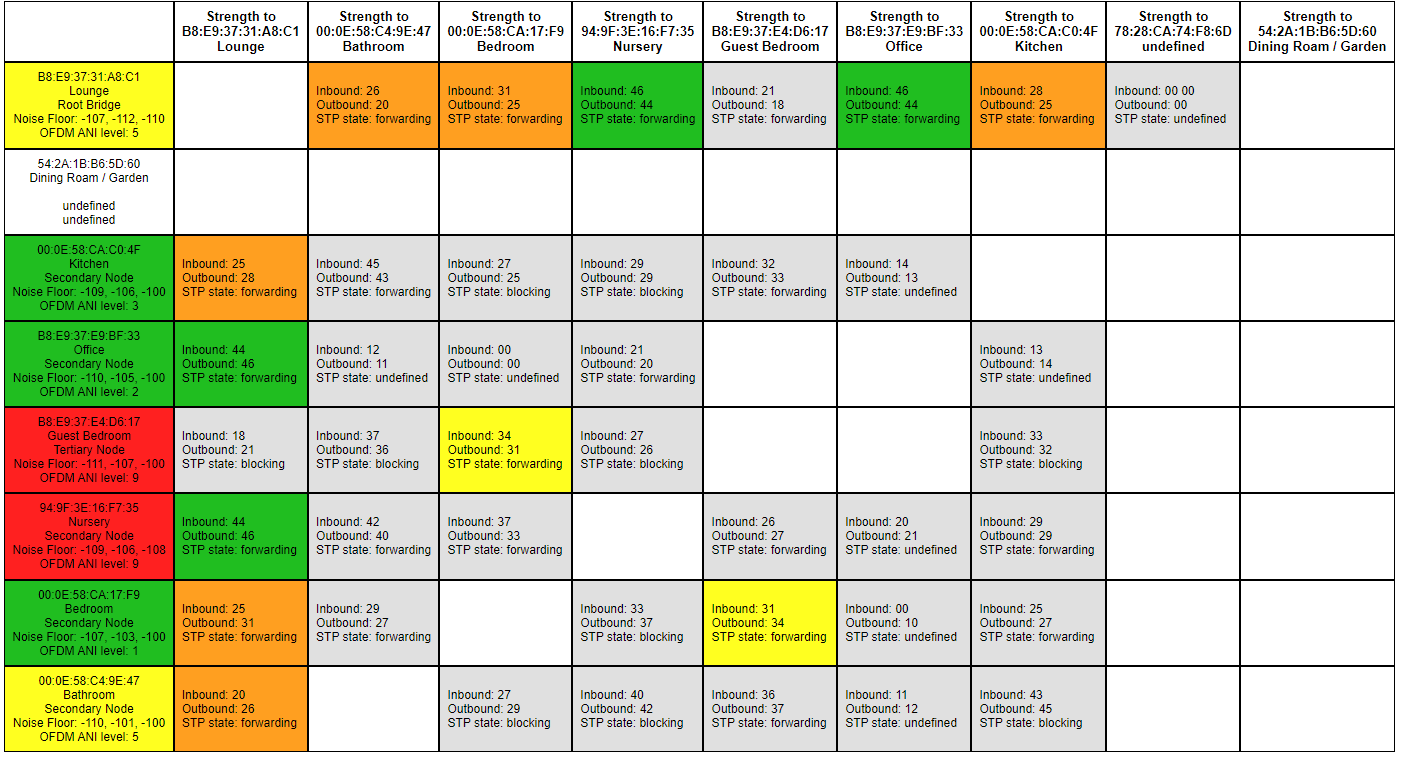


Everything seems to be working as we want, local files, online streaming etc


The two upstairs speakers that are red I have very limited options on where I can move them to and I cannot work out what is causing the interference, but they seem to be working as we like.


However I have some questions:

  1. Would replacing the Lounge with the unused Boost give any benefit? Is the boost more powerful to handle the amount of devices connecting to it as root?
  2. Does the boost give off any interference to a speaker right next to it? i.e if I replaced the Lounge with the boost, and then put the Lounge and Boost next to each other. Boost hardwired and Lounge on Sonosnet?
This topic has been closed for further comments. You can use the search bar to find a similar topic, or create a new one by clicking Create Topic at the top of the page.
Best answer by Stanley_4

I had a lot of frustration with my Sonos setup from having speakers too close to each other. Moving them as far apart as possible helped a great deal. The one that surprised me was a dining room and bathroom speaker, in different rooms but right next to each other’s back with a wall between them.

When looking at the red speakers do not just test devices with a radio, many non-radio devices will put out enough electrical noise to cause Sonos issues. I had a WD external HD that killed one channel of a stereo pair when it was in use, moving it from inches away to a couple feet solved that.

13 replies

Ken_Griffiths
November 1, 2022

The Boost would take any ‘burden’ off the Lounge speaker, but the Boost needs to be set at least one metre away from that speaker and other wireless devices including the router etc. The answer here is to try it, but as I’m sure many here will be thinking, if it works as it stands at the moment, then why bother?

Stanley_4
Stanley_4Answer
Grand Maestro
November 1, 2022

I had a lot of frustration with my Sonos setup from having speakers too close to each other. Moving them as far apart as possible helped a great deal. The one that surprised me was a dining room and bathroom speaker, in different rooms but right next to each other’s back with a wall between them.

When looking at the red speakers do not just test devices with a radio, many non-radio devices will put out enough electrical noise to cause Sonos issues. I had a WD external HD that killed one channel of a stereo pair when it was in use, moving it from inches away to a couple feet solved that.

Trending Lyricist I
November 2, 2022

I had a lot of frustration with my Sonos setup from having speakers too close to each other. Moving them as far apart as possible helped a great deal. The one that surprised me was a dining room and bathroom speaker, in different rooms but right next to each other’s back with a wall between them.

When looking at the red speakers do not just test devices with a radio, many non-radio devices will put out enough electrical noise to cause Sonos issues. I had a WD external HD that killed one channel of a stereo pair when it was in use, moving it from inches away to a couple feet solved that.

Interesting, the one in the nursery currently has a calpol vapour plug in next to it which we use when our son has a cold. That is fairly close to the speaker and there is more interference when it’s on.

In his room there is also a baby monitor (RF so low intereference) and a wireless IP camera used as a baby monitor overnight.

The guest bedroom s fairly close to a smart TV which I suspect is a cause of the interference for that one

Trending Lyricist I
November 2, 2022

A few more tweaks…


I think my only real step now would be to put the boost where lounge is and find somewhere else for Lounge, so the boost is doing what I bought it for...

buzz
November 2, 2022

Signal strength to Guest Bedroom is scary low. I can imagine that humans walking around could cause issues.

Trending Lyricist I
November 2, 2022

I am unsure really why Guest Bedroom hasn’t connected via another speaker and become tertiary as it has in the past connected through the Bedroom one

Stanley_4
Grand Maestro
November 2, 2022

Baby monitors are often a problem for any device using the WiFi channels, not sure what you mean by “(RF so low intereference)” as RF is exactly what causes interference.

A wireless camera can also eat up a lot of channel capacity, HD and a high frame-rate can pretty much fill a single 20 MHz channel.

Have you looked at your WiFi channels and put your Sonos on the one with the lowest usage and noise levels?

buzz
November 2, 2022

In terms of interference, the network matrix shown is very good. This is a static view and the situation might change over time. Signal strengths are a little low in some areas and a temporary concentration of “water bags” (humans) could cause trouble.

Trending Lyricist I
November 4, 2022

Baby monitors are often a problem for any device using the WiFi channels, not sure what you mean by “(RF so low intereference)” as RF is exactly what causes interference.

A wireless camera can also eat up a lot of channel capacity, HD and a high frame-rate can pretty much fill a single 20 MHz channel.

Have you looked at your WiFi channels and put your Sonos on the one with the lowest usage and noise levels?

Yes I realise now I wrote the wrong thing, our old baby monitor which filled the matrix with red when on was swapped out for an audio only one that causes a lot less interence. We have no issues with that one.


I have looked at my channels, as we have a zigbee hub and a hue hub are options are very limited on 2.4 but sonos is on one that nothing else is.

Stanley_4
Grand Maestro
November 4, 2022

If you keep having issues wait for one to pop up and send Sonos a diagnostic, then contact them (phone is best) with the ID number and they can check internal data we users can’t see.