
Contributor I
Dec 23, 2020 4:48 PM UTC
Answered

sonos port setup with turntable and existing yamaha amp
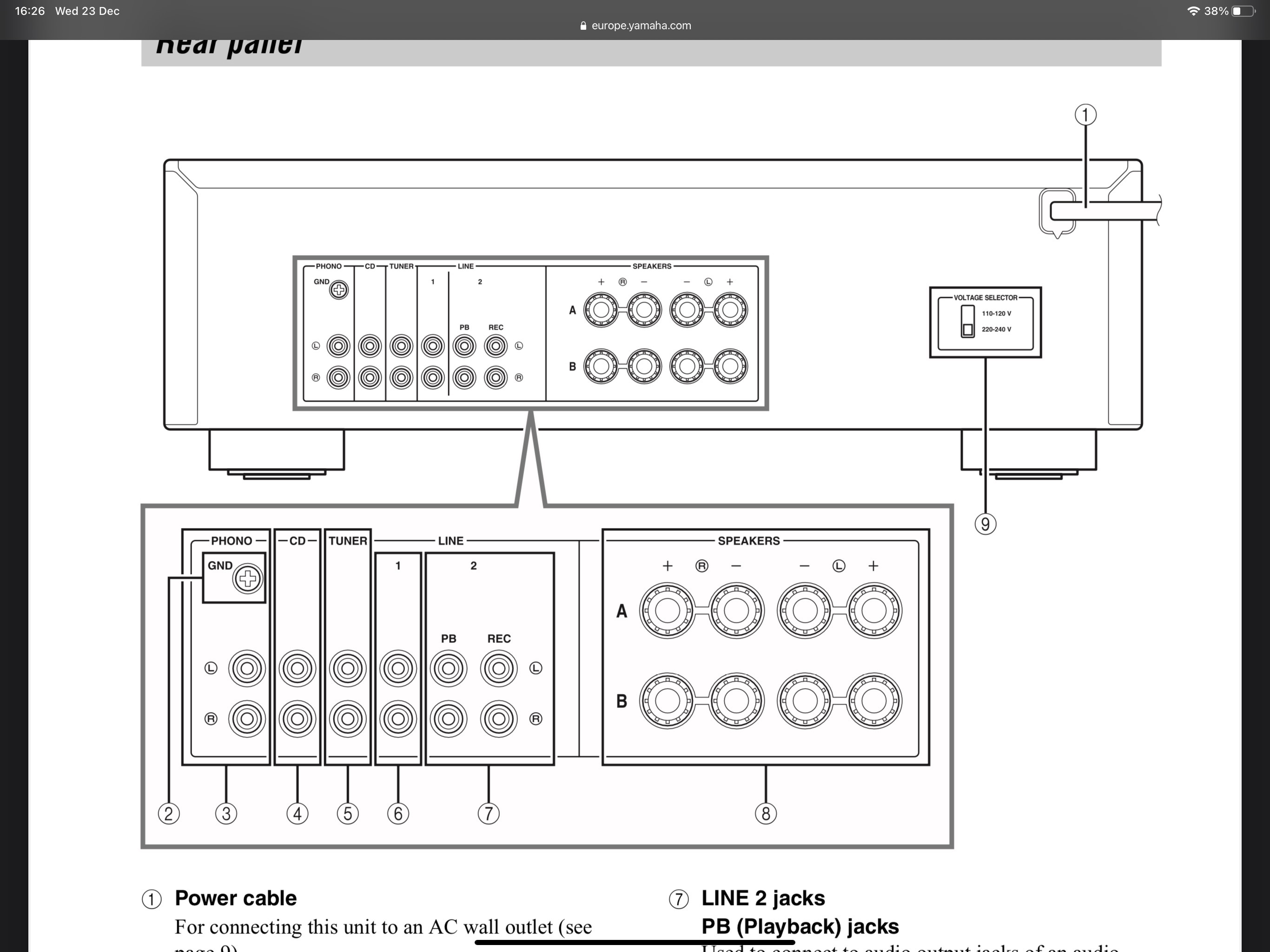
Looking for some help. I have a turntable connected to a Yamaha amplifier. I’m trying to use a Sonos port to then connect this to the rest of my Sonos speakers. The Yamaha amp also has speakers connected to it (non-Sonos) that I’d also like the audio to play through at the same time. However when setting up in the same room as a Sonos arc there is a noticeable delay in the audio. I’ve decreased to the minimum audio delay but still noticeable. Can someone advise? There is no delay when all speakers are being used to stream audio bough Spotify, it only seems to be when using the turntable to play vinyl (which is the reason I bought the port in the first place!)


ive attached an image of my amp. I currently have the ‘audio in’ from the port going into REC and the ‘audio out’ going into the PB. 

This topic has been closed for further comments. You can use the search bar to find a similar topic, or create a new one by clicking Create Topic at the top of the page.
Ken_Griffiths
Dec 23, 2020 6:05 PM UTC

Thanks Ken


my amp is a Yamaha AS201 and my turntable is a Pioneer PL30

On the back of the turntable you should find a switch (see attached) - switch that to ‘line’ and attach its RCA cable to the Sonos Port line-in.

Then connect the Port’s Analog Out to the → Yamaha (Line In) (you can use any line in CD/Tuner/PB) just select that as the audio output for the Amps speakers.


Group the Arc and Port rooms in the Sonos App (middle icon on main toolbar) ...and select your Ports line-in as your playing source from the tab with music icon… play your vinyl and see if that works.

11 replies

Ken_Griffiths
Dec 23, 2020 5:07 PM UTC

Assuming the turntable has a built-in pre-amp, try connecting that to your Sonos port RCA analog-in, instead of the Yamaha receiver ...and then play the Port Line-In audio (the turntable audio) to both your Port and Arc rooms (grouped in the Sonos App) and see if that sorts the echo/delay issue to all speakers.
 

Obviously you will need to connect the Sonos Port’s "Analog-out” to your Yamaha Receiver. I can’t see a digital coax audio-in within your posted image.

Translate
Contributor I
Dec 23, 2020 5:08 PM UTC

My turntable doesn’t have an inbuilt pre-amp 

Translate
Contributor I
Dec 23, 2020 5:22 PM UTC

Actually I think it has got a built in phono stage. But where do I plug in the output from the Sonos port to the Yamaha amp???

Translate
Airgetlam
Dec 23, 2020 5:30 PM UTC

Either 1 or 2 PB, based on what I see on the diagram.

Translate
Bruce
Contributor I
Dec 23, 2020 5:36 PM UTC

I just tried that and the audio only played through the arc (and the sound was very low and poor quality) and not the speakers connected to the Yamaha amp


Translate
Ken_Griffiths
Dec 23, 2020 5:41 PM UTC

Let me look at your Yamaha manual - what amp model is it?

Translate
Contributor I
Dec 23, 2020 5:44 PM UTC

Thanks Ken


my amp is a Yamaha AS201 and my turntable is a Pioneer PL30

Translate
Ken_Griffiths
Dec 23, 2020 6:05 PM UTC

Thanks Ken


my amp is a Yamaha AS201 and my turntable is a Pioneer PL30

On the back of the turntable you should find a switch (see attached) - switch that to ‘line’ and attach its RCA cable to the Sonos Port line-in.

Then connect the Port’s Analog Out to the → Yamaha (Line In) (you can use any line in CD/Tuner/PB) just select that as the audio output for the Amps speakers.


Group the Arc and Port rooms in the Sonos App (middle icon on main toolbar) ...and select your Ports line-in as your playing source from the tab with music icon… play your vinyl and see if that works.

Translate
Ken_Griffiths
Dec 23, 2020 6:09 PM UTC

Let me know if it works, as there are some other things you can perhaps do to improve the audio out and make it even louder etc.

Translate
Contributor I
Dec 23, 2020 6:45 PM UTC

That’s works thanks. I’ve increased the audio volume via the app for the line in. The quality may not be as good as before but that is only a minor niggle. Thanks for your help! 
 

Any other hints/tips to improve quality/volume welcome. 
 

Thanks again!

Translate