
Contributor I
March 8, 2020
Answered

Sonos Port - Faulty input

  • March 8, 2020
  • 9 replies
  • 800 views

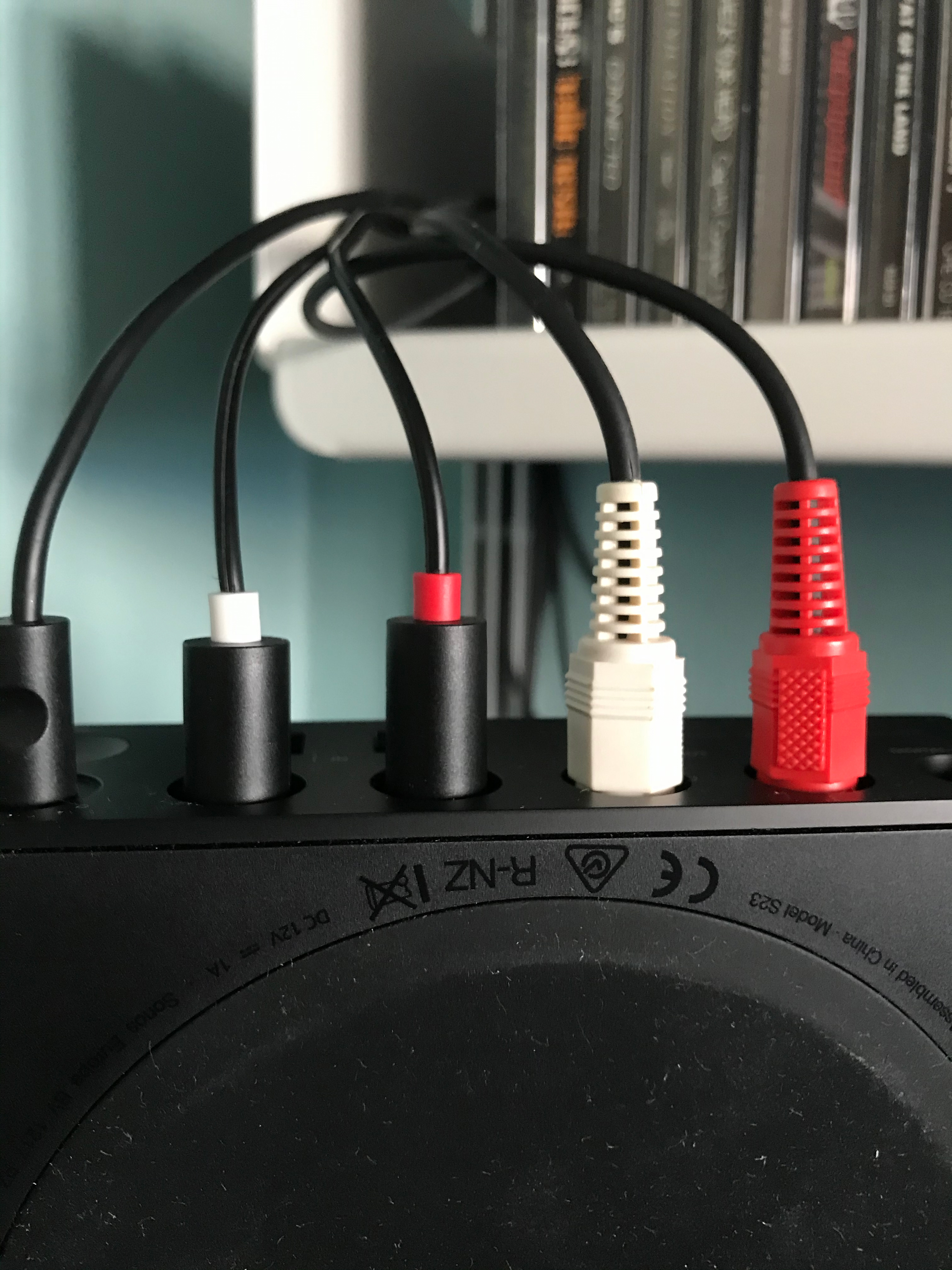
Just took delivery of my Sonos Port and I think there may be an issue with the Line-In connections. The red connector doesn’t seat in the port propery, it won’t go all the way in. In the app, Line-In is showing as disconnected.


Anyone had this issue?


    This topic has been closed for further comments. You can use the search bar to find a similar topic, or create a new one by clicking Create Topic at the top of the page.
    Best answer by ratty

    There is a mechanical switch which detects plug insertion in order to enable Line-In. It’s conceivable that it’s become misaligned. 

    9 replies

    ratty
    March 8, 2020

    If you try another plug will that go in fully?

    BaldbossAuthor
    Contributor I
    March 8, 2020

    Tried a few plugs. When I look down the port, it looks like there’s a small metal object which is not present in any of the other ports.


    It must be a manufacturing error, I’ll give them a call tomorrow.

    ratty
    rattyAnswer
    March 8, 2020

    There is a mechanical switch which detects plug insertion in order to enable Line-In. It’s conceivable that it’s become misaligned. 

    BaldbossAuthor
    Contributor I
    March 8, 2020

    Sounds plausible. I won’t fiddle in case it voids any warranty :)


    BaldbossAuthor
    Contributor I
    March 9, 2020

    Spoke to Sonos today and they are kindly replacing the device. You were correct @ratty 

    Lyricist I
    March 27, 2020

    Took delivery of a Port earlier today to replace a Connect, and mine has the exact same issue’s. On phone now, hoping for a replacement. 

    Not very impressed with it to be honest, the Connect has lasted years and never had any issues, currently they keep asking me to check things on my record player, but that works perfectly well with the Connect so it has to be an issue with the Port.
     

    Fingers crossed they sort it anyway, expensive upgrade to not work

    broox
    Contributor I
    April 2, 2020

    Yep. I’m in the same boat.

    I just received a Port to update my ~7 year old Connect and I am having the same issue. The Line-in shows as Disconnected using the cable that was shipped with the device. Now that I look directly at it from the top, I can see that the left/white RCA is not seated as far as the red one is. I tried wiggling it around and pushing a bit harder, no dice. Faulty product.

    ...and now I’m suddenly bummed that I just bricked my old Connect. The new Amps feel like an upgrade, the Port does not.

    broox.com
    broox
    Contributor I
    April 2, 2020

    After inspecting this a bit more. This is due to a bad RCA jack design.

    In each of the RCA jacks there is a thin piece of metal that runs parallel to the male RCA plug’s pin. It is designed to rest on the plug’s pin with a bit of tension. In our case, the metal in one of my jacks must’ve been bent too far downward so when we plugged our RCA jacks in, it bent the piece of metal the wrong way and crushed it in the bottom of the jack.

    Even with Sonos replacing device, with this design, it could take just one slightly misaligned plug-in to render your $450+ device useless.

    Be very gentle and deliberate when plugging your RCA cables in with this new generation of devices (that sounds so ridiculous, lol).

    I hope they fix it.

    broox.com
    April 2, 2020

    This is not good because not everyone uses line-in right away. Some folks might go a long time not using the input and then later when they have a need for it find that it doesn’t work (and probably never did). Sonos should send a warning to all Port owners to test the line-in while their unit is still under warranty.

    Local music library with carefully constructed playlists - no shuffling!, Integration with Homeseer Automation, No touch screen devices, No streaming services, No Apple products ever