
Sonos Amp LS50 Frequency Response Graphs (brightness, crossover, loudness eq)
I'd like to share my impressions of the new Sonos amp paired with kef LS50, id also like to share the frequency graphs i have recorded using REW to address some of the concerns on the amp being bright and the sub woofer crossover boosting the treble.
Positive:
The pair sounds good, I came from a much larger (older) stereo component setup looking to keep the HiFi sound but also have some of the always on convenience that I have found using the numerous PLAY:1s around the house. I now find myself listening to much more music as the amp is always on ready to go.
It also sounds good for TV/Movies using ARC (with my previous setup I always found the voices too quiet and i didn't want a large AVR) even with just having stereo speakers - I feed the amp Dolby 5.1 from the Apple TV4, the Amp down-mix very well to include a DSP centre channel (this sounds noticeably clearer than feeding stereo), I am looking forward to adding rear surround at a later date.
Hardware is built well, and i think the cost is reasonable - especially compared to over HiFi components.
Negative:
I am having a few issues with the remote, sometimes when changing volume, the sound changes normally but the volume OSD lags and sometimes doesn't move at all. I also checked within the Sonos app, and it does the same. I change volume and it will lag and the slider will jump to the new volume setting.
Requests:
Id prefer to have linear volume control rather than a curve, at the moment my volume is mostly set at 50% to achieve good sound. I have read that most of the power is reserved for after 50%. (Source: theverge) and this is noticeable, with lower efficiency speakers.
Id really like to either see TruePlay or even better a parametric eq/convolution ability on the amp. With everything in one box I cannot add third party room correction, so this would have to be a software add-on. This would really complete the package.
On to the Frequency Response Graphs
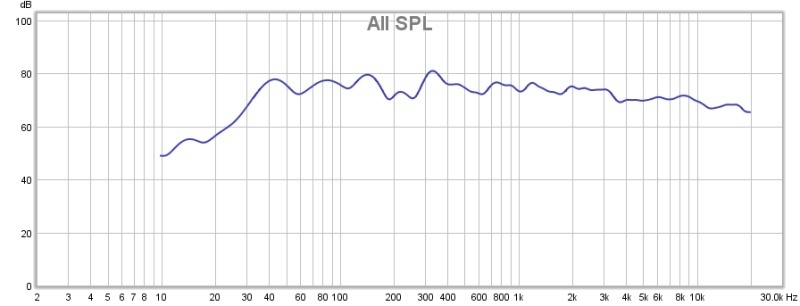
(Blue) LS50 + Sonos Amp (Ports Plugged) - fairly flat response, note no treble boost/brightness
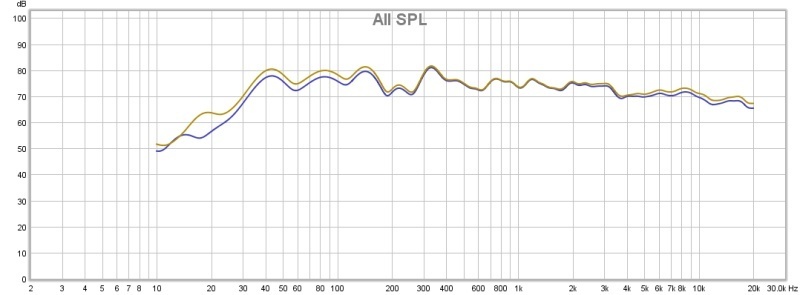
(Yellow) Loudness Setting On - taken at 50% volume subtle tapered 2.6db boost to bass and treble frequencies
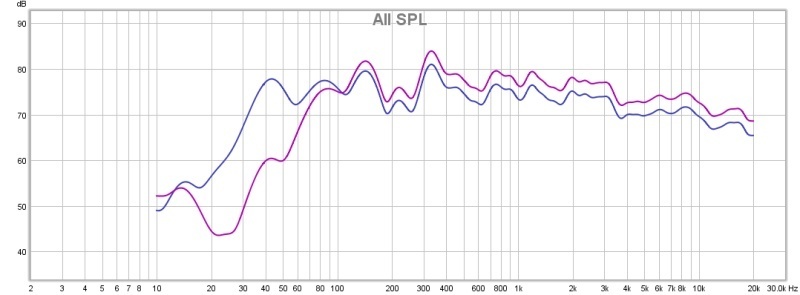
(Purple)Crossover (80hz)
I've seen some reports that turning on the subwoofer crossover makes the sound overtly bright - i thought id investigate.
The crossover works correctly sloping the output at 80hz however it does boost the overall sound 3db, the response above 80hz is the same just louder, the volume setting wasn't touched between taking the measurements.
(Red)Crossover (80hz Reduced 3db)
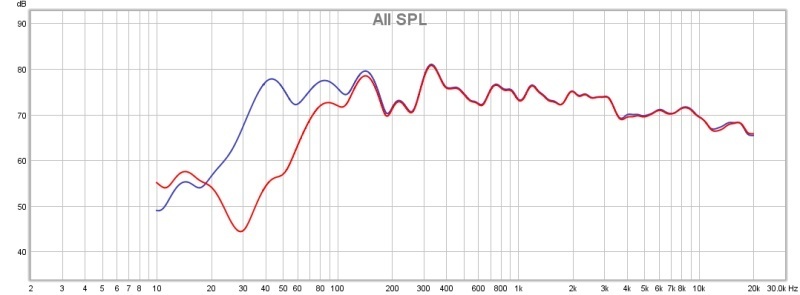
I reduced the volume 3db, this was 7 pressed on the volume slider
That's better, as shown the crossover setting doesn't make the sound bright, it just boosts volume. I'm not sure why, perhaps because of the lighter load Sonos is happier to increase the volume.
Thanks for reading, if you have any questions or want me to go into any more detail please let me know.
Positive:
The pair sounds good, I came from a much larger (older) stereo component setup looking to keep the HiFi sound but also have some of the always on convenience that I have found using the numerous PLAY:1s around the house. I now find myself listening to much more music as the amp is always on ready to go.
It also sounds good for TV/Movies using ARC (with my previous setup I always found the voices too quiet and i didn't want a large AVR) even with just having stereo speakers - I feed the amp Dolby 5.1 from the Apple TV4, the Amp down-mix very well to include a DSP centre channel (this sounds noticeably clearer than feeding stereo), I am looking forward to adding rear surround at a later date.
Hardware is built well, and i think the cost is reasonable - especially compared to over HiFi components.
Negative:
I am having a few issues with the remote, sometimes when changing volume, the sound changes normally but the volume OSD lags and sometimes doesn't move at all. I also checked within the Sonos app, and it does the same. I change volume and it will lag and the slider will jump to the new volume setting.
Requests:
Id prefer to have linear volume control rather than a curve, at the moment my volume is mostly set at 50% to achieve good sound. I have read that most of the power is reserved for after 50%. (Source: theverge) and this is noticeable, with lower efficiency speakers.
Id really like to either see TruePlay or even better a parametric eq/convolution ability on the amp. With everything in one box I cannot add third party room correction, so this would have to be a software add-on. This would really complete the package.
On to the Frequency Response Graphs
(Blue) LS50 + Sonos Amp (Ports Plugged) - fairly flat response, note no treble boost/brightness
(Yellow) Loudness Setting On - taken at 50% volume subtle tapered 2.6db boost to bass and treble frequencies
(Purple)Crossover (80hz)
I've seen some reports that turning on the subwoofer crossover makes the sound overtly bright - i thought id investigate.
The crossover works correctly sloping the output at 80hz however it does boost the overall sound 3db, the response above 80hz is the same just louder, the volume setting wasn't touched between taking the measurements.
(Red)Crossover (80hz Reduced 3db)
I reduced the volume 3db, this was 7 pressed on the volume slider
That's better, as shown the crossover setting doesn't make the sound bright, it just boosts volume. I'm not sure why, perhaps because of the lighter load Sonos is happier to increase the volume.
Thanks for reading, if you have any questions or want me to go into any more detail please let me know.