

Setup, Install, and Getting the most from Sonos Amp
Welcome! Here you can find tips and tricks, how to get started, and many answers to the questions you might have about how to use the Sonos Amp. For the basic details, check out our introductory post on the Amp and our product guide.
The Amp is a great solution for anyone with their own passive speakers that they'd like to bring into the Sonos world. It's for people who are designing a home and want to install speakers in walls or ceilings. Use the Amp with your TV, or to bring sound outside. There are a dizzying amount of options, and this thread should help ease your mind and help make some decisions, so let's get started.
Sonos Amp is an amplifier for passive speakers, bringing the Sonos experience to your own speakers. It brings all the Sonos music services, functionality, and ease of use to speakers installed your home. Along with all other Sonos speakers, Amp is capable of receiving voice control commands from microphone-enabled devices, such as the Sonos One.
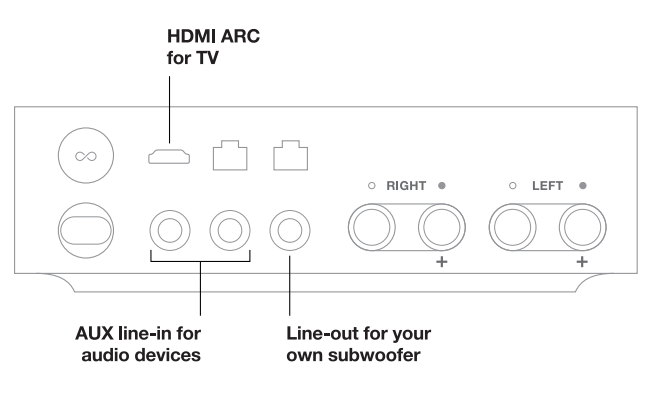
Amp has an HDMI-ARC and Analog RCA input, allowing for a lot of customization and different setups. Amp plays Dolby Digital 5.1 or PCM stereo sound over HDMI-ARC.
Regarding speakers, Amp puts out a powerful 125 watts per channel at 8 Ohm to a max of 6 speakers, scroll down for more on speakers.
The greatest thing about the Amp is its versatility, no matter if it's wall-mounted, sitting on a center console, hiding in an audio closet, or stashed behind a TV, Amp can be used with in-wall, in-ceiling, outdoor, free-standing towers, bookshelf, and any other type of passive speakers. Up to two pairs of speakers or three pairs of the Sonos Architectural by Sonance, which are specially designed for use with Amp.
Hook up the Amp to a record player (phono-preamp may be needed), CD player, or other analog audio connection, or connect it with your TV to amp up your home theater.
Home Theater setups with Sonos Amp
Designed with home theater in mind, Amp has HDMI-ARC for audio with high quality (Dolby Digital 5.1 and PCM stereo). You can use your IR TV remote with Amp to adjust the volume, and when paired with a voice controlled device, the Amp can send commands to your TV over HDMI-ARC CEC.
A single Sonos Amp can be used as front or rear channels for a Sonos surround sound setup. You can use two Amps together for the full surround sound (4.0 or 4.1 with a Sub or attached subwoofer) setup. When used as the main home theater speaker, the front channels, center audio is generated by the left and right channels working together. The Amp can be bonded with a pair of Sonos speakers supporting surround channels (Play:1, Sonos One, Play:3, Play:5 gen2...).
When used for the rear channels, Amp will wirelessly pair with any other Sonos home theater device (Amp, Beam, Playbar, or Playbase) over 5GHz. Please note, when operating as the rear channels, the subwoofer output and audio inputs on the Amp are disabled.
New to Sonos and the Amp? Here's what you'll need:
To get started, first install the Sonos App, then follow the instructions in the app to connect your Amp to the network and get registered.
The biggest trick to installing an Amp might just be figuring out how to run the wires to your speakers. You might be looking to wall mount or use built-in speakers, so a customer AV installer may be someone you want to reach out to. You can find a list of Sonos installers in your area here.
Use the Amp with 2, 4, or 6 speakers. If you'd like to use 6 speakers with the Amp, use the Sonos Architectural by Sonance.
To install speakers with your Amp, you'll wire the + and - cables from the right speaker(s) back to your Amp, using the black and red ports marked right, and then again the same for the left. Use the included banana plugs, which you unscrew to open up and make wider for larger gauge or multiple speakers.
For more details and diagrams, check out our support article here.
Amp Mounting
Amp can be mounted with the bottom flush against the wall, vertically mounted to hide behind a TV or in a small space. Ensure that there's an inch on all sides for airflow. The Amp wall mount is available here.
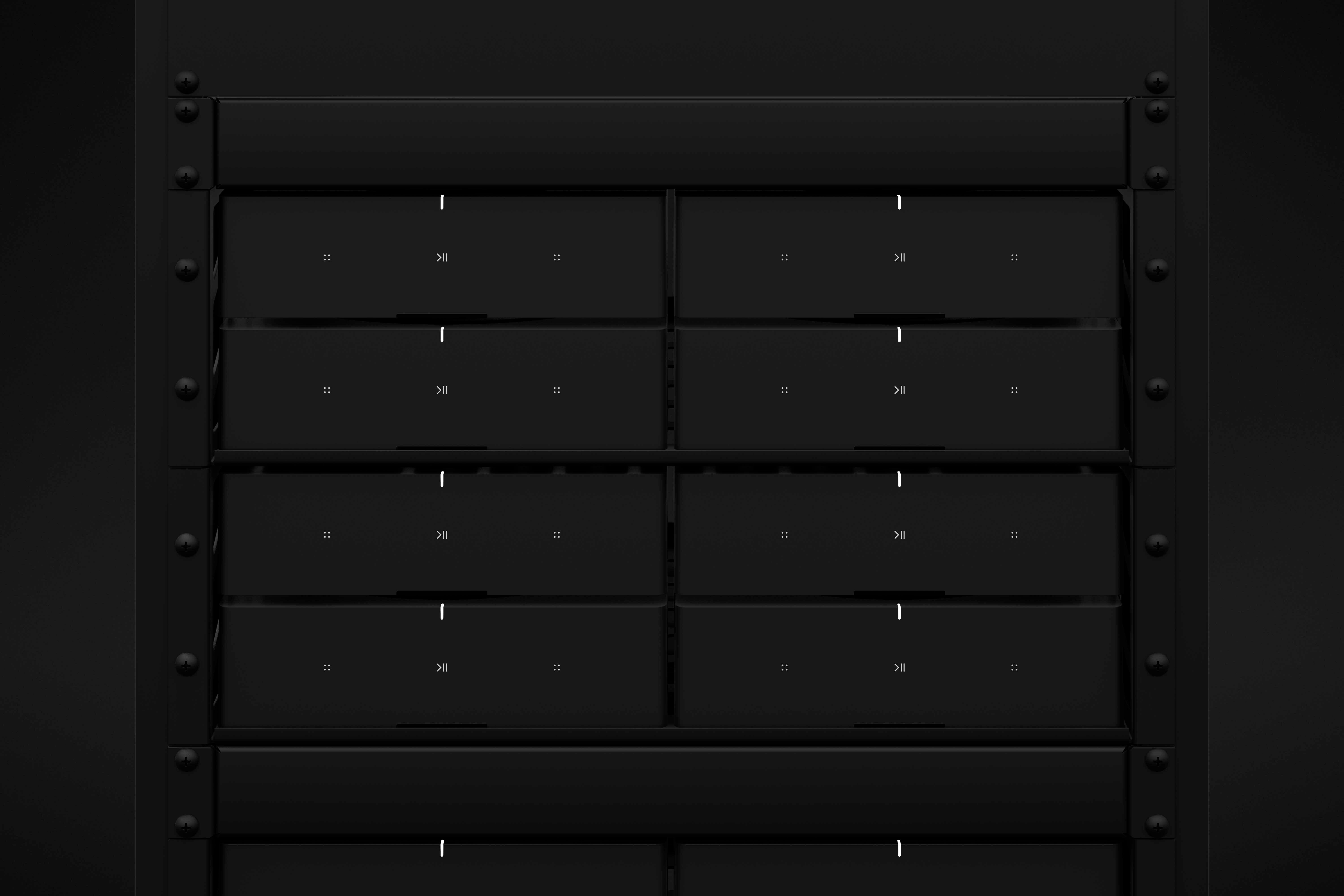
Rack mounting the Amp is also possible. The Amp was designed for home audio installation specifically designed to fit well into a rack of audio equipment. There's a screw on the bottom to secure the Amp into the location.
There are several options for rack mounting the Amp, as they will nicely fit in with a standard audio installation. You can get an impressive wall like this one:
Use your own passive speakers with the Amp. For setup, Amp comes with custom banana plugs that accept 10 - 18 AWG speaker wire and the Class-D digital amplifier sends a maximum of 125W per channel at 8 Ohms. This is more than twice what the older Connect:Amp pushed out. You can use 2 pairs of 8 Ohms speakers with the Amp, or if you're using the new Sonos Architectural by Sonance speakers, you can use up to 3 pairs.
The Amp also has a subwoofer output that's auto-detecting RCA with adjustable crossover, between 50 to 110Hz, if you'd like to use your own subwoofer. You'll need to be using an independently powered subwoofer. Please note, when operating as the rear channels, the subwoofer output on the Amp is disabled. Amp will also bond with the Sonos Sub.
When connecting speakers with the Amp, you'll use the included banana plugs and follow the installation instructions above.
To purchase the Sonos Architectural by Sonance, you can find them respectively here for the In-ceiling, In-wall, and Outdoor speakers. Hot Tip: If you're using these Sonance speakers, make sure you go into the Sonos App > Settings > Room Settings > Trueplay and Identify the speakers (it really can improve the sound a lot).
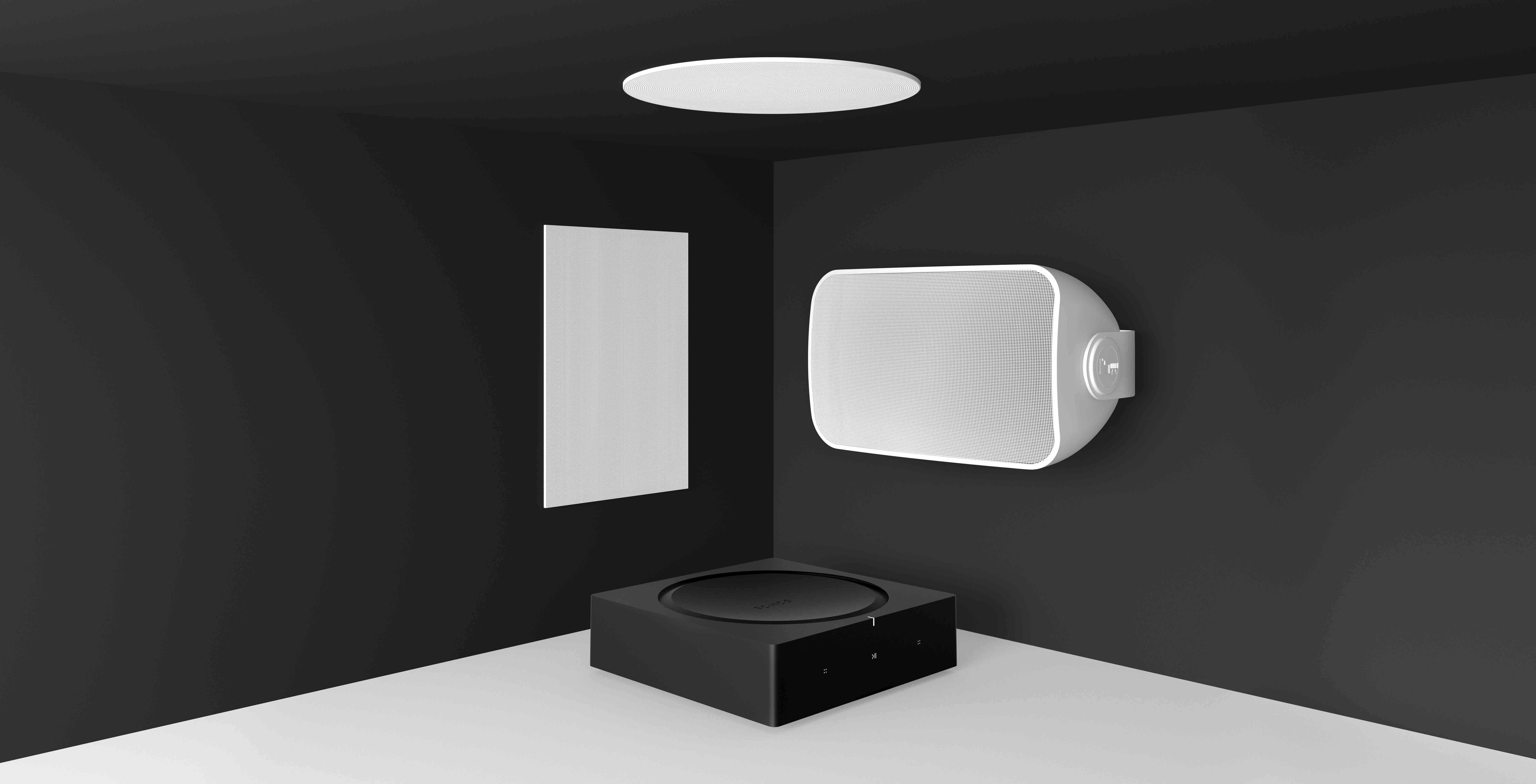
The Amp is Trueplay capable when paired with in-ceiling and in-wall Sonos Architectural by Sonance speakers. These speakers have been specifically designed to be capable of Trueplay tuning with the Amp and will be automatically detected using the Sonos app.
Trueplay tuning will only function in one room with an Amp, so if you're wiring speakers in multiple rooms with the Amp, you'd be best off not using Trueplay.
Home theater setups using an Amp as the rear surrounds will also be able to Trueplay. The surrounds don't need to be Sonos Architectural speakers, but if they are, you'll be getting finer tuning and a better experience when using them. Please note that if you're using two Sonos Amps for a home theater setup, you will need to be using the Sonos Architectural by Sonance speakers or Trueplay won't show as an option.

The Amp is a great solution for anyone with their own passive speakers that they'd like to bring into the Sonos world. It's for people who are designing a home and want to install speakers in walls or ceilings. Use the Amp with your TV, or to bring sound outside. There are a dizzying amount of options, and this thread should help ease your mind and help make some decisions, so let's get started.
What is Amp?
Sonos Amp is an amplifier for passive speakers, bringing the Sonos experience to your own speakers. It brings all the Sonos music services, functionality, and ease of use to speakers installed your home. Along with all other Sonos speakers, Amp is capable of receiving voice control commands from microphone-enabled devices, such as the Sonos One.
Amp has an HDMI-ARC and Analog RCA input, allowing for a lot of customization and different setups. Amp plays Dolby Digital 5.1 or PCM stereo sound over HDMI-ARC.
Regarding speakers, Amp puts out a powerful 125 watts per channel at 8 Ohm to a max of 6 speakers, scroll down for more on speakers.
Amp Setups
The greatest thing about the Amp is its versatility, no matter if it's wall-mounted, sitting on a center console, hiding in an audio closet, or stashed behind a TV, Amp can be used with in-wall, in-ceiling, outdoor, free-standing towers, bookshelf, and any other type of passive speakers. Up to two pairs of speakers or three pairs of the Sonos Architectural by Sonance, which are specially designed for use with Amp.
Hook up the Amp to a record player (phono-preamp may be needed), CD player, or other analog audio connection, or connect it with your TV to amp up your home theater.
Home Theater setups with Sonos Amp
Designed with home theater in mind, Amp has HDMI-ARC for audio with high quality (Dolby Digital 5.1 and PCM stereo). You can use your IR TV remote with Amp to adjust the volume, and when paired with a voice controlled device, the Amp can send commands to your TV over HDMI-ARC CEC.
When used for the rear channels, Amp will wirelessly pair with any other Sonos home theater device (Amp, Beam, Playbar, or Playbase) over 5GHz. Please note, when operating as the rear channels, the subwoofer output and audio inputs on the Amp are disabled.
Installing a new Amp
New to Sonos and the Amp? Here's what you'll need:
- Sonos App on iOS or Android.
- Wireless router broadcasting a 2.4GHz network.
- Passive speakers you want to use with the Amp, and the wires to connect them.
To get started, first install the Sonos App, then follow the instructions in the app to connect your Amp to the network and get registered.
The biggest trick to installing an Amp might just be figuring out how to run the wires to your speakers. You might be looking to wall mount or use built-in speakers, so a customer AV installer may be someone you want to reach out to. You can find a list of Sonos installers in your area here.
Use the Amp with 2, 4, or 6 speakers. If you'd like to use 6 speakers with the Amp, use the Sonos Architectural by Sonance.
To install speakers with your Amp, you'll wire the + and - cables from the right speaker(s) back to your Amp, using the black and red ports marked right, and then again the same for the left. Use the included banana plugs, which you unscrew to open up and make wider for larger gauge or multiple speakers.
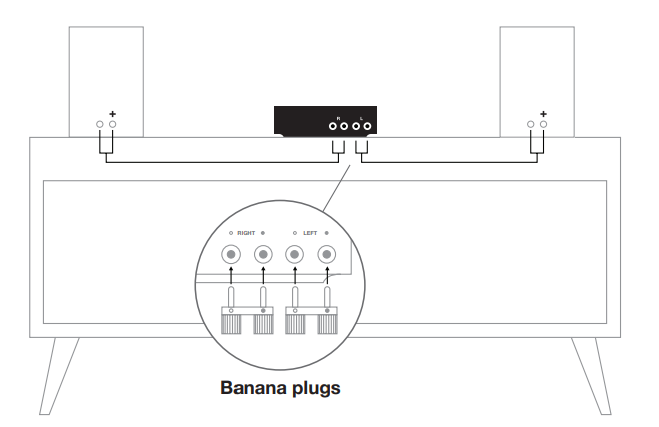
For more details and diagrams, check out our support article here.
Amp Mounting
Amp can be mounted with the bottom flush against the wall, vertically mounted to hide behind a TV or in a small space. Ensure that there's an inch on all sides for airflow. The Amp wall mount is available here.
Rack mounting the Amp is also possible. The Amp was designed for home audio installation specifically designed to fit well into a rack of audio equipment. There's a screw on the bottom to secure the Amp into the location.
Speakers
Use your own passive speakers with the Amp. For setup, Amp comes with custom banana plugs that accept 10 - 18 AWG speaker wire and the Class-D digital amplifier sends a maximum of 125W per channel at 8 Ohms. This is more than twice what the older Connect:Amp pushed out. You can use 2 pairs of 8 Ohms speakers with the Amp, or if you're using the new Sonos Architectural by Sonance speakers, you can use up to 3 pairs.
The Amp also has a subwoofer output that's auto-detecting RCA with adjustable crossover, between 50 to 110Hz, if you'd like to use your own subwoofer. You'll need to be using an independently powered subwoofer. Please note, when operating as the rear channels, the subwoofer output on the Amp is disabled. Amp will also bond with the Sonos Sub.
When connecting speakers with the Amp, you'll use the included banana plugs and follow the installation instructions above.
To purchase the Sonos Architectural by Sonance, you can find them respectively here for the In-ceiling, In-wall, and Outdoor speakers. Hot Tip: If you're using these Sonance speakers, make sure you go into the Sonos App > Settings > Room Settings > Trueplay and Identify the speakers (it really can improve the sound a lot).
Trueplay and Amp
The Amp is Trueplay capable when paired with in-ceiling and in-wall Sonos Architectural by Sonance speakers. These speakers have been specifically designed to be capable of Trueplay tuning with the Amp and will be automatically detected using the Sonos app.
Trueplay tuning will only function in one room with an Amp, so if you're wiring speakers in multiple rooms with the Amp, you'd be best off not using Trueplay.
Home theater setups using an Amp as the rear surrounds will also be able to Trueplay. The surrounds don't need to be Sonos Architectural speakers, but if they are, you'll be getting finer tuning and a better experience when using them. Please note that if you're using two Sonos Amps for a home theater setup, you will need to be using the Sonos Architectural by Sonance speakers or Trueplay won't show as an option.