
Contributor I
March 16, 2018
Answered

Connecting Sonos Connect to receiver

  • March 16, 2018
  • 4 replies
  • 3906 views
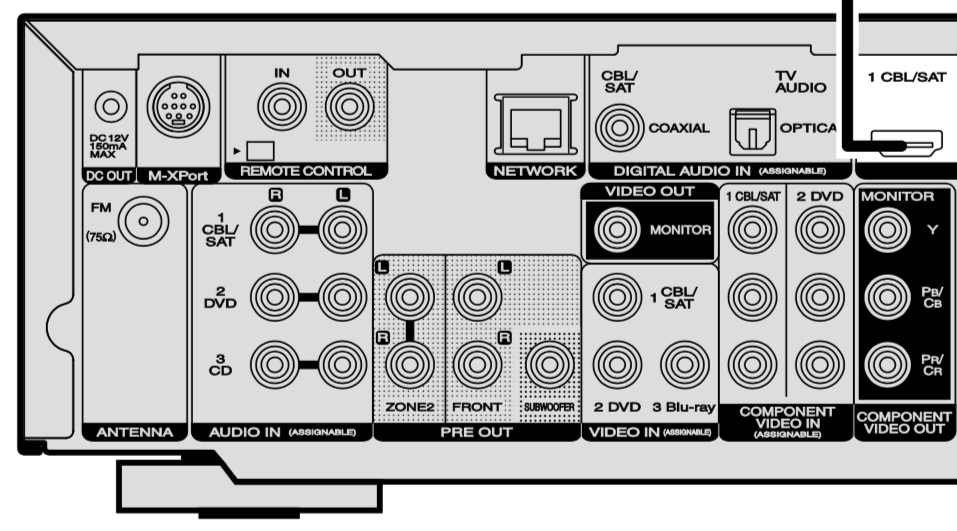
I have a Marantz NR 1604 Receiver. The TV is connected through the HDMI output, Direct TV box and DVD through HDMI inputs, and my phono preamp through the CD audio inputs. What should I use to connect my Sonos Connect to the receiver?
    This topic has been closed for further comments. You can use the search bar to find a similar topic, or create a new one by clicking Create Topic at the top of the page.
    Best answer by pwt
    I would use the CBL/SAT COAXIAL input or TV AUDIO OPTICAL input for digital signals from the CONNECT. Alternatively, use a spare AUDIO IN (ASSIGNABLE) L/R pair for analog signals from the CONNECT.

    4 replies

    melvimbe
    March 16, 2018
    Ideally, you'd want to use the coaxial or optical inputs, if not that, then one of the rca inputs. It's a little difficult to tell what will work for that receiver as the inputs are labeled for the type of input, but are also assignable. Without the manual for the receiver, I can't tell if using the hdmi for CBL/SAT (for example) will automatically turn off CBL/SAT labeled inputs for COAX and RCA inputs. I doubt that, but again, can't confirm without the user manual.

    FYI, I would look up the manual, but it's my company blocks the Marantz site for some reason.
    Danny
    pwt
    pwtAnswer
    Virtuoso
    March 16, 2018
    I would use the CBL/SAT COAXIAL input or TV AUDIO OPTICAL input for digital signals from the CONNECT. Alternatively, use a spare AUDIO IN (ASSIGNABLE) L/R pair for analog signals from the CONNECT.

    4 x P:5 | Sub | 4 x P:1 | 3 x Connect | 2 x Boost | Connect:Amp | 2 x One | Amp | Move | Port | Era 300
    RobLARyanAuthor
    Contributor I
    March 31, 2018
    Thanks for the help. I used the assignable TV audio optical input. However, once I connect the ethernet to the Connect AMP, it basically shuts down my internet & WiFi, and I am unable to complete the setup or any updates from Sonos. Further recommendations are greatly appreciated.
    Stanley_4
    Grand Maestro
    March 31, 2018
    Networking issues can be frustrating, you may have an STP issue, start here https://sonos.custhelp.com/app/answers/detail/a_id/42/kw/stp

    If that doesn't help try this https://sonos.custhelp.com/app/answers/detail/a_id/4284/kw/remove%20password