
Avid Contributor III
October 20, 2026
Answered

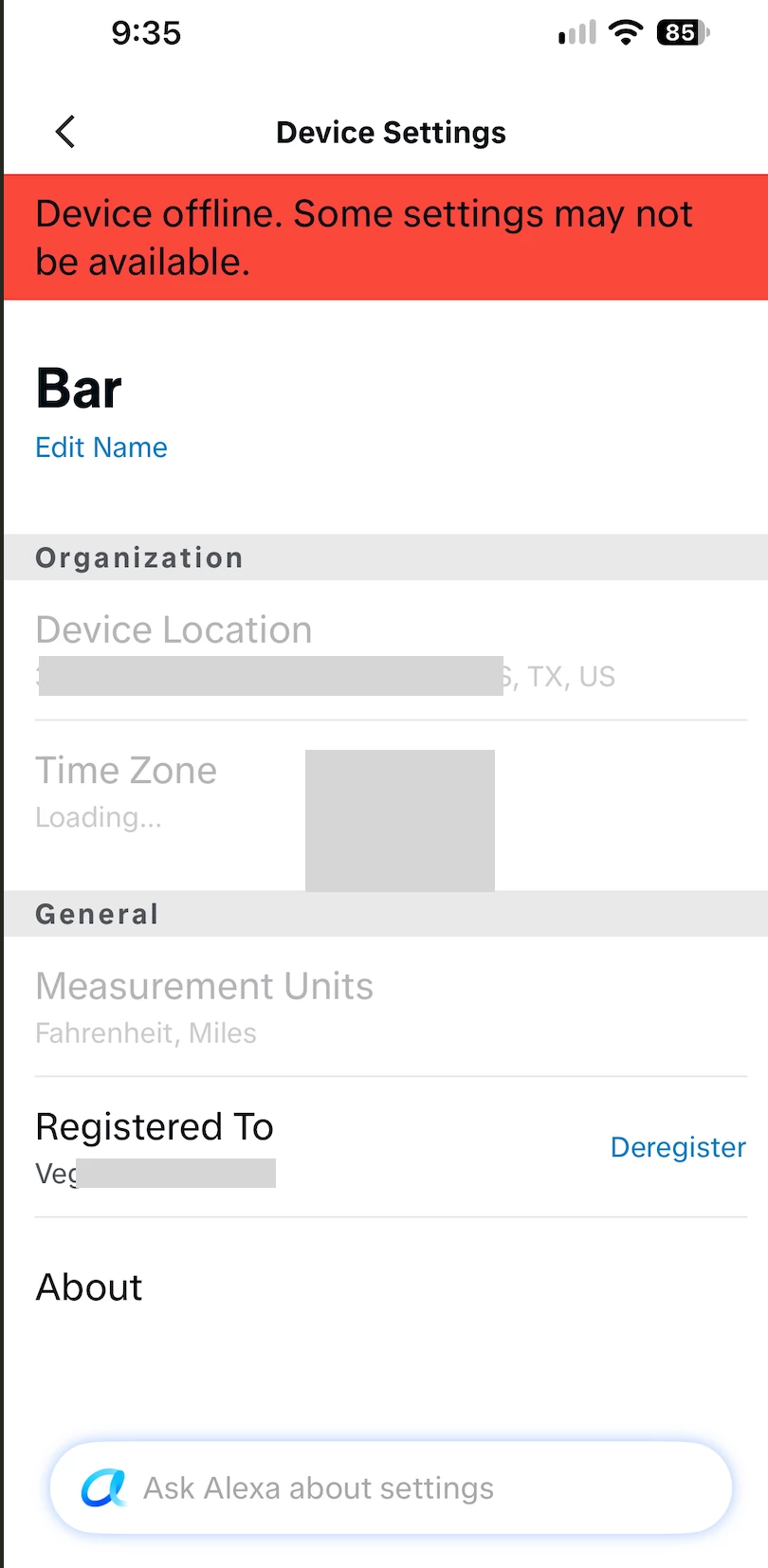
Sonos with Alexa. Device Settings showing Red Banner 'Device Offline' with stale address

I’ve been fighting this for days. Any thoughts appreciated.

  • I have 2 places with Sonos groups, 1 of which was a move from Location A to Location B
  • Separate Alexa accounts for each group to accommodate the Alexa commands to the Specific Sonos devices for that location

2 interesting findings.

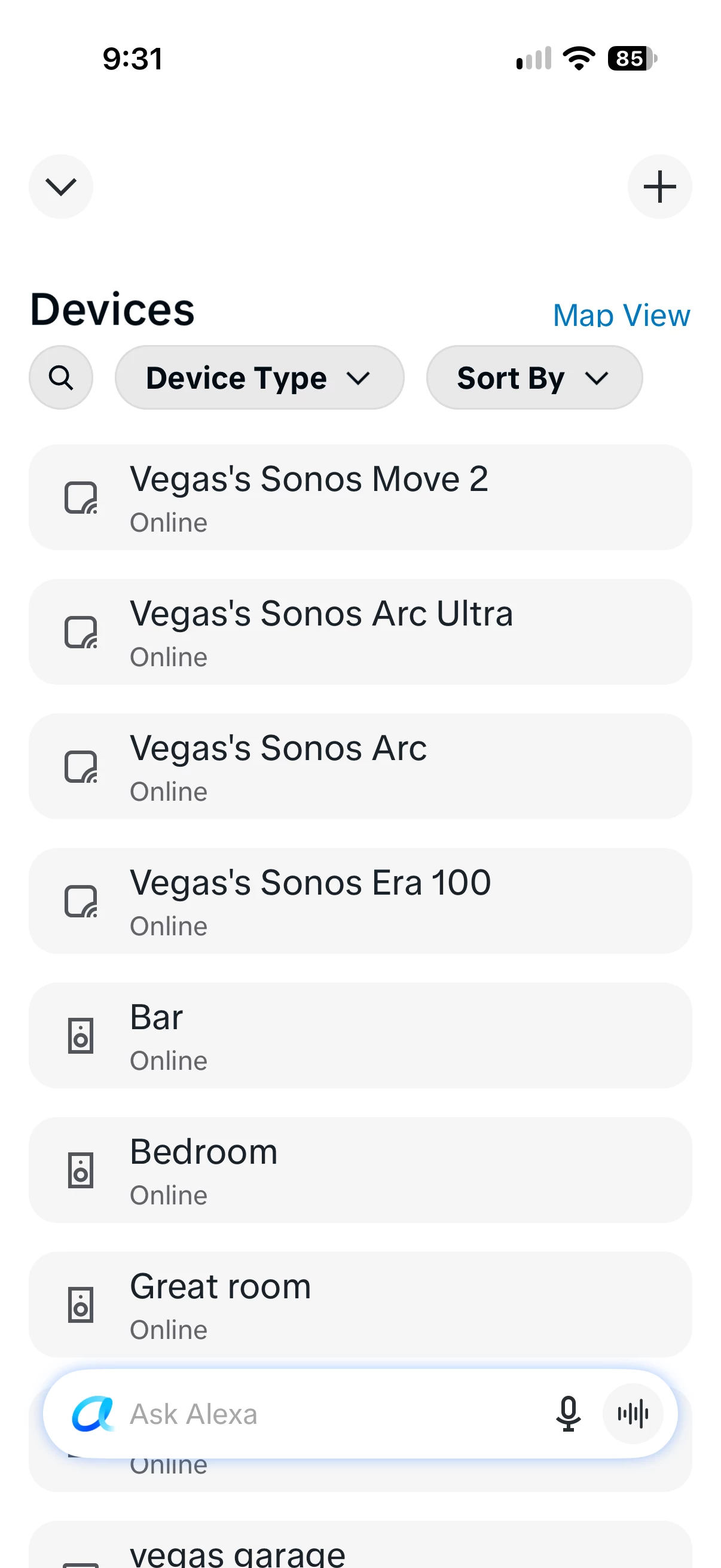
#1. The Sonos devices are listed 2x, once as the Alexa device, and once as the Sonos device. Attachment 1

#2. I cannot get rid of the Red Banner at the top of the Sonos Devices, AND the address is an old Amazon Alexa address, my earlier location. Attachment 2


Troubleshooting:

  1. I have deregistered on the Alexa app
  2. Deregistered on the Amazon Store (Devices List)
  3. The old address doesnt exist anywhere
  4. Removed and reenabled Skill (Sonos)
  5. Rebooted device, router
  6. Contacted Amazon and Sonos support.

I can’t figure it out. Any help would be appreciated.


Attachment 2


Smilja
SmiljaAnswer
October 21, 2026

​@heynowjerry, You're welcome. 🙂

It’s probably best to contact Sonos Support directly for further assistance.

https://support.sonos.com/contact-global

»And the world is like an apple whirling silently in space, Like the circles that you find in the windmills of your mind.« (›Windmills Of Your Mind‹ [1967]. Music by Michel Legrand ; English lyrics written by Alan & Marilyn Bergman)

7 replies

Smilja
October 20, 2026

​@heynowjerry, Try this:

  1. Verify Your Sonos Account Details: Log in at login.sonos.com and double-check that your country and physical address are correctly updated in your profile
  2. Remove Alexa in the Sonos App: Open the Sonos app, navigate to Settings > Services & Voice, select Amazon Alexa, and remove the voice service for all authorized components
  3. Log Out of ALL Amazon Mobile Apps: On your mobile device, log out of all Amazon-related apps (Alexa app, Amazon Music, Audible etc.). Further temporarily uninstall the Amazon Shopping app
  4. Clean Up Your Amazon Device List: Log into your Amazon account in a web browser, go to Content & Devices > Devices, and deregister any remaining or duplicate Sonos entries
  5. Set Up Alexa from Scratch: Reboot your mobile device, open the Sonos app, go back to Services & Voice, and re-add Amazon Alexa
Translate
»And the world is like an apple whirling silently in space, Like the circles that you find in the windmills of your mind.« (›Windmills Of Your Mind‹ [1967]. Music by Michel Legrand ; English lyrics written by Alan & Marilyn Bergman)
Avid Contributor III
October 21, 2026

Thank you Smija.

I performed all the steps. Interesting find.

Although I deregistered all 8 devices in Alexa (4 that showed above in Attachment 1 as ‘Vegas’s xyz’ and it’s Bar or Great Room entry, when I opened Alexa to ‘Set Up from Scratch, the first 4 items were already there. 

Bar

Bedroom

Great Room

Move 

When I added the first device  (Bar) through SONOS app, the Alexa app shows the new entry ‘Vegas’s Sonos Era 100’ after about 15 second.

Unfortunately the Bar Entry still shows an old address and the Red banner.

:(

Translate
Smilja
October 21, 2026

Does deregistering them in the Alexa app as well resolve the issue?

Translate
»And the world is like an apple whirling silently in space, Like the circles that you find in the windmills of your mind.« (›Windmills Of Your Mind‹ [1967]. Music by Michel Legrand ; English lyrics written by Alan & Marilyn Bergman)
Smilja
SmiljaAnswer
October 21, 2026

​@heynowjerry, You're welcome. 🙂

It’s probably best to contact Sonos Support directly for further assistance.

https://support.sonos.com/contact-global

Translate
»And the world is like an apple whirling silently in space, Like the circles that you find in the windmills of your mind.« (›Windmills Of Your Mind‹ [1967]. Music by Michel Legrand ; English lyrics written by Alan & Marilyn Bergman)
Smilja
October 21, 2026

P.S. Make sure to delete any Sonos speaker groups in the Alexa app as well, if you haven't already.

Translate
»And the world is like an apple whirling silently in space, Like the circles that you find in the windmills of your mind.« (›Windmills Of Your Mind‹ [1967]. Music by Michel Legrand ; English lyrics written by Alan & Marilyn Bergman)
Avid Contributor III
October 26, 2026

Thanks however no luck. Both Sonos and Alexa support pointed me to the other so I will live with this defect. It’s amazing that the old actress doesn’t exist anywhere however it’s sitting in some database that it’s referenced. 

Translate
buzz
Grand Maestro
October 27, 2026

At some point did you uninstall and reinstall the SONOS controller? It may be caching something.

Translate
