
Contributor I
August 11, 2022
Answered

Never ending issues with Sonos and Alexa

  • August 11, 2022
  • 15 replies
  • 1647 views

ISSUE 1:

My Sonos Arc shows up as a TV in the Alexa app. Therefore, I cannot add it as a speaker to a room. Trying to group together two Sonos speakers is my goal, which I had done previously, but all of the sudden I can’t. Music will play on one speaker or the other, but not both. This is a brand new problem that started today after disconnecting and reconnecting my Sonos “skill” in Alexa to try to fix the below, issue #2.

ISSUE 2: (post from Reddit. keep in mind issue #1 hadn’t happened yet at the time I wrote this)

I'm pretty frustrated with what is a pretty basic, fundamental thing I want to do with my "smart" speakers- change the volume.

I personally tend to use my phone or Sonos app to change the volume, but my partner, roommate, and guests sometimes need to use Alexa. I also like the convenience of it when I'm not near my phone.

When I ask Alexa to change the volume of a group, it's only changing the volume of one speaker instead of the whole group. The volume is only changed on the Alexa enabled speaker.

I have an Arc+Sub and a Move. I enabled Alexa on the Move. I made a group in the Alexa app to group them together, named "Lounge". I'll say something like, "Change volume in Lounge to 20%", or "Change volume in lounge to 2", and Alexa only changes the volume on the Move.

I troubleshooted with Sonos support for 90 minutes before hanging up on them in frustration. We went through all of the standard troubleshooting steps which I'd already done myself, and finally got to a point where they just kept asking me to do the same thing repeatedly despite explaining I'd already done it. Almost as if he was waiting for me to rage quit.

At some point during the troubleshooting I was able to change the volume of both speakers by just saying "Change the volume to x", leaving out the group name. This is viable at the moment, but not when (..if) I expand my setup to have more speakers, and I want to control only a specific group of them.

My Alexa setup is pretty simple at the moment. The Move isn't in any other groups, and the Arc+Sub is in one other group- "Living Room". The Arc is named "Sonos Living Room", and the Move is named "Sonos Move". I can change the volume of each of them individually with Alexa, but never the two combined when using the group name.

All software is up to date (which I suspect is the problem- a software update- since I didn't have this problem when I lived here 8 months ago). We reset and unplugged the Arc. Renamed everything.

I've found other posts complaining about this, but most of them were at least a year old and I didn't actually see any solutions.

Any help sincerely appreciated.
This topic has been closed for further comments. You can use the search bar to find a similar topic, or create a new one by clicking Create Topic at the top of the page.
Best answer by microbrew5

@microbrew5,

I created a quick .gif animation (attached) just to show what I see in the Sonos App when I ask Alexa to play music to an Alexa ‘enabled’ group - it automatically groups 3 rooms in this instance ‘Living Room’, ‘Fireplace’ and ‘Portable’ and then I can ask Alexa to adjust the volume and hopefully you can see the Group volume slider control moves - I’ve then just clicked on the slider control to show that all rooms change to the exact same volume in the group. The .gif is quite limited in quality as the file-size upload to the forum here is only 5MB but hopefully you can see that this can and does work for group volume control.

I’ve also attached a screenshot of the Alexa Group in this case to maybe assist you further. One further thought I did have and that is to just ensure another Alexa device (set outside the group) is not picking up your instruction to adjust the volume as it must be given to an ‘enabling’ Alexa component in the same group.

If you need any further assistance, then let me know.

Thank you for the continued support.

I noticed your Sonos app looks different than mine. The “Inactive” and “Active” labels don’t appear on my screen, and where yours says “My Home” mine just says “System”. Is that possibly because you’re on a different device or OS? Or maybe because I only have two devices and you have more? I’m on an iPhone. I checked and my Sonos app is the most recent version. 

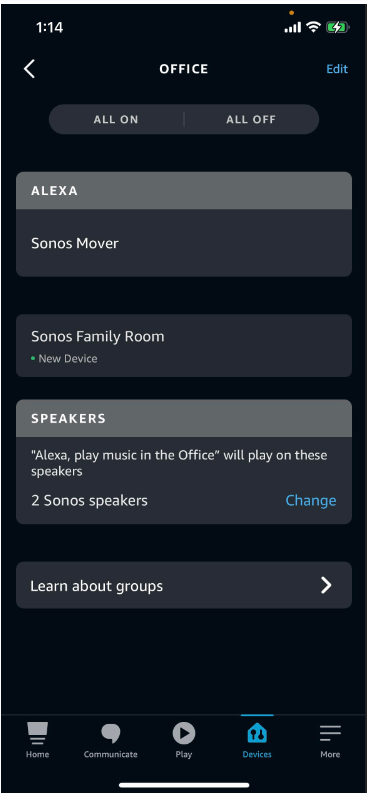
I guess my screen shot from my last post didn’t actually show up. It’s attached on this one.

I hadn’t tried grouping two rooms together in Alexa yet, so I gave that a try. Put one speaker in one room, another in a different room, and then combined the rooms to a group. No luck with that either. Same issues. I even did the reset again with removing the skill, deleting devices, renaming, etc. Nothing works.

I guess I need to call Sonos again, but I don’t know when I’ll have the energy for that. 


15 replies

Ken_Griffiths
August 12, 2022

@microbrew5, 
Just to add too that it is possible to create ‘groups’ in the Sonos App in ‘Settings/System/Groups’ and play/control the audio/volume to those grouped rooms using Sonos Voice Control, as mentioned earlier.

The SVC assistant uses ‘Group Volume’ control by default, unless you specify a room - so that’s perhaps another option for you to consider and maybe try. SVC also works alongside Alexa.

HTH.

Ken_Griffiths
August 14, 2022

@microbrew5,

I created a quick .gif animation (attached) just to show what I see in the Sonos App when I ask Alexa to play music to an Alexa ‘enabled’ group - it automatically groups 3 rooms in this instance ‘Living Room’, ‘Fireplace’ and ‘Portable’ and then I can ask Alexa to adjust the volume and hopefully you can see the Group volume slider control moves - I’ve then just clicked on the slider control to show that all rooms change to the exact same volume in the group. The .gif is quite limited in quality as the file-size upload to the forum here is only 5MB but hopefully you can see that this can and does work for group volume control.

I’ve also attached a screenshot of the Alexa Group in this case to maybe assist you further. One further thought I did have and that is to just ensure another Alexa device (set outside the group) is not picking up your instruction to adjust the volume as it must be given to an ‘enabling’ Alexa component in the same group.

If you need any further assistance, then let me know.

microbrew5AuthorAnswer
Contributor I
August 18, 2022

@microbrew5,

I created a quick .gif animation (attached) just to show what I see in the Sonos App when I ask Alexa to play music to an Alexa ‘enabled’ group - it automatically groups 3 rooms in this instance ‘Living Room’, ‘Fireplace’ and ‘Portable’ and then I can ask Alexa to adjust the volume and hopefully you can see the Group volume slider control moves - I’ve then just clicked on the slider control to show that all rooms change to the exact same volume in the group. The .gif is quite limited in quality as the file-size upload to the forum here is only 5MB but hopefully you can see that this can and does work for group volume control.

I’ve also attached a screenshot of the Alexa Group in this case to maybe assist you further. One further thought I did have and that is to just ensure another Alexa device (set outside the group) is not picking up your instruction to adjust the volume as it must be given to an ‘enabling’ Alexa component in the same group.

If you need any further assistance, then let me know.

Thank you for the continued support.

I noticed your Sonos app looks different than mine. The “Inactive” and “Active” labels don’t appear on my screen, and where yours says “My Home” mine just says “System”. Is that possibly because you’re on a different device or OS? Or maybe because I only have two devices and you have more? I’m on an iPhone. I checked and my Sonos app is the most recent version. 

I guess my screen shot from my last post didn’t actually show up. It’s attached on this one.

I hadn’t tried grouping two rooms together in Alexa yet, so I gave that a try. Put one speaker in one room, another in a different room, and then combined the rooms to a group. No luck with that either. Same issues. I even did the reset again with removing the skill, deleting devices, renaming, etc. Nothing works.

I guess I need to call Sonos again, but I don’t know when I’ll have the energy for that. 


Ken_Griffiths
August 18, 2022

I’m using the iPad Pro 3rd Gen S2 controller - the system renaming feature is in the Settings area of the Sonos App between ‘Parental Controls’ and ‘System Updates’. 

I’m not sure whether the features may alter by device, but the S2 App version in the about box is this:


Edit: The Amazon Alexa App installed here is version 2.2.491753

The Sonos skill doesn’t show me a version, but it is set to English GB (Great Britain)

Ken_Griffiths
August 18, 2022

In your Alexa group screenshot in your last post, I see you have two Sonos rooms set to auto-group and play when you speak direct to ‘Sonos Mover’ (the enabling device). It will group with ‘Sonos Family Room’ - I assume those are the two speakers set in the ‘speaker section’.

However. have you gone onto set the ‘playback options’ for the office group and set them to ‘always’?

See screenshot from the Alexa App: