

AjTrek1
June 15, 2023

Sonos and Mesh Networks Can Play In The Same Sandbox

HI

Mesh Networks do work with Sonos as long as you choose components designed to work as a Mesh. Let me explain….

The PRIMARY function of a Mesh network is to extend the coverage of your Wi-Fi across your home wherein a single router fails to do so. A Mesh network properly configured should consist of a Primary Router (Main Node) connected to your ISP modem. If the ISP modem is a combo router/modem then it should be set to Bridge mode.

The device or devices used to extend the network are called Satellites (Secondary Nodes). The nodes used to extend the network should be of the same brand/model designed to work as such for the best performance. The secondary nodes can be full blown routers themselves; but when used as secondary nodes cease to function in the same manner as the Main node. 

Devices of a different brand/model can be used as secondary nodes as long as they are certified for compatibility to be used as such with the brand of your Primary router/Main node. Think oranges and tangerines…not oranges and apples.

The aforementioned assumes you are designing your own Mesh network. There are manufacturer brands wherein you may purchase a Mesh Network that is preconfigured with a Main Node and one Secondary Node with the option to purchase/add additional Nodes as needed. Typically those packages max out at a Main Node plus two satellite nodes. There are some use cases wherein three satellite nodes plus a Main are used in very large homes. The senarios just described would also require that the Main node be connected to your ISP’s Modem.

There is one more scenario wherein you already have a Primary router connected to your ISP moden or just the ISP Router/Modem combo. Mesh units of the same brand are also sold to be used solely as Satellites/secondary nodes. I find those to be less stable as the whole process depends upon a perfect marriage of the components.

The most common deployment of a Mesh network (to extend the Wi-Fi signal) is called a Wireless Backhaul. Tri-Band routers are the product of choice. Tri-Band routers typically have a 2.4Ghz band x 1 and 5Ghz band x 2 or 2.4Ghz band x 1, 5Ghz band x 1 and a 6Ghz band x 1. Either a 5Ghz or 6Ghz band is used to extend the Wi-fi signal. When using the Wireless backhaul method the capacity of the band used (5Ghz or 6Ghz) to handle other traffic is reduced by about 50%. Traffic using that band may be slower to respond or worse case temporarily dropped causing a few seconds of delay until it’s picked up by another band. In most cases the delay will not be noticed.

The best method of deployment of a Mesh network (to extend the Wi-Fi signal) is called a Wired Backhaul. All nodes are connected to the Main node via Ethernet cable. In this manner each node broadcasts the unabated spectrum of frequencies_2.4Ghz x 1 and 5Ghz x 2 or 2.4Ghz x 1, 5Ghz x 1 and 6Ghz x 1. Other devices can be wired to the nodes via Ethernet to enjoy the full throughput of the ISP service with no wireless interference.

Outside of setting up the Mesh network properly with compatible components the most critical aspect is to make sure that none of the Satellites have DHCP capability. The Main node is the only component in the Mesh that should have the ability to assign IP Addresses. If a secondary node assigns an IP Address to a client (say a Sonos product) said client will not show as part of your Main network. For Sonos the affected component may show as missing in the Sonos App.

I’d be remiss if I didn’t share my network configuration which is an Asus AiMesh with Wired Backhaul. ISP is Comcast/Xfinity with provided router/modem combo in Bridge Mode. My Mesh network consists of three (3) Asus Tri-Band Wi-Fi 6e routers connected via Ethernet cable which is the Ethernet Backhaul:

  • Main Node: ZenWiFi Pro ET12 connected to Comcast/Xfinity router/modem
  • Satellite Node 1:  ZenWiFi Pro ET12
  • Satellite Node 2:  GT-AXE11000

Each router receives the full throughput of my ISP’s service plan. Below is a picture of how my Mesh network looks. If the Backhaul were Wi-Fi the green lines would be dotted. The clients will vary based upon use/connection status:
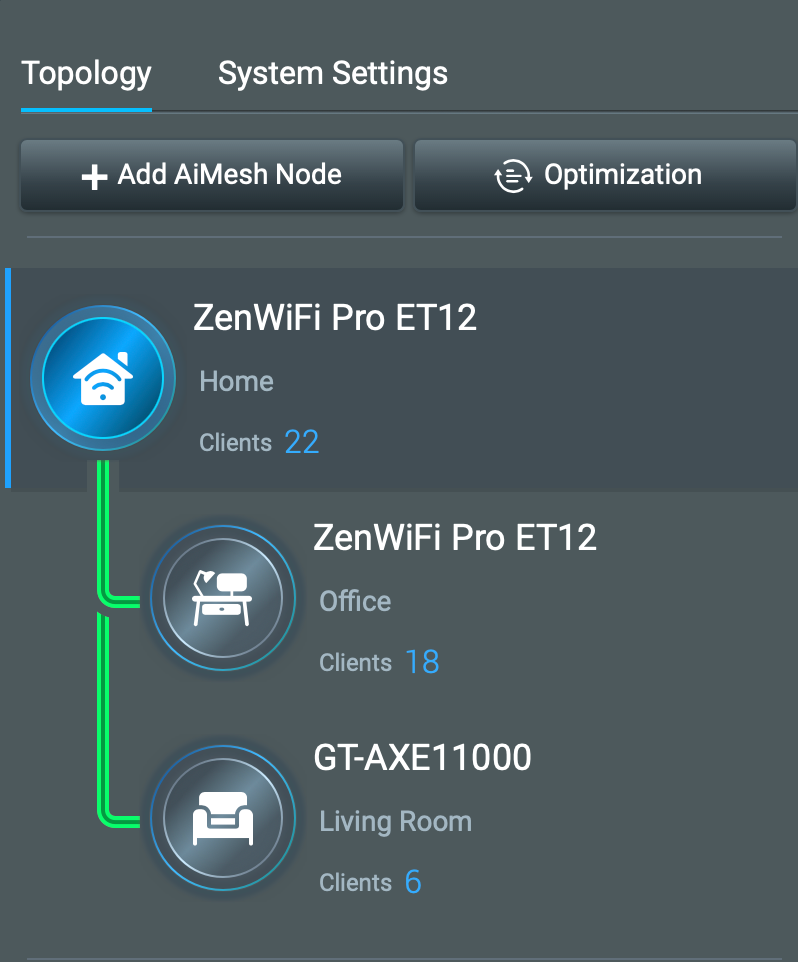
The Ethernet Backhaul allows each router in the Mesh to broadcast 2.4Ghz, 5Ghz and 6Ghz to full potential. 

My Sonos is maxed out at 32 units. The About My System information is a combination of WM:0, WM:1 and WM:3. For kicks and grins I recently had all 32 units actively streaming Sirius XM Watercolors for 10 minutes and no drops. I don’t do that on a regular basis but I wanted to see how my network would handle the stress. It Did!!!

I hope this information has been useful to someone. Enjoy your Sonos!


This topic has been closed for further comments. You can use the search bar to find a similar topic, or create a new one by clicking Create Topic at the top of the page.

19 replies

Corry P
Sonos Staff
June 16, 2023

Hi @AjTrek1 

Thanks for sharing your thoughts!

"Common sense is the collection of prejudices acquired by age eighteen." - Albert Einstein
Local Superstar
June 16, 2023

Curious. You have 3 WiFi routers, I’m assuming 2 are on the same 2.4GHz channel to avoid conflict with Sonos WM:0, ie you have 3 APs + Sonos, but only 3 2.4 channels to use, 1,6 & 11

Ken_Griffiths
June 16, 2023

Curious. You have 3 WiFi routers, I’m assuming 2 are on the same 2.4GHz channel to avoid conflict with Sonos WM:0, ie you have 3 APs + Sonos, but only 3 2.4 channels to use, 1,6 & 11

Personally speaking, because it’s the same network subnet, I would ‘fix’ all wireless Hubs/AP’s to the exact same non-overlapping WiFi channels, that’s if that option is available in the mesh router/AP settings. 

And… (if using), just put SonosNet on a completely different channel.

However, I now opt to not use SonosNet anyway these days, as modern WiFi networks are faster and more reliable with a modern mesh-based system.

skullc
Prodigy III
June 16, 2023

Personally I just use eero 6 pro it just works 😊

never had issues with my Sonos speakers and any other devices and I don’t have to mess around to much

last thing I want after working on IT all day 😀

never seen any issues with mesh networks and sonosnet playing nice together 

glad yours works 👍

Network= livewire cpe pro 3 +eero 6 pro wireless
AjTrek1
AjTrek1Author
June 16, 2023

@skullc

Glad your Mesh works as well! 👍

I submitted the post as information for others that might find it useful. Wasn’t having any issues with my setup.

However, regarding your comment that “you haven’t seen  any issues with mesh networks and SonosNet”…well probably not you personally…but do me favor….

Type “mesh” into the community search field. I think you may be amazed at the number of posts on the subject. It’s an 👀 opener…to say the least 😂😂😂

Best regards 👍

Together Everyone Achieves More = T.E.A.M.
Lyricist I
November 9, 2023

This is completely unacceptable. We have had a Sonos system for more than 10 years. Obviously, we have wifi -- but we needed an extender. We set it up and now 3 of our speakers don’t work. I read your ‘white paper’ above and truly that is too much for anyone to have to do as a work around unless they have nothing but time to play with their wifi -- which is the opposite of what wifi is for. This is clearly a Sonos bug that needs to be fixed. Is that in the works? If not, why?

November 9, 2023

 but we needed an extender. We set it up and now 3 of our speakers don’t work.

Disable DHCP on the extender, that may be the solution.

ratty
November 9, 2023

This is completely unacceptable. We have had a Sonos system for more than 10 years. Obviously, we have wifi -- but we needed an extender. We set it up and now 3 of our speakers don’t work.

If it’s really an extender, rather than a mesh, that’s likely your problem. Sonos doesn’t support extenders. They typically mangle the network addresses of devices attached to their WiFi. For a system like Sonos which is very ‘chatty’ between local devices this can ruin the party.

If your ‘extender’ is basically a router then you could have broken your network into two subnets. Sonos controller and players need to be on the same subnet.

If you tell us what router and ‘extender’ you have we may be able to help. Also, kindly confirm which Sonos devices you have and whether they are indeed all connected to the WiFi, rather than one unit being wired to the network.


This is clearly a Sonos bug that needs to be fixed. Is that in the works? If not, why?

Because the problem is with your network, not Sonos. The clue is in the fact that the issues started after you introduced the extender.

Lyricist I
November 26, 2023

This is completely unacceptable. We have had a Sonos system for more than 10 years. Obviously, we have wifi -- but we needed an extender. We set it up and now 3 of our speakers don’t work. I read your ‘white paper’ above and truly that is too much for anyone to have to do as a work around unless they have nothing but time to play with their wifi -- which is the opposite of what wifi is for. This is clearly a Sonos bug that needs to be fixed. Is that in the works? If not, why?

This is unfortunately not only a Sonos problem. If you use an extender it can affect everything on the network, printers, smart lights, etc. It's pretty annoying but it is just how it is. You don't necessarily need to follow the instructions above. Make sure to have a good mesh router network, buy the package with the correct amount of "extenders" (or satellites being the correct name for mesh networks) for your house size and that should be easy to install following the set up instructions. My routers are not necessarily expensive, just have the right technology in.

Lyricist II
December 7, 2023

So I’ve worked super hard to try to understand all the new (to me) terminology. My brain has hit the wall though now and I just need someone to help get me over the line.

I’ve installed a mesh wifi system in the house- it’s ASUS XD5. Vodafone router with wifi turned off plugs in via ethernet cable to WAN of master XD5. The other 2 units/nodes/satellites are backhauled via ethernet cable to the Vodafone router (hopefully best thing to do-  but now I’m writing this I wonder whether it should be to a switcher hanging off the master xd5?). 

Wifi coverage is spot on- I’m really happy with it. But, I have the Sonos issue which I’d like to resolve. After reading this really helpful post (thank you @AjTrek1 ), I guess I just need to swith off the DHCP from the 2 satellite units- PLEASE could someone tell me how to do that?


Thanks in advance.