
Contributor I
February 2, 2024

No delay option for Era100 speakers

I’m the proud owner of two Era100 speakers and I was planning to further upgrade my System to roughly 8 speakers but unfortunately something crossed that path.

I absolutely love the sound, the design and the features of these speakers but the introduced delay and the missing option to fully remove it destroyed the perfect image of these speakers for me.
(And it seems like for other people too: like here, here, here, here, here, here, or here)


I want to use the Era100’s in two scenarios:

  1. Casually listening to music via spotify / soundcloud / airplay
  2. Djing / live-recorded playback via line-in and an aux cable to each speaker

When buying the speakers, I assumed that the line in would have no delay but this is clearly not the case and can’t be bypassed even though it would be so easy to implement.

I’ve created a sample mockup of how this feature could look like in the app:
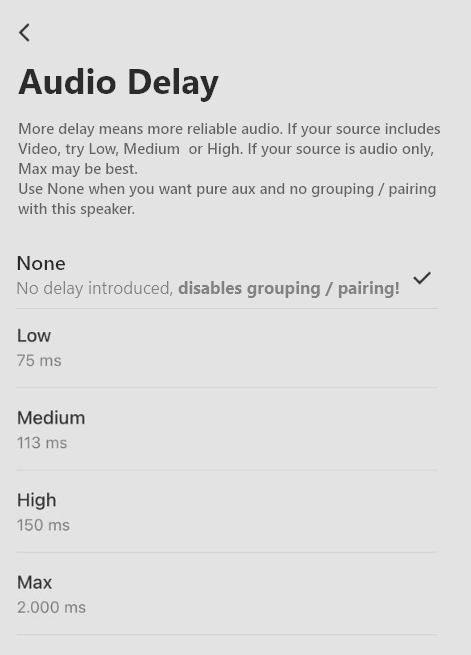
Just disable the grouping / pairing feature during the use of the line-in audio source when this delay option is selected.

I guess I have to return these awesome speakers but I would always immedeately buy the Era100’s again with a line-in adapter for each, if this feature would be added in an update.


Please share your opinion on this feature proposal / request and share instances where the None setting would also make sense besides djing.


Kind regards

Simon

This topic has been closed for further comments. You can use the search bar to find a similar topic, or create a new one by clicking Create Topic at the top of the page.

18 replies

Senior Virtuoso
February 2, 2024

The delay is so that grouped speakers can all play in sync. When streaming, the delay is irrelevant/ undetectable as there’s no “reference point”. It’s why there’s a slight lag when a tv input to a home theatre device is grouped with additional rooms. 

As a consequence I don’t think you’ll ever see (from Sonos or any other manufacturer) a zero-delay multiroom wifi system. 

FliensAuthor
Contributor I
February 2, 2024

The delay is so that grouped speakers can all play in sync. When streaming, the delay is irrelevant/ undetectable as there’s no “reference point”. It’s why there’s a slight lag when a tv input to a home theatre device is grouped with additional rooms. 

As a consequence I don’t think you’ll ever see (from Sonos or any other manufacturer) a zero-delay multiroom wifi system. 

I understand why the delay is introduced and why it is necessary for the besaid usecases.

But why shouldn’t they allow the user to decide on how they want to use their speakers.
In my second usecase, I want to use the speaker like a regular speaker.. (no grouping, no pairing… just plain line-in) .. why is this not possible?!

Do I have to buy two sets of speakers?
One set for casual listening to music over spotify / soundcloud / airplay
And one set for djing?
Seems like a waste of money and space.

Other multiroom wifi systems that have the option to play music over a line-in port do not introduce a delay. I’ve tested a system from the German brand “Teufel” yersterday at their store. These speakers can be used as a wifi multiroom system but also as a regular speaker when the audio is playing over the line-in. (They lack in other features that I really like about the Era100 so they are unfortunately not an alternative)

Senior Virtuoso
February 2, 2024

That’s not a make I’m familiar with. Are you saying they switch between zero delay when running stand-alone and auto-switch to be with delay when grouped into a multiroon setup? Or there’s a user-controlled switch? 

In a larger system, I can see a lot of stuttering as some rooms switch on a delay whilst others are already in that mode.
 

For a small number of owners I can see why it might be desirable. But that may be the issue here: it’s only desirable for a very small number of Sonos users. Would the benefit to them outweigh the cost of development?

jgatie
February 2, 2024

That’s not a make I’m familiar with. Are you saying they switch between zero delay when running stand-alone and auto-switch to be with delay when grouped into a multiroon setup? Or there’s a user-controlled switch? 

In a larger system, I can see a lot of stuttering as some rooms switch on a delay whilst others are already in that mode.
 

For a small number of owners I can see why it might be desirable. But that may be the issue here: it’s only desirable for a very small number of Sonos users. Would the benefit to them outweigh the cost of development?


Or the cost of support when every person who buys it for things like DJing call up to complain that the expensive multi-room speakers system they purchased can’t do multi-room in certain configurations.  

FliensAuthor
Contributor I
February 2, 2024

That’s not a make I’m familiar with. Are you saying they switch between zero delay when running stand-alone and auto-switch to be with delay when grouped into a multiroon setup? Or there’s a user-controlled switch? 

In a larger system, I can see a lot of stuttering as some rooms switch on a delay whilst others are already in that mode.
 

But for a small number of owners I can see why it might be desirable. But that may be the issue here: it’s only desirable for a very small number of Sonos users. Would the benefit to them outweigh the cost of development?

Yeah I think that’s how it worked

I don’t think so. Just make speakers with true line-in ungroupable / pairable so you can’t create stuttering because you can’t group the speakers.


I think the amount of people isn’t that small. The links that I’ve mentioned are just some of the posts that talk about the delay issue and these are by just a fraction of the people that would even post in a forum.


The cost of development should be pretty small. I work as a developer in a major software company so I would say that I got some experience with developing code for hardware applications.

Disabling the delay should be a pretty easy implementation. It’s more difficult to say when it comes to blocking the ability to group / pair the speaker since this could be a completely new flag that needs to be handled by the speakers, the network and the app. The setting in the app and transfering the 0 delay to the speakers over the network would be pretty easy again.

So I think that fully implementing that feature would take ~5 days + testing

FliensAuthor
Contributor I
February 2, 2024

That’s not a make I’m familiar with. Are you saying they switch between zero delay when running stand-alone and auto-switch to be with delay when grouped into a multiroon setup? Or there’s a user-controlled switch? 

In a larger system, I can see a lot of stuttering as some rooms switch on a delay whilst others are already in that mode.
 

For a small number of owners I can see why it might be desirable. But that may be the issue here: it’s only desirable for a very small number of Sonos users. Would the benefit to them outweigh the cost of development?


Or the cost of support when every person who buys it for things like DJing call up to complain that the expensive multi-room speakers system they purchased can’t do multi-room in certain configurations.  

Well I clearly state in the ui I’ve made that grouping / pairing is not possible in true line-in mode.

On the other hand I have to say that the line-in delay that is currently present also isn’t communicated that good.

Senior Virtuoso
February 2, 2024

That’s not a make I’m familiar with. Are you saying they switch between zero delay when running stand-alone and auto-switch to be with delay when grouped into a multiroon setup? Or there’s a user-controlled switch? 

In a larger system, I can see a lot of stuttering as some rooms switch on a delay whilst others are already in that mode.
 

But for a small number of owners I can see why it might be desirable. But that may be the issue here: it’s only desirable for a very small number of Sonos users. Would the benefit to them outweigh the cost of development?

Yeah I think that’s how it worked

I don’t think so. Just make speakers with true line-in ungroupable / pairable so you can’t create stuttering because you can’t group the speakers.


I think the amount of people isn’t that small. The links that I’ve mentioned are just some of the posts that talk about the delay issue and these are by just a fraction of the people that would even post in a forum.


The cost of development should be pretty small. I work as a developer in a major software company so I would say that I got some experience with developing code for hardware applications.

Disabling the delay should be a pretty easy implementation. It’s more difficult to say when it comes to blocking the ability to group / pair the speaker since this could be a completely new flag that needs to be handled by the speakers, the network and the app. The setting in the app and transfering the 0 delay to the speakers over the network would be pretty easy again.

So I think that fully implementing that feature would take ~5 days + testing


As a software developer, you should be aware that modifying an existing, complex system is not straight-forward. Frankly, I’m staggered that you can offer a timescale for software modification without any idea of the task or the scale of the testing. But everyone’s entitled to their opinion: we seem to disagree on this one. 😜

FliensAuthor
Contributor I
February 2, 2024

That’s not a make I’m familiar with. Are you saying they switch between zero delay when running stand-alone and auto-switch to be with delay when grouped into a multiroon setup? Or there’s a user-controlled switch? 

In a larger system, I can see a lot of stuttering as some rooms switch on a delay whilst others are already in that mode.
 

But for a small number of owners I can see why it might be desirable. But that may be the issue here: it’s only desirable for a very small number of Sonos users. Would the benefit to them outweigh the cost of development?

Yeah I think that’s how it worked

I don’t think so. Just make speakers with true line-in ungroupable / pairable so you can’t create stuttering because you can’t group the speakers.


I think the amount of people isn’t that small. The links that I’ve mentioned are just some of the posts that talk about the delay issue and these are by just a fraction of the people that would even post in a forum.


The cost of development should be pretty small. I work as a developer in a major software company so I would say that I got some experience with developing code for hardware applications.

Disabling the delay should be a pretty easy implementation. It’s more difficult to say when it comes to blocking the ability to group / pair the speaker since this could be a completely new flag that needs to be handled by the speakers, the network and the app. The setting in the app and transfering the 0 delay to the speakers over the network would be pretty easy again.

So I think that fully implementing that feature would take ~5 days + testing


As a software developer, you should be aware that modifying an existing, complex system is not straight-forward. Frankly, I’m staggered that you can offer a timescale for software modification without any idea of the task or the scale of the testing. But everyone’s entitled to their opinion: we seem to disagree on this one. 😜

I fully agree

I have no clue on how the software works or how difficult it actually is to implement.
Neither do I know how the testing is done or at what scale.


But i still think that it shouldn’t be too difficult since some parts of my requested feature are already a part of the software (changing the delay and transmitting that change to other parts of the system)


I just wonder why there is absolutely no option to use the speaker as a plain regular speaker.
(should be bare minimum of any speaker that has some type of input port. Ever other feature should build on top of that in my opinion)

Airgetlam
February 2, 2024

Get hired by Sonos, so you can provide them numbers, and convince them to support your assertion that they need to implement this feature.
 

Then you might share with us the cost associated with making such a substantial change. Numbers that cover costs of design, software updating, hardware, testing, manufacturing line, marketing / competition, customer support, as well as the amount of increased sales they would generate. 

Bruce
jgatie
February 2, 2024

It would not surprise me in the least that the ADC stage hardware of the line-in is combined with the buffering and volume hardware all in one chip, and thus is not bypassable by software.