
Contributor II
March 4, 2021

Static IP question

Hi all. I’ve been reading these threads forever, thought I’d finally post my own questions :) I’ve gained a lot of insight from all of you contributing to the forums and I’d like to thank you. This particular question of mine has to do with static IP addresses.

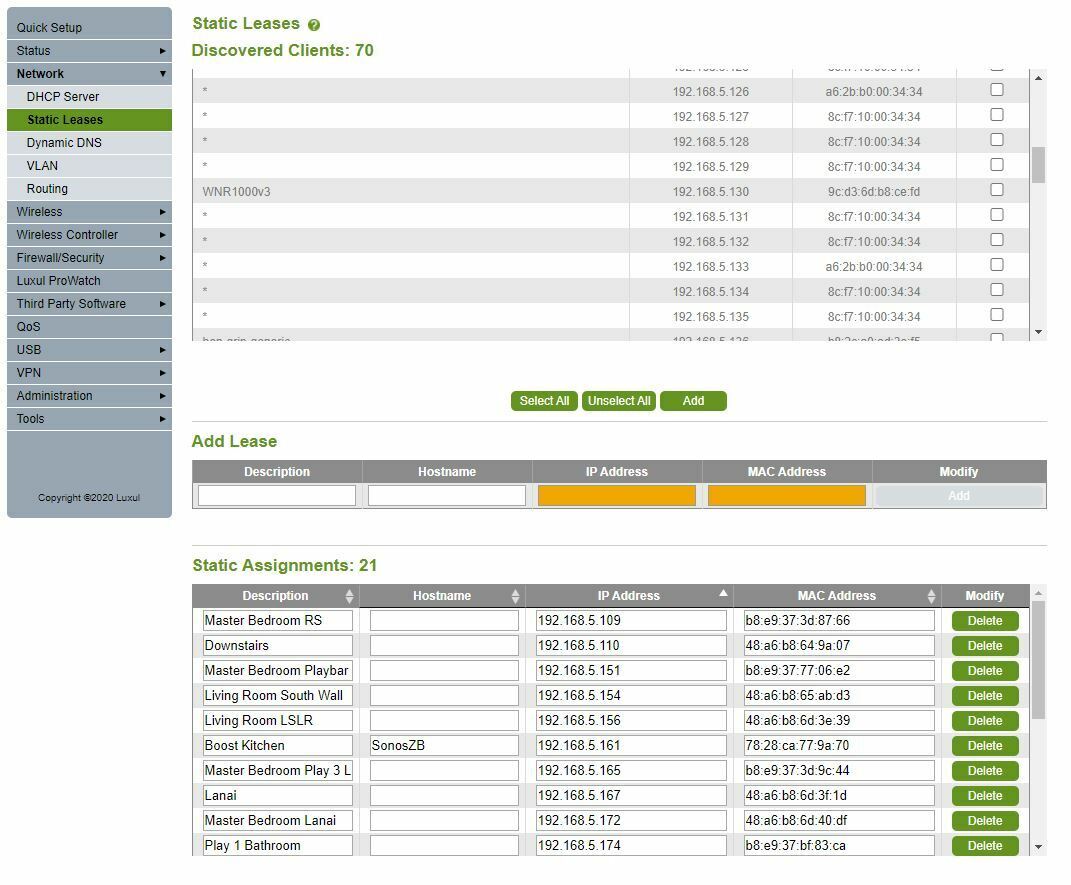
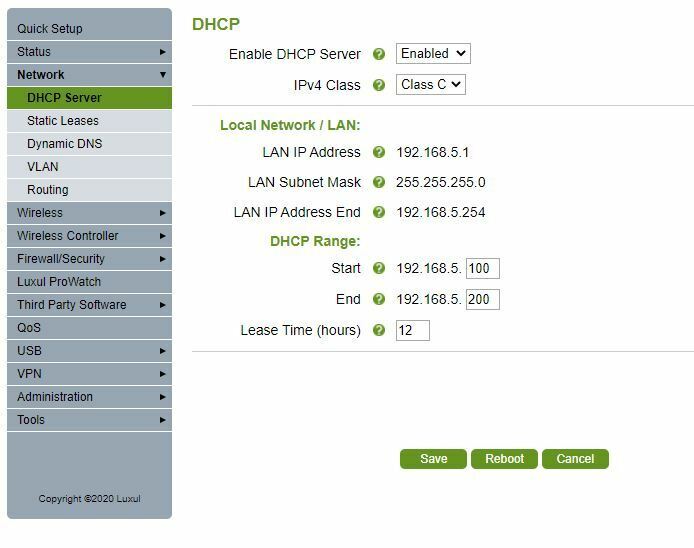
First of, I’m very novice at this and trying to better my system as I gain some knowledge from my readings. I’ve read several times that, if you create static IPs for your Sonos devices, it’s important to configure them outside of the DHCP range. Can someone please elaborate a bit on this? I’ve posted some screenshots below of what I’ve done. I was able to select all of my Sonos products from the client list and give them static IP assignments, but I don’t think they’re outside of my DHCP? One screenshot is of my assignment list, and the other is what I think my DHCP range is - is it 100-200? So would I want to assign the suffixes, or last three digits, at something under 100 or over 200? If so, why have an assignment list in the first place? Thank you all again and looking forward to your insight.


This topic has been closed for further comments. You can use the search bar to find a similar topic, or create a new one by clicking Create Topic at the top of the page.

30 replies

Prodigy III
March 4, 2021

You are correct your dhcp range is 100 to 200 and yes you have assigned your speakers to be within the dhcp range. In effect you have asked the router to do contradictory  things - when a device connects please give it a number in this range, when this specific device connects give it this number but what to do if another device has already got that number.

So move your sonos kit to be outside the dhcp  range, maybe start at 090 and work downwards.

The static assignment is to avoid problems like having duplicate ipaddresses on your network. It shouldn't  happen but there are a number of scenarios where routers lose track and end up assigning duplicate addresses. Devices  rebooting  is one such scenario which is why there are a number of posts here complaining that sonos stopped working after an upgrade when it is the router at fault.


Belly M
March 4, 2021

The confusion arises due to mixed use of terminology within the routers interface.

Fixed or static IP is configured at the client which you cannot do on Sonos equipment as it only uses DHCP. You can however reserve an IP within the DHCP pool on the router which makes Sonos devices use the same IP. Some routers let you reserve outside the DHCP scope.


ratty
March 4, 2021

Some routers insist that IP reservations are outside the DHCP pool, some that they’re inside the pool, and some don’t care.

Belly M
March 4, 2021

Some routers insist that IP reservations are outside the DHCP pool, some that they’re inside the pool, and some don’t care.

THIS  ^^^^^ very confusing for users, especially as the reservations outside the pool must be issued by DHCP for the client or get its IP if it does not support a static IP.

Stano7Author
Contributor II
March 4, 2021

Thanks all. I’ll try going outside of the pool and report back. After reassigning I assume I have to reboot router and all devices?

Belly M
March 4, 2021

No need for a reboot.

Stano7Author
Contributor II
March 4, 2021

Done. Started at 201 and worked up. Did not reboot anything. 


Stano7Author
Contributor II
March 4, 2021

And I must say, significant matrix improvement. I’ve posted before and after matrix screenshots. Wow.


Belly M
March 4, 2021

That’s just a coincidence, reserved IPs won’t help your matrix, but choosing a different channel on your router may.

ratty
March 4, 2021

The matrix shows what’s happening at the SonosNet PHY and data link layers. IP runs at the network layer, over the top of anything and everything.