hitopharry
Contributor I
December 13, 2017
Answered

Please make Sonos work with the computer

So many of us want to use our Sonos system alongside all our media, not just streaming music. I have understood with research that there is a lag/delay with the sound when pictures too. This could be fixed with a plug-in for a browser or OS, which has calibrated the audio lag, so that we can watch Netflix or any other non streaming audio media. I am tempted to return the 2 Play:3's I bought because of this, and I'm sure I am not alone in this frustration. Having spoken to a Sonos Expert on the chat menu, she told me that this "might" be addressed in the future, and that the best thing to do is to leave a message on here. If this were to be solved, I as well as others would likely buy additional Sonos products. I honestly love the Play 3 as a product, makes great sound and great/simple interface, having had an Airport Extreme which had at least a headphone jack for streaming over 10 years ago, I'm surprised that it hasn't been part of the Sonos design.
This topic has been closed for further comments. You can use the search bar to find a similar topic, or create a new one by clicking Create Topic at the top of the page.
Keith N
Keith NAnswer
Sonos Staff
December 14, 2017
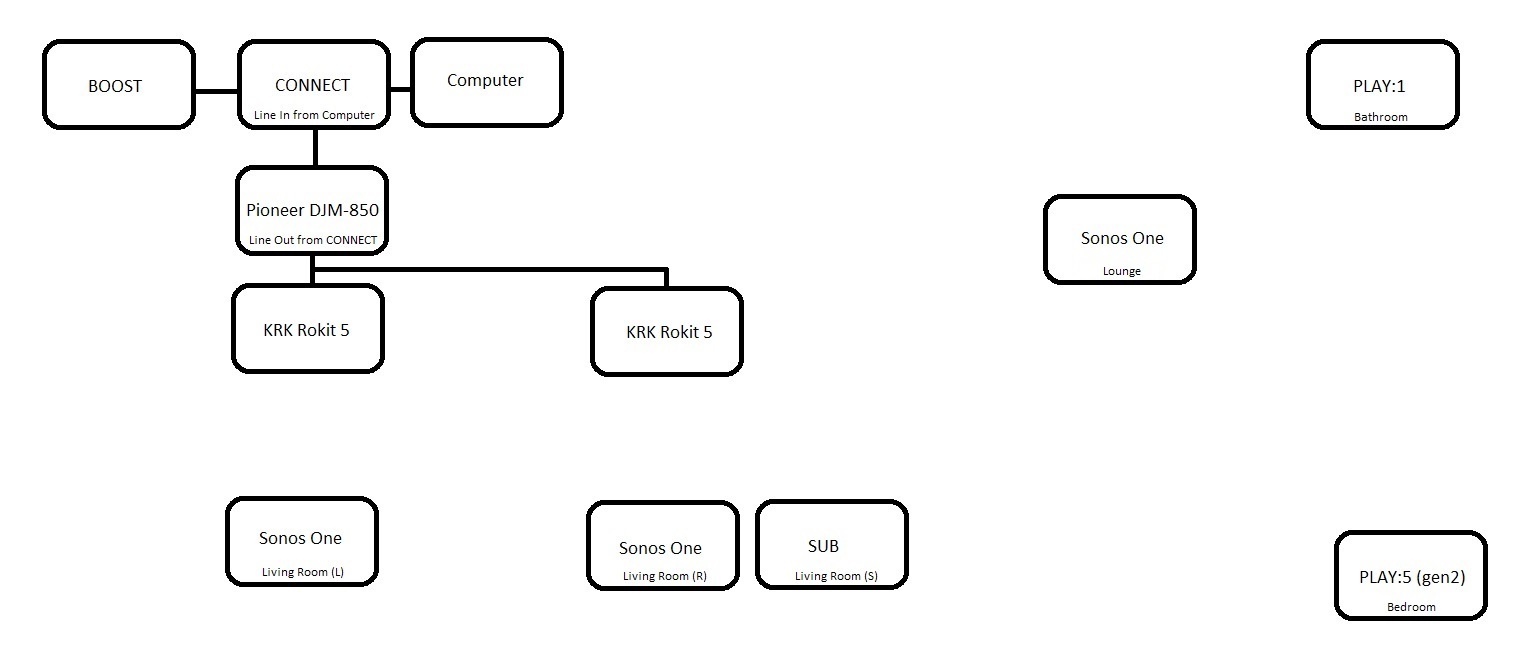
No worries! I'm always happy to share details about my home setup. By night, I produce electronic music and DJ so I have projects on my computer and recordings that aren't easy to be found on conventional streaming services. Bringing computer audio to Sonos was something I wanted to do from the moment I was first introduced to Sonos and saw the same opportunities as you do. That being said, here's my system. Feel free to ask any questions you may have.


Here's a really great video where A-Trak shows his home setup that is very similar. Check it out.
Building community is like building a garden. You build the frame, till the ground, plant the seeds, feed the plants & sometimes you gotta pull the weeds.

12 replies

hitopharry
Contributor I
December 14, 2017
If you put a line in on the PLAY 5, does it just play out of that speaker or act as an input for the entire network? Thanks
Keith N
Sonos Staff
December 14, 2017
Reading through your conversations is quite interesting but a bit over my head. The addition of the Boost and Connect seems a bit pricey for me to just broadcast computer audio through SONOS speakers. The single way I see it can be done is a hard wire out from CPU to the Play5. BUT the PLAY5 is too strong for a 10 x 10 room. IS THERE AN ADAPTER OR AUXILLARY APPARATUS THAT CAN USED TO GET SOUND FROM THE COMPUTER TO PLAY3 OR PLAY1???
You do not need the BOOST to make this happen. The BOOST is completely separate from getting outside audio into Sonos and only used to deal with less than ideal network environment/connectivity. Out of all the Sonos products available, the CONNECT would be the cheapest way to connect outside audio to Sonos. In my example, this is why I made sure to not only use the CONNECT as a single use. The CONNECT serves as a way to get Sonos to play through another set of non-Sonos speakers. I agree, purchasing a CONNECT for just the sole purpose of Line-In doesn't make too much sense. Especially if you can do that with a PLAY:5 and get a decent player along with the audio input.

If you put a line in on the PLAY 5, does it just play out of that speaker or act as an input for the entire network? Thanks
As I eluded to above, the PLAY:5 will act as an input for the rest of the system.
Building community is like building a garden. You build the frame, till the ground, plant the seeds, feed the plants & sometimes you gotta pull the weeds.