
Contributor I
August 5, 2024
Answered

Multiple Sonos Boosts - Broadcast Storms / Network Loops

We’ve had problems for quite a long time now with our home network suffering from periodic broadcast storms (usually after an interruption to our main router), requiring powering off/on of multiple devices to resolve.  With the help of my good wife we finally narrowed it down (with a packet capture) to our network setup and SonosNet causing a network / bridging loop.

We have a house that has been extended and modified over time, so WiFi (and SonosNet) reception across the entire house is poor in places (we previously suffered multiple drop-outs until we invested in 2 x Boost).  We have a WiFi network (ASUS RT-AX88U and RT-AX92U routers, linked with AIMesh) which covers most of the core of the house, and use cables and unmanaged Netgear switches for our main home/office and our TV entertainment system, etc.  

Our Sonos system is hard wired at five locations (2 x Sonos Boost, 1 x Play:1, 1 x Amp, 1 x Five), the rest connect via SonosNet (on Channel 11 which isn’t used on our home WiFi setup). 

Following our discovery, I have disabled the WiFi on the Amp, Play:1, and Five that are also hard wired (which has improved things), but I can’t do the same for our 2 x Boost which are needed to reach speakers at the edges of our house that don’t have wired connections, nor great WiFi signals.   The Sonos Boosts will almost certainly be able to reach each other as they are nearer the centre of the house.  See attached diagram (blue is SonosNet on 2.4GHz Channel 11, red is disabled WiFi on device, green are cat 6/8 cables).  One of the Boosts is connected by Powerline adaptors, but this seems to work ok except for the broadcast storms.
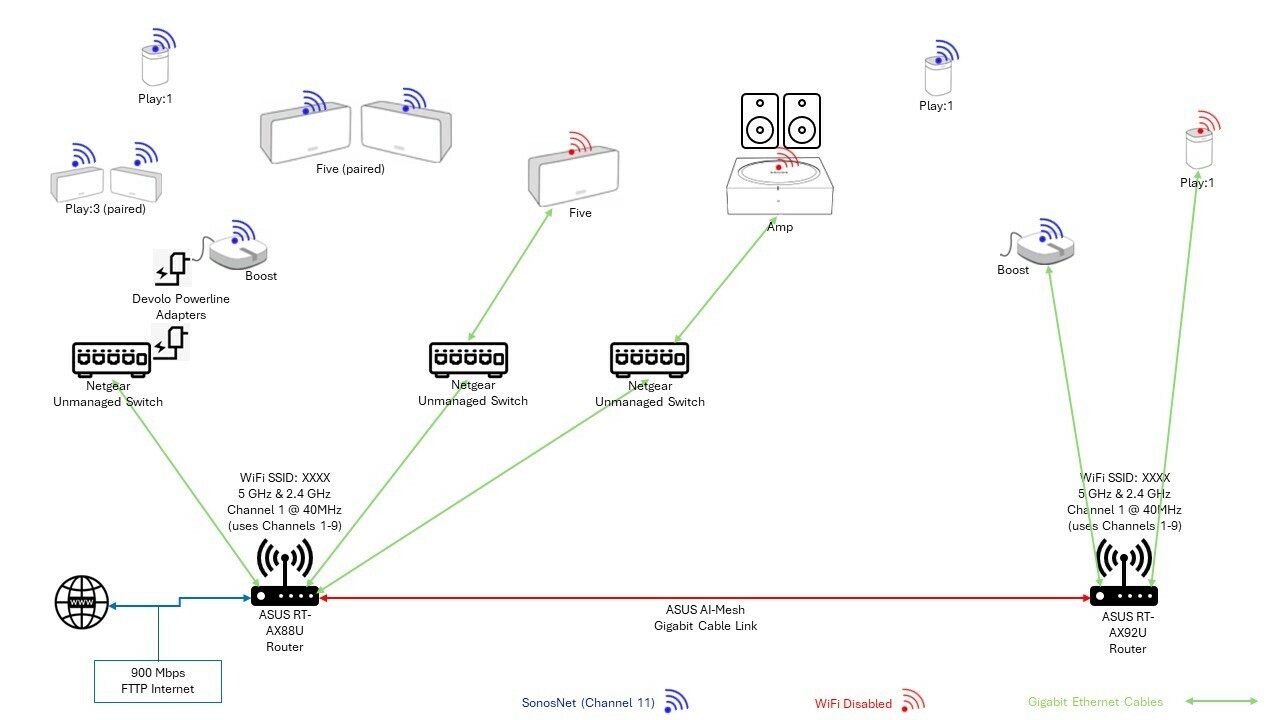
Sonos Network

Our routers, ASUS RT-AX92U and RT-AX88U (linked with AI Mesh) don’t appear to have Spanning Tree Protocol (STP) enabled (I used SSH to log on and check), and I can’t find a way to permanently enable it via the GUI (only manually via SSH and command line which resets when the router reboots, which is usually when we get a broadcast storm).

I think we still have a potential loop via our LAN/WiFi and SonosNet because of the 2 x Boost which are needed to reach the east and west ends of our house respectively.  I did think about connecting all of the Sonos back to a single unmanaged switch rather than via the routers, but can’t easily put in another cable to do this.   

Have I missed something obvious?  Does anyone have any suggestions on how we might easily change/improve our setup to prevent loops and broadcast storms without masses of cabling works or spending a lot of money replacing all of our network equipment.

Thank you

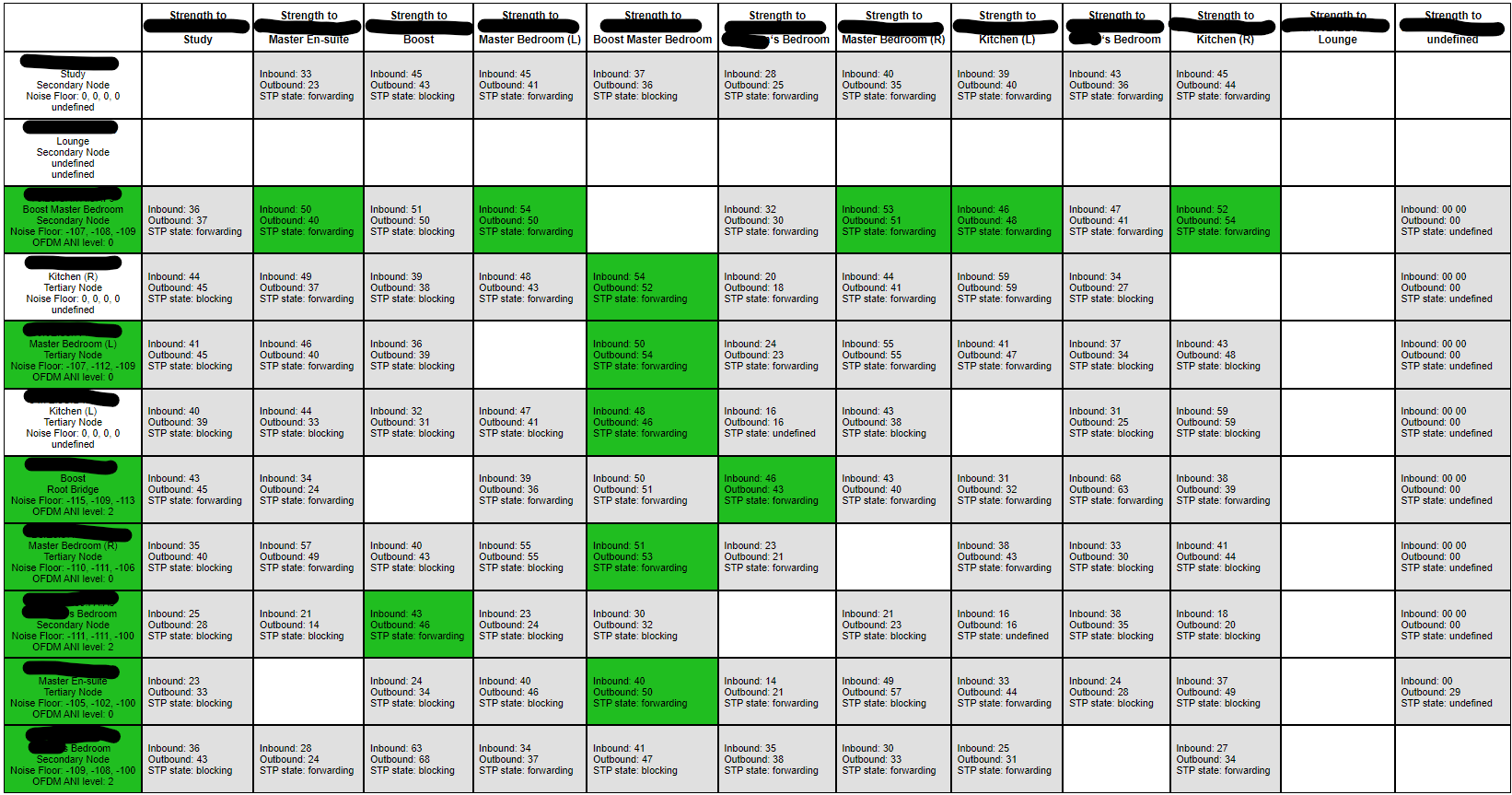
FYI: Sonos Support Network Matrix in case it helps:


This topic has been closed for further comments. You can use the search bar to find a similar topic, or create a new one by clicking Create Topic at the top of the page.
press250
press250Answer
Prodigy III
August 5, 2024

Hi @tcp1p, Ken’s suggestion above is solid. Asus Wi-Fi routers are great and AI mesh is better than SonosNet in every way. Adding another Asus Wi-Fi router will give you far more stable coverage than SonosNet. Re-stating for clarity: beef-up your AI mesh with one additional Asus Wi-Fi router and connect all Sonos devices via “regular Wi-Fi,” removing SonosNet from the equation.

I recognize that doing away with your two Boosts would be disappointing, but SonosNet is reasonably outdated in any case. Once all of your Sonos devices are on regular Wi-Fi, furthermore, you can experiment with moving all of them onto the 5GHz band to mitigate interference.

21 replies

Ken_Griffiths
August 5, 2024

My view is to perhaps try the setup without the power-line adapter and see if that helps to resolve the matter, simply because those EoP devices can be intermittent and are shown as unsupported in the Sonos System Requirements. You may perhaps be better off with another Asus WiFi mesh hub in place of the EoP device instead.

Have you ever considered running Sonos on your Asus mesh WiFi instead of using ‘wired’ SonosNet mode?

https://support.sonos.com/en-us/article/sonos-system-requirements

press250
press250Answer
Prodigy III
August 5, 2024

Hi @tcp1p, Ken’s suggestion above is solid. Asus Wi-Fi routers are great and AI mesh is better than SonosNet in every way. Adding another Asus Wi-Fi router will give you far more stable coverage than SonosNet. Re-stating for clarity: beef-up your AI mesh with one additional Asus Wi-Fi router and connect all Sonos devices via “regular Wi-Fi,” removing SonosNet from the equation.

I recognize that doing away with your two Boosts would be disappointing, but SonosNet is reasonably outdated in any case. Once all of your Sonos devices are on regular Wi-Fi, furthermore, you can experiment with moving all of them onto the 5GHz band to mitigate interference.

Prodigy III
August 5, 2024

You have a very nice looking network matrix.

Not my area but my understanding If the broadcast storms are a result of a rooter reboot it does suggest that the router is not handling stp very well.

You could try the tedious process of turning router off, power down the sonos, router on, turn the sonos back on one at a time and see what happens


If you do go down the road of trying the WiFi option it might be worth checking this page https://support.sonos.com/en-gb/article/asus-rt-and-ax-series-compatibility


tcp1pAuthor
Contributor I
August 5, 2024

Thank you - removing the power-line adapter or expanding the AiMesh to cover the area both need a new cable through a difficult route with very solid wall(s), but I think it’s probably the right long-term solution (and will fix the WiFi in that area too, which also drops-out from time to time). 

I will investigate options to get a new cable to a suitable location to connect up a new AiMesh router and then move the Sonos to use the AiMesh WiFi.

sigh
Prodigy II
August 6, 2024

Is there an easier route to run a cable up into the loft and mount the additional mesh router in the loft above the living space or on the ceiling of an upstairs space if upstairs doesn’t have the thick load bearing walls?

Having wifi access points mounted above the living spaces can actually give better coverage. Signal penetration vertically through floors (unless they’re all concrete) is easier and the walls are just thin vertical strips the signal doesn’t need to get through for wider coverage.

Depending on the angles between the higher mounting position and the lower walls, it could still create weak areas where the wall is in the signal path.

Excuse the crude drawing, but hopefully it helps visualise things. The two green locations for example would be more likely to give better coverage across both floors (assuming upstairs is not solid thick walls) than trying to use two combinations of the red locations. Trying to get high locations centralised above the thick lower walls would reduce the amount of interference they cause.

Ideally Wifi access points in difficult to reach places would be much better if they support power over ethernet (PoE) then you don’t need to worry about finding a power point to plug them into. Unplugging the network cable at the house end of the cable to them would also cut the power if you wanted to switch them off while going away or needed to hard reboot them. Stand alone PoE+ injectors to use with ordinary switches or small switches than can provide 4 PoE+ ports are not expensive.

eg

https://www.broadbandbuyer.com/products/50348-tp-link-ls105gp/

https://www.broadbandbuyer.com/products/42960-ubiquiti-u-poe-at/

Prodigy III
August 6, 2024

Ditching Sonosnet is the way forward as then although any wired Sonos units will still forward STP they won’t be actively using it to try and manage anything. Make sure you actively turn off WiFi in the Sonos app for any device that is wired in. After doing that reboot the whole Sonos system and power on the wired boxes first to make sure they are no longer using Sonosnet. 

Whilst the Sonos system is off, it might be worth using Wireshark to see what becomes the STP root bridge in its absence to see if something else is partly responsible for some of the issues. 

Local Superstar
August 6, 2024

How refreshing to see a well documented question, with lots of information for others to help answer, and some good answers, reminds me of the old days.

BTW - Agree with all the above answers.

tcp1pAuthor
Contributor I
August 6, 2024

Is there an easier route to run a cable up into the loft and mount the additional mesh router in the loft above the living space or on the ceiling of an upstairs space if upstairs doesn’t have the thick load bearing walls?

Having wifi access points mounted above the living spaces can actually give better coverage. Signal penetration vertically through floors (unless they’re all concrete) is easier and the walls are just thin vertical strips the signal doesn’t need to get through for wider coverage.

Depending on the angles between the higher mounting position and the lower walls, it could still create weak areas where the wall is in the signal path.

Excuse the crude drawing, but hopefully it helps visualise things. The two green locations for example would be more likely to give better coverage across both floors (assuming upstairs is not solid thick walls) than trying to use two combinations of the red locations. Trying to get high locations centralised above the thick lower walls would reduce the amount of interference they cause.

Ideally Wifi access points in difficult to reach places would be much better if they support power over ethernet (PoE) then you don’t need to worry about finding a power point to plug them into. Unplugging the network cable at the house end of the cable to them would also cut the power if you wanted to switch them off while going away or needed to hard reboot them. Stand alone PoE+ injectors to use with ordinary switches or small switches than can provide 4 PoE+ ports are not expensive.

eg

https://www.broadbandbuyer.com/products/50348-tp-link-ls105gp/

https://www.broadbandbuyer.com/products/42960-ubiquiti-u-poe-at/

Thanks, I really wish there was an easy way to get cables up into the loft / ceiling space, but it would be a challenge, and I’m not sure would solve the connection to one of the Sonos pairs, as the left of the pair sits under a big steel beam, and the other sits under the house electricity distribution/fuse board.  I’ve ordered another Asus router and will put it in the area the other side of the thick wall (which used to be the external wall of the house), that involves drilling one (difficult) hole (away from the power cables) and should (hopefully) resolve all my wireless issues in that area with a single solution.   
The only thing I haven’t decided is whether to use native AiMesh on the routers (they then share common WiFi channels), or to set them up as one router and two APs (allows using different WiFi channels on each device, but loses some centralised management capabilities).  I will probably try both and see which works best for us.

Thanks for your input anyhow.

tcp1pAuthor
Contributor I
August 7, 2024

How refreshing to see a well documented question, with lots of information for others to help answer, and some good answers, reminds me of the old days.

BTW - Agree with all the above answers.

Thank you - I was worried my original post was too long ;)

Prodigy III
August 7, 2024

I had similar issues with Sonosnet, Asus routers and STP in the past as well. There's an option under LAN / Switch Control to turn STP on, but this seems not to help:

The SSH commands you mentioned could be run on start-up as script, if you use Merlin. You can search for help on snbforums.com under Wireless Networking / ASUS Wireless / Asuswrt-Merlin.

In my case, I connect my Beam to Ethernet and disable wi-fi. Then, my surrounds and other speakers connect to my home Wi-Fi, using different nodes under AiMesh.

I have all my nodes wired to the main router and, instead of EOP, I use MoCA for that. If you have coax running in your house, MoCA could be an excellent option.