
How can I stop random dropouts across large network?
Hi, turning to community to hope that someone can advise as I’m at end of tether with my Sonos setup.
It’s one of those cases where speakers will occasionally disappear from the app, and playback will occasionally stop (prompting error message on app such as ‘Unable to play song - the file cannot be found’ or ‘The file was not encoded correctly’ via Spotify playback).
There appears to be no common factor when the errors appear or speaker dropouts happen - can happen two or three times a day, or sometimes it might only happen once in a week.
Is getting really frustrating as I use the Symfonisk to play white noise throughout the night for my 6-month-old son, so when the playback stops randomly in the night he can wake up.
I have a really good fibre broadband connection, and an Asus XT mesh Wi-Fi system with one extra node at the back of the house, which appears to work perfectly well with all my other devices.
I have a Beam plugged in to the main router in the front room, and up until now all the others were unplugged, so a relatively straightforward Sonosnet system. Just today I plugged in the Symfonisk, which is at the other end of the house, into an ethernet port too, just to see if it made any difference, and I’ve already had one playback stop with the usual ‘file cannot be found’ error message.
Rebooting the router(s) or power cycling all the speakers appears to fix any immediate issue, and brings any missing speakers back into the app, but obviously having to do this several times a week is getting tiresome.
I’ve set up fixed MAC addresses for all speakers, and turned off QoS mode on Asus router, and also ensured that Sonosnet is on a channel (11) with least interference. Still having problems.
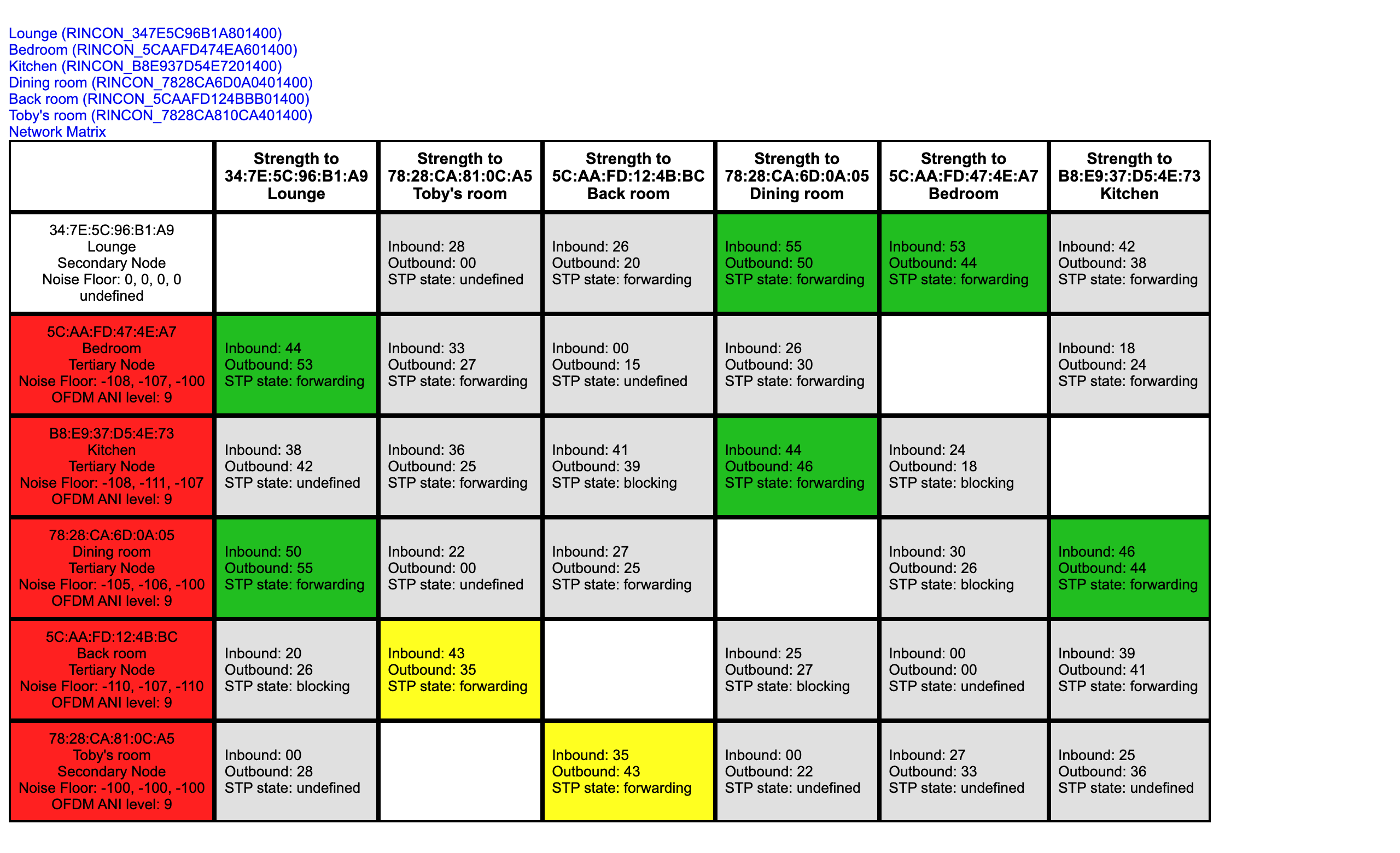
Have attached screengrab of my network matrix, so hoping anyone may be able to spot anything specific about the setup that could be causing these seemingly random dropouts.
With many thanks for any advice.
Mark