
Hooking up a chromecast to a Play:1 (Play:3) without line-in
I got tired of waiting for Sonos to get around to release some kind of cast support (they have good reasons not to too).
Before I began this was my wish list:
So, to the hardware:
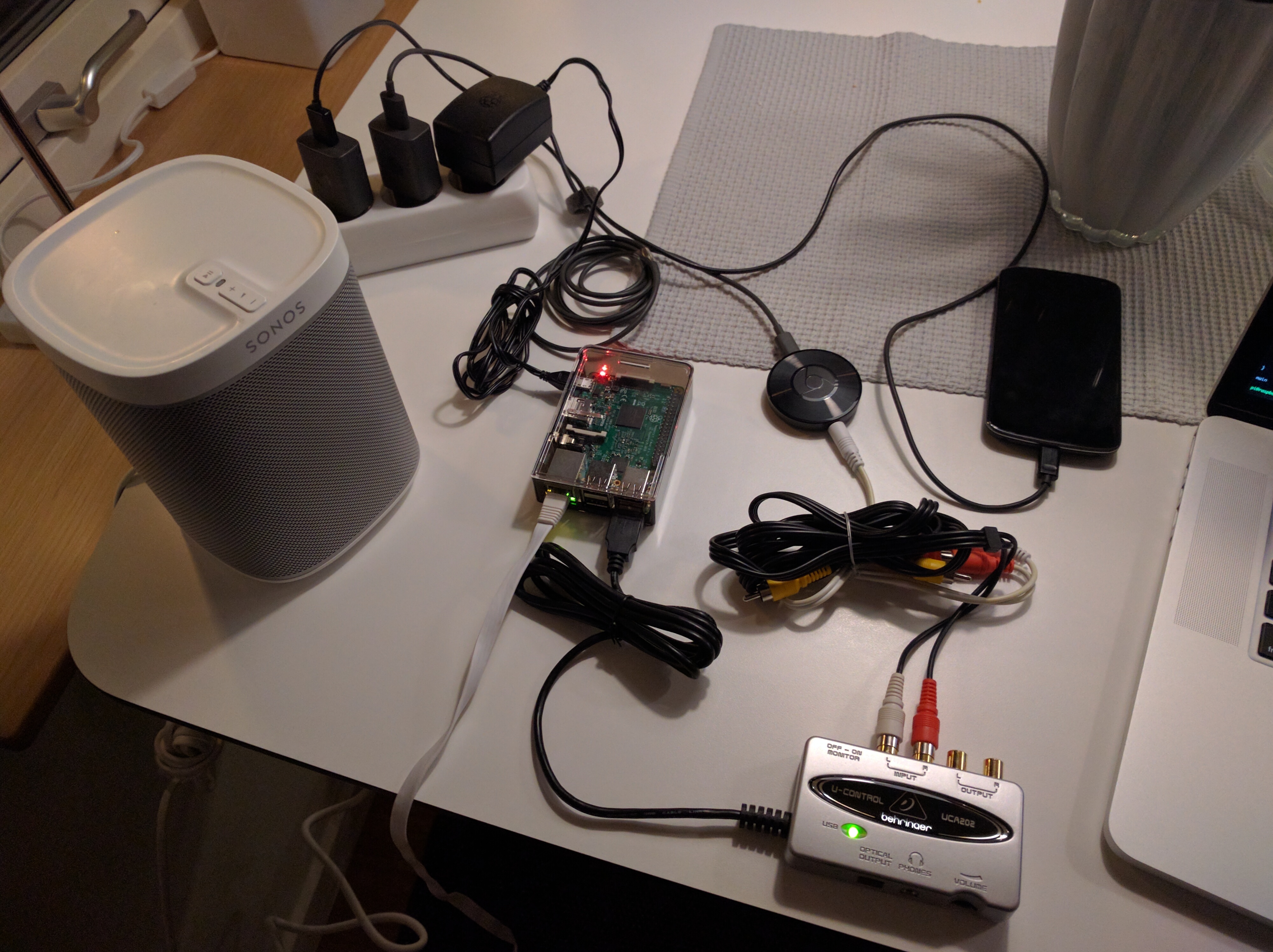
Here is an image of the mess! :)
After installing the standard raspbian (and running the raspi-config + apt update/upgrade) I proceeded to install pulseaudio (~for capturing and monitoring), vlc (for transcoding) and sox (for sound manipulation):
** Note: I probably install way to much than is really needed... **
The pulseaudio deamon should start "when needed by a client", otherwise, now is a good time to start it so do
Then I plugged in my USB sound capture which was connected to the chromecast (and was playing ) device it showed up directly using arecord:
Note the name of your input, mine was alsa_input.usb-Burr-Brown_from_TI_USB_Audio_CODEC-00-CODEC.analog-stereo.
Now comes the time to try stuff out, start by recording some sound from the chromecast:
Transfer the file to your computer and try and play it (you could also hook up some speakers to the raspberry directly and try playing the wav file using mplayer or vlc).
All good? Hopefully. Now comes the transcoding part. Instead of recoding the sound we want to serve it as a http-mp3 stream, I use cvlc for this but there are other alternatives (icecast?):
If there are no dangerous errors you should be good to go and try and open the stream using the sonos application (desktop) using this URL: http://<IP_TO_RASPBERRY>:8080/sonos.mp3). We are close to success if you hear the chromecast sound...
For the last part I've written a small script to detect start and stop of casting and automatically steer the sonos to the cast. Pay extra close attention to the variables in the beginning.
Before I began this was my wish list:
- Cast from android/iphone using chromecast,
- it should start automatically when I cast,
- have acceptable sound quality (I tried bluetooth with a similar setup but it sounded awful) and
- be relatively cheap.
So, to the hardware:
- chromecast audio (I would recommend getting a normal chromecast and extract the audio - the one I got has some limitations),
- raspberry pi as transcoder (record output from chromecast and transform it into a mp3-stream that the sonos can handle)
- (and a USB sound card because the raspberry has no line-in (got a behringer UCA202 which is supported)
Here is an image of the mess! :)
After installing the standard raspbian (and running the raspi-config + apt update/upgrade) I proceeded to install pulseaudio (~for capturing and monitoring), vlc (for transcoding) and sox (for sound manipulation):
** Note: I probably install way to much than is really needed... **
code:
$ sudo apt install pulseaudio pulseaudio-module-zeroconf alsa-utils avahi-daemon vlc-nox vlc-plugin-pulse sox bc
The pulseaudio deamon should start "when needed by a client", otherwise, now is a good time to start it so do
code:
to start it...pulseaudio --start
Then I plugged in my USB sound capture which was connected to the chromecast (and was playing ) device it showed up directly using arecord:
code:
$ pacmd list-sources | grep  'name:'
       	name: <alsa_output.usb-Burr-Brown_from_TI_USB_Audio_CODEC-00-CODEC.analog-stereo.monitor>
       	name: <alsa_input.usb-Burr-Brown_from_TI_USB_Audio_CODEC-00-CODEC.analog-stereo>
       	name: <alsa_output.0.analog-stereo.monitor>
Note the name of your input, mine was alsa_input.usb-Burr-Brown_from_TI_USB_Audio_CODEC-00-CODEC.analog-stereo.
Now comes the time to try stuff out, start by recording some sound from the chromecast:
code:
parec -d <YOUR_DEVICE_NAME> | sox -t raw -r k -sLb 16 -c 2 - test.wav
Transfer the file to your computer and try and play it (you could also hook up some speakers to the raspberry directly and try playing the wav file using mplayer or vlc).
All good? Hopefully. Now comes the transcoding part. Instead of recoding the sound we want to serve it as a http-mp3 stream, I use cvlc for this but there are other alternatives (icecast?):
code:
cvlc -vvv pulse://<YOUR_DEVICE_NAME> --sout "#transcode{vcodec=none,acodec=mp3,ab=320,channels=2}:standard{access=http,dst=0.0.0.0:8080/sonos.mp3}"If there are no dangerous errors you should be good to go and try and open the stream using the sonos application (desktop) using this URL: http://<IP_TO_RASPBERRY>:8080/sonos.mp3). We are close to success if you hear the chromecast sound...
For the last part I've written a small script to detect start and stop of casting and automatically steer the sonos to the cast. Pay extra close attention to the variables in the beginning.
code:
#!/bin/bash

pulse_input='<YOUR_DEVICE_NAME>'
sonos_host='sonos'     # you should set up static ip/or let the router give the same ip each time
this_host='cast2sonos' # ...

volume='15'         # default volume
pause_timeout='20'  # seconds till it pauses the sonos
noise_level='0.005' # depends on your noise level, mine was very low

media_uri="x-rincon-mp3radio://$this_host:8080/sonos.mp3"

main () {
    # start the transcoder...
    cvlc -q pulse://$pulse_input --sout "#transcode{vcodec=none,acodec=mp3,ab=320,channels=2}:standard{access=http,dst=0.0.0.0:8080/sonos.mp3}" &
    sleep 5 # .. and let it settle

    # this is the timestamp when we heard sound the last time (initialize it to now)
    last_sound=$(date +%s)

    while true; do
       	now=$(date +%s)

       	# check the max amplitude of the recording sound
       	amplitude=$(timeout 1 parec -d $pulse_input | sox -t raw -b 16 -e signed -c 2 -r 44100 - -n stat 2>&1 | sed -n 's#^Maximum amplitude:[^0-9]*\([0-9.]*\)$#\1#p')

       	# the code below:
       	# if we hear some noise (music?)
       	#    swich over the sonos to the chromecast radio station if NOT we are already listening to it
       	# if it is silence for a while (so it's not just a pause in a song)
       	#    pause the sonos if the user has not switched to another channel already

       	echo $amplitude

       	if [ 1 -eq $(echo "$amplitude > $noise_level" | bc -l) ]; then
       	    echo "noise"
       	    last_sound=$now
       	    if ! is_our_stuff_playing; then
       		echo "PLAY!"
       		play >> /dev/null
       	    fi
       	else
       	    echo "silence"
       	    if [ 1 -eq $(echo "$now - $last_sound > $pause_timeout" | bc -l) ]; then
       		if is_our_stuff_playing; then
       		    echo "PAUSE!"
       		    pause >> /dev/null
       		fi
       	    fi
       	fi
    done
}

sonos () {
    local "${@}"
    full_type="urn:schemas-upnp-org:service:$service_type:1"
    curl -s -X POST -H "SOAPAction: $full_type:1#$action" -d "<?xml version=\"1.0\" encoding=\"utf-8\"?><s:Envelope xmlns:s=\"http://schemas.xmlsoap.org/soap/envelope/\" s:encodingStyle=\"http://schemas.xmlsoap.org/soap/encoding/\"><s:Body><u:$action xmlns:u=\"$full_type\">$arguments</u:$action></s:Body></s:Envelope>" "http://$sonos_host:1400/MediaRenderer/$service_type/Control"

}

play () {

    # sets the uri to this transcoder
    sonos service_type='AVTransport'\
       	  action='SetAVTransportURI'\
       	  arguments="<InstanceID>0</InstanceID><CurrentURI>$media_uri</CurrentURI><CurrentURIMetaData></CurrentURIMetaData>"

    # sets the initial volume
    sonos service_type='RenderingControl'\
       	  action='SetVolume'\
       	  arguments="<InstanceID>0</InstanceID><Channel>Master</Channel><DesiredVolume>$volume</DesiredVolume>"

    # play :)
    sonos service_type='AVTransport'\
       	  action='Play'\
       	  arguments='<InstanceID>0</InstanceID><Speed>1</Speed>'
}

pause() {
    # pause
    sonos service_type='AVTransport'\
       	  action='Pause'\
       	  arguments='<InstanceID>0</InstanceID>'
}

is_our_stuff_playing() {
    # check that the station is the same as ours
    if sonos service_type='AVTransport' action='GetMediaInfo' arguments='<InstanceID>0</InstanceID>' | grep -v -q $media_uri; then
       	return 1
    fi

    # check that we are indeed playing our station
    if sonos service_type='AVTransport' action='GetTransportInfo' arguments='<InstanceID>0</InstanceID>' | egrep -v -q "PLAYING|TRANSITIONING"; then
       	return 2
    fi

    return 0
}

main