
Trending Lyricist I
July 28, 2022
Answered

Help on improving my home setup - (Omada wifi / another boost?)

I have recently changed our home Wifi to TP Link Omada as our existing Wifi didnt reach around the home, I am planning on adding some managed switches too which I think will help with our sonos setup in the long run.


I currently have a number of devices hard wired (wifi off), a boost and some on wifi (should be sonosnet)


We have had performance issues on and off over the years and hard wiring some of the sonos appears to have fixed it, the office and nursery speakers are hard wired as they are the furthest from the Boost. Would an additional boost help?


Since changed to Omada APs, our devices connected by WiFi arent able to play anything, the wired devices are still functioning, these are currently connected to dumb switches.


Our network matrix is as below:
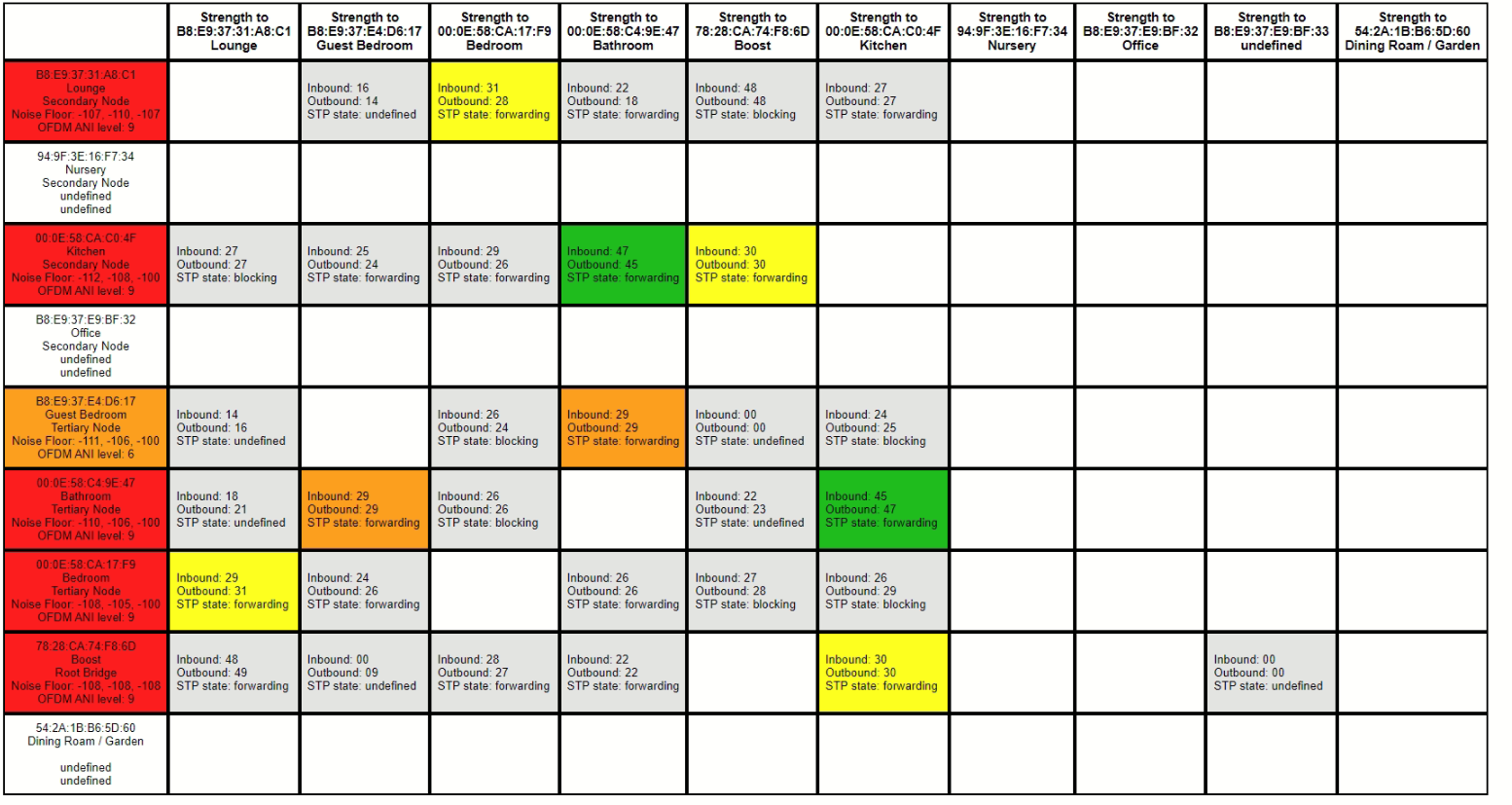


Any advice, suggestions are appreciated. 

I plan to move the location of the boost again as a first port of call. Does anyone use TP Link Omada and know the best settings to use?

This topic has been closed for further comments. You can use the search bar to find a similar topic, or create a new one by clicking Create Topic at the top of the page.
John BAnswer
August 1, 2022

When you can, turn the whole baby alarm system off for a few minutes and refresh the matrix.

Edit: just seen your question about this!

66 replies

buzz
Grand Maestro
October 23, 2022

If all of the players are wired, BOOST is redundant.

buzz
Grand Maestro
October 23, 2022

Nothing has changed physically inside, and I see no new wireless networks from neighbours.


Something has changed, but is not visible in your scanner.

Trending Lyricist I
October 24, 2022
  1. no.
  2. it shouldn’t matter if the switch itself is unmanaged. If it isn’t, then the router itself is the appropriate choice. 
     
  3. have you called in to Sonos for guidance at all?

Wouldn’t having wifi and wired enabled create loops?


I currently have managed switches with STP enabled and configured with the appropriate values depending on where the switches are in the chain


I havent yet called Sonos but think that is worth doing now as I am struggling

Trending Lyricist I
October 24, 2022

Nothing has changed physically inside, and I see no new wireless networks from neighbours.


Something has changed, but is not visible in your scanner.

Yes, it is most likely something external rather than internal so out of my control

buzz
Grand Maestro
October 24, 2022

Wouldn’t having wifi and wired enabled create loops?


I currently have managed switches with STP enabled and configured with the appropriate values depending on where the switches are in the chain


No. Enabling STP in the switches will take care of that. I have both managed and unmanaged switches and no loops. I’d wire SONOS to the switches and avoid the router -- just in case it does not handle STP well.

Trending Lyricist I
October 26, 2022

I have cabled in one Sonos to the switch nearest my router, lowest STP value, and getting more drop outs than before and notifications of network loops


Next step is to contact Sonos.


Wife is currently preferring to use Alexa devices as we have now got them playing local music using Plex and it can do Spotify and Amazon Music without drop outs