

SkipperGreg
Contributor I
March 16, 2024

Alexa Not Recognizing Sonos One (Gen 1) Speakers

  • March 16, 2024
  • 26 replies
  • 2710 views

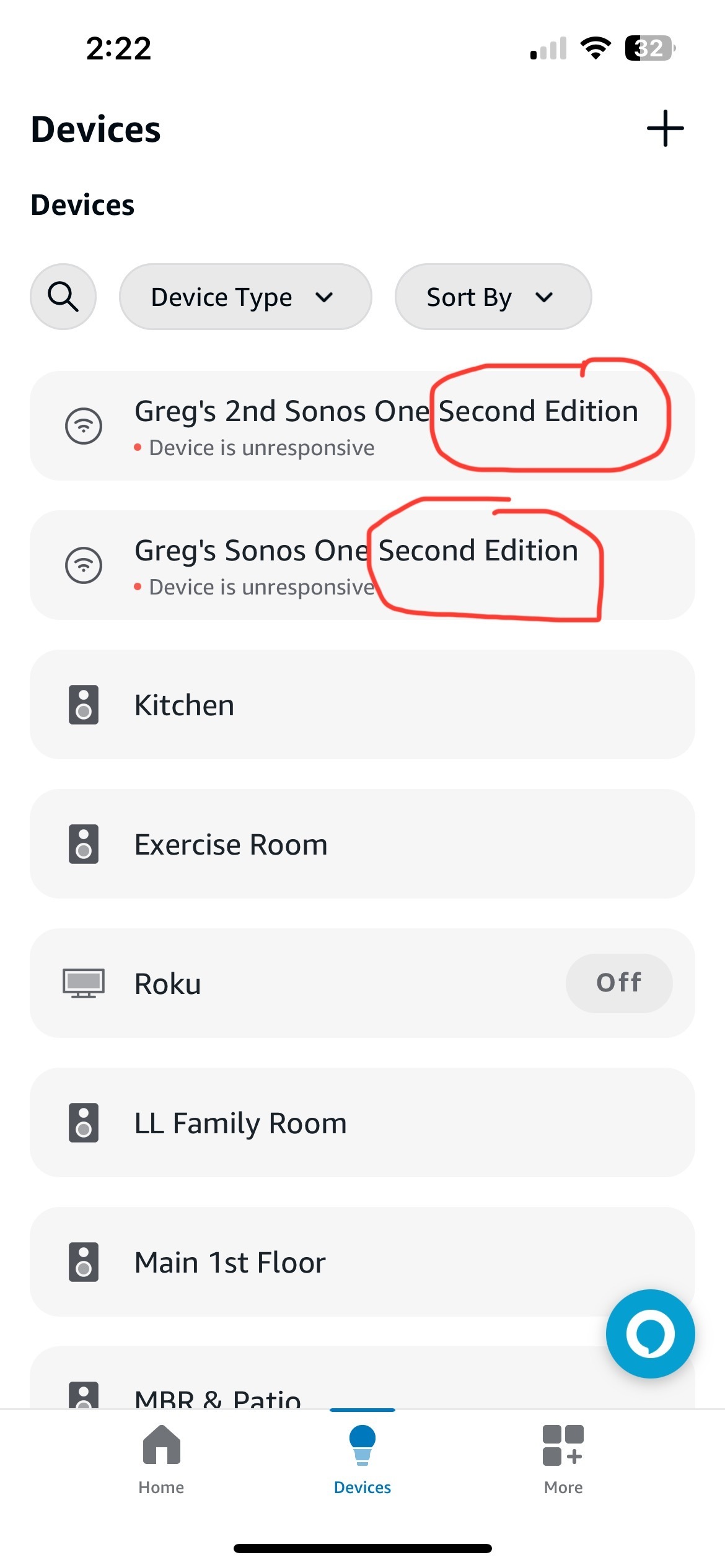
Known bug (on Sonos support page) that with the March 14, 2024 Alexa App and Sonos 1 app updates, Alexa voice does not work on the Sonos One (Gen 1) speakers. When I look at devices in the Alexa app it says my 2 Sonos One speakers are unresponsive and offline. I’ve tried to clean out or log out of all apps to get my Sonos speakers to work with Alexa without success but have further data to support that the latest Alexa app (updated 3/14/2024) is recognizing my Sonos One FIRST Edition speakers as SECOND Edition speakers and that explains why they are not working. See screen shot below of my devices in the Alexa app for that corroboration.

i tried to email this to Sonos (support@sonos.com) but got a reply saying that address is not monitored. A support link for posting was provided but that is the generic support page with phone and chat but no way to submit any info except here. Hence this post to share with Sonos and the community. As mentioned, I have Sonos One GEN 1 (first edition) but Alexa is seeing my speakers as GEN 2 which is why they won’t work any longer.


This topic has been closed for further comments. You can use the search bar to find a similar topic, or create a new one by clicking Create Topic at the top of the page.
Pinned Reply By Corry P

Hi @SkipperGreg 

We have released an update for S1 that we believe addresses this issue. Please check your system for updates and test. If you continue to see this issue after updating, we recommend you get in touch with our technical support team for assistance.

Thank you for your patience.

26 replies

Lyricist I
March 22, 2024

I have version 11.14

Checking for updates tells me 

Your System is up to date 


Still no Alexa available

SkipperGreg
Contributor I
March 23, 2024

Hi @SkipperGreg 

We have released an update for S1 that we believe addresses this issue. Please check your system for updates and test. If you continue to see this issue after updating, we recommend you get in touch with our technical support team for assistance.

Thank you for your patience.

Yes it is fixed. Thank you.

SkipperGreg
Contributor I
March 23, 2024

My Sonos One speakers are fixed (meaning Alexa voice is working again). I didn’t do anything. It just worked today. Neither the Sonos S1 app or the Alexa app were updated so there must have been a Sonos system update last night that implemented the fix as stated above by @Corry P. In viewing my system info, I am running v11.14 build 572151190. I checked updates am up to date. I have a Sonos Connect, 2 ZP100s, and 2 Sonos Ones. Both speakers are voice enabled now. When I go into the ALEXA app I saw that the 2 speakers are now online (in contrast to my screen shot from before today when they were unresponsive or offline as shown above). For some reason the new version since this problem began is creating 2 speakers for each Sonos One as shown in my screen shot in the original post above. One with a speaker icon for the correct room (eg Kitchen) and one saying “Greg’s Sonos One Speaker…Sonos 2”.  Perhaps new Sonos 2 functionality is interfering with backward compatibility for Sonos 1 devices? In any event, I changed that name to “Kitchen” but it wouldn’t stick so I changed it to “Kitchen Alexa” and it worked. None of this has to do with functional voice response. That was working already.

Good luck to those not online yet  


Lyricist III
March 23, 2024

Mine is also fixed.  Thanks Sonos support. and  @SkipperGreg  

Lyricist I
April 15, 2024

Hey all

Huge thanks to @SkipperGreg. I’ve been following this post for a while and then gave up but tried again just now and my Sonos One & Alexa is working again! 


I have the latest version install

11.14

I am using the S1 Controller

I also spotted that my Sonos One speaker had the odd title “Sonos One Second Generation” within the Alexa App. I tried to rename it and all the speakers and devices disappeared. 
 

  1. I removed the voice service from Sonos S1 Controller
  2. I logged out and back in to the Alexa App
  3. On the Sonos S1 app I added voice services, and went through the screens. My Sonos One chimed and said it was connected, but when I tried to wake it, it didn’t respond. 
  4. I went to the Alexa App - located the device named “Claire’s Sonos One Second Generation” > renamed it to Kitchen Alexa. 
    My Sonos One was appearing twice as Kitchen and “Claire’s Sonos One etc etc” & just like Greg duplicating the name didn’t work, kitchen Alexa did. 
  5. Boom! Alexa started to respond again. 
     

After you rename the speaker you may have to log in and out again or add/remove service.
For whatever reason the speaker gets named incorrectly in Alexa and once that was amended it was happy again. 
 

I hope that also helps for anyone experiencing this unique problem. 
I should upgrade my Sonos Play:5 and thus move to the S2 Controller as well, but I don’t want to be wasteful, the speakers are in excellent working order. But super happy to find a fix. Sad there is no proper Sonos support otherwise than this forum. 

Lyricist I
April 15, 2024

I had the same issue and resolved it in the same manner.


I too should upgrade but with 2 Play 5s and a Beam it wont be an inexpensive exercise!