
Contributor I
Jan 18, 2023 5:59 PM UTC
Answered

wifi on sonos 1

I have been using FiOS for over a year and only recently have noticed lag and very slow download speeds 65-85mbps. I have many ‘newer’ connected wifi devices, including a Sonos Port and no issues. 
 

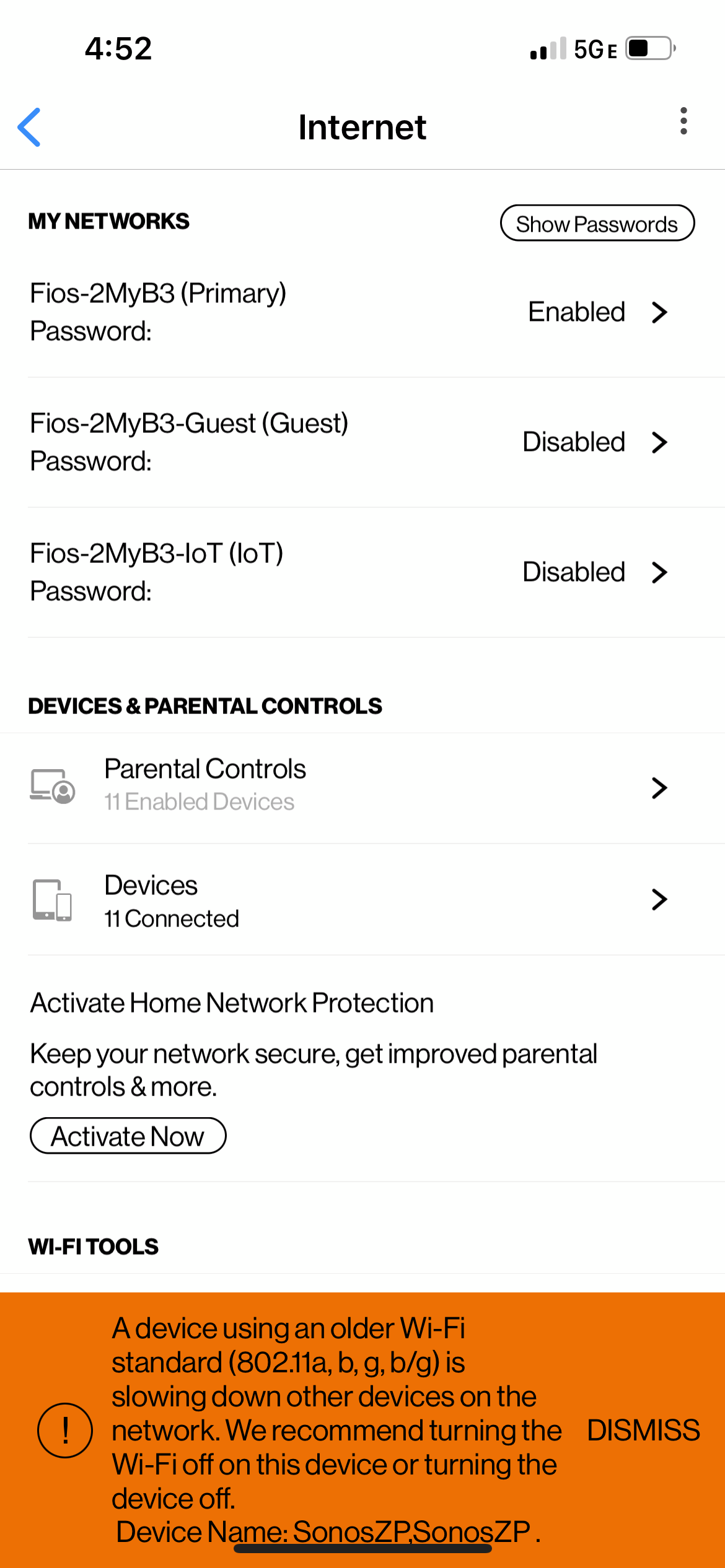
I’m wondering if anyone else has a message from ISP (orange area in attached) showing my Sonos 1s need to be upgraded? Also is this the whole unit or just firmware? Does Sonos fix or do trade ins?

Thanks,

Ben
 

This topic has been closed for further comments. You can use the search bar to find a similar topic, or create a new one by clicking Create Topic at the top of the page.
Corry P
Corry PAnswer
Sonos Staff
Jan 23, 2023 4:03 PM UTC

Hi @BeFunky 

Welcome to the Sonos Community!

All three of your Sonos products can connect to 5GHz, so I’m not sure why you’re seeing this.

I recommend you get in touch with our technical support team, who have tools at their disposal that will allow them to give you advice specific to your Sonos system and what it reports.

"Common sense is the collection of prejudices acquired by age eighteen." - Albert Einstein

7 replies

Airgetlam
Jan 18, 2023 11:19 PM UTC

Sonos does allow upgrade discounts, once per item, you can see the details here: 

https://www.sonos.com/en-us/upgrade


I’ve never seen such a message before, though. Seems odd. Although I don’t have fiber, but the network that’s “slow” is inside the home, and the speed of one device really shouldn’t impact other devices….it’s just the speed of the connection between that device and the router. Are they trying to suggest everything should be 802.11a/c instead? It still wouldn’t, to my knowledge, impact other devices. 


Have you contacted your ISP for additional information?

Translate
Bruce
Stanley_4
Grand Maestro
Jan 18, 2023 11:49 PM UTC

Using some of the older WiFi standards forces your new gear to fall back to a slower mode to support these older devices, that impacts your new devices connection options and speeds.

I’d wire one or more Sonos to Ethernet and get them off your WiFi as my first option.

A second Access Point with a different clear channel (1, 6 or 11) and different SSID would be option 2. I think Sonos still is selling the Beam, it is a dedicated Sonos only AP, look in the Last-Chance sale section of the Sonos web store.

Translate
Corry P
Corry PAnswer
Sonos Staff
Jan 23, 2023 4:03 PM UTC

Hi @BeFunky 

Welcome to the Sonos Community!

All three of your Sonos products can connect to 5GHz, so I’m not sure why you’re seeing this.

I recommend you get in touch with our technical support team, who have tools at their disposal that will allow them to give you advice specific to your Sonos system and what it reports.

Translate
"Common sense is the collection of prejudices acquired by age eighteen." - Albert Einstein
buzz
Grand Maestro
Jan 23, 2023 11:09 PM UTC

BeFunky,

I’m curious, which model FIOS gateway are you using?

Translate
BeFunkyAuthor
Contributor I
Jan 26, 2023 2:43 PM UTC

BeFunky,

I’m curious, which model FIOS gateway are you using?

I only just got FiOS last year, so it's the latest. I will look up the model number and post here.

We did have an outage last week (the whole) block. The performance seems to have improved -- at least no warmings at this time?

Translate
BeFunkyAuthor
Contributor I
Jan 26, 2023 2:45 PM UTC

Using some of the older WiFi standards forces your new gear to fall back to a slower mode to support these older devices, that impacts your new devices connection options and speeds.

I’d wire one or more Sonos to Ethernet and get them off your WiFi as my first option.

A second Access Point with a different clear channel (1, 6 or 11) and different SSID would be option 2. I think Sonos still is selling the Beam, it is a dedicated Sonos only AP, look in the Last-Chance sale section of the Sonos web store.

I'd need an A/V receiver to do that? My place isn't wired with ethernet.

Translate
Stanley_4
Grand Maestro
Jan 26, 2023 9:23 PM UTC

Your gateway will usually have an Ethernet port.

An AVR would have no use in this connection.

Translate
