Answered

What could I do with network access on Sonos Arc?

  • August 18, 2021
  • 2 replies
  • 531 views

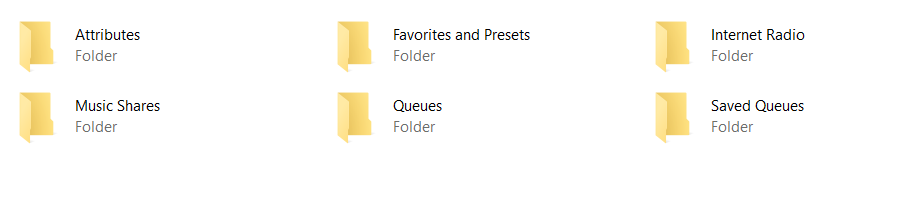
From my notebook I could see Sonos arc accessible via network share.

I see the following folders available:

What coudl I do with them??
 

Best answer by controlav

All Sonos audio devices expose the UPnP service urn:upnp-org:serviceId:ContentDirectory and PCs will find it, think it is a DLNA source (which it is not) and display it as shown.

If you have music files on your PC you can use this feature by right clicking on such a file and use Cast To to play it on directly on your Sonos speaker.


This topic has been closed for further comments. You can use the search bar to find a similar topic, or create a new one by clicking Create Topic at the top of the page.

2 replies

Corry P
Forum|alt.badge.img+19
  • Sonos Staff
  • August 18, 2021

Hi @JWPY 

Welcome to the Sonos Community!

Nothing much, to be honest - you’ll notice that there are no files in any of the folders, only subfolders. This is likely because the contents are restricted to other Sonos devices only - your PC can only see the folder structure.


controlav
Forum|alt.badge.img+24
  • Lead Maestro
  • Answer
  • August 19, 2021

All Sonos audio devices expose the UPnP service urn:upnp-org:serviceId:ContentDirectory and PCs will find it, think it is a DLNA source (which it is not) and display it as shown.

If you have music files on your PC you can use this feature by right clicking on such a file and use Cast To to play it on directly on your Sonos speaker.

