
Answered

Roam connects to my PC laptop Bluetooth system but won't pair or play

  • May 11, 2021
  • 14 replies
  • 5482 views

I was really looking forward to getting the Sonos Roam paired with my Windows bluetooth system but have now spent a couple of hours trying, but only get frustrated.

In particular, I got the blue light and went into my Windows systems and ‘added a bluetooth device’ and it then claimed that the Roam had been “connected”.

So far so good.

The problem is that I can’t get it to play any music or even ‘pair’ audio from my PC.

Help--please--this is very frustrating.

Vince
Best answer by GuitarSuperstar

So strange… not sure what it could be.


Try the troubleshooting steps in this article:
https://support.microsoft.com/en-us/windows/fix-bluetooth-problems-in-windows-10-723e092f-03fa-858b-5c80-131ec3fba75c

This topic has been closed for further comments. You can use the search bar to find a similar topic, or create a new one by clicking Create Topic at the top of the page.

14 replies

  • Lead Maestro
  • 10452 replies
  • May 11, 2021

Try removing the Roam from your list of Bluetooth devices and pairing it again. Also try rebooting your computer.


  • Author
  • Contributor I
  • 8 replies
  • May 11, 2021

Thanks for your note. Unfortunately, I have trued your advice--twice already. The list of devices includes Roam which is “connected” but not “paired”---when I select it, the only option that appears is to remove it from the Bluetooth list--what now?

THX

V


  • Lead Maestro
  • 10452 replies
  • May 11, 2021

Remove the Roam from the Bluetooth list and reconnect it by following these instructions:
https://support.sonos.com/s/article/4989?language=en_US


  • Author
  • Contributor I
  • 8 replies
  • May 11, 2021

Yup...tried it--in fact I have read the instructions several times--The best I get is to adding Roam to Bluetooth (it actually says, ‘connected and that I am done’) but it doesn’t show as “paired” nor can i play the music from my laptop on my sonos roam---arrgh

Any other ideas for me?

V


  • Lead Maestro
  • 10452 replies
  • May 11, 2021

Do you see a solid blue light on the Roam? Is your computer muted? Is the volume turned up on the Roam?


  • Author
  • Contributor I
  • 8 replies
  • May 11, 2021

it is flashing blue at the moment


  • Lead Maestro
  • 10452 replies
  • May 11, 2021

Flashing blue means the Roam is not paired yet. It will turn solid blue when the Roam is paired over Bluetooth. What version of Windows are you using?


  • Author
  • Contributor I
  • 8 replies
  • May 11, 2021

still flashing blue---i’m running Windows 10 Pro


  • Author
  • Contributor I
  • 8 replies
  • May 11, 2021

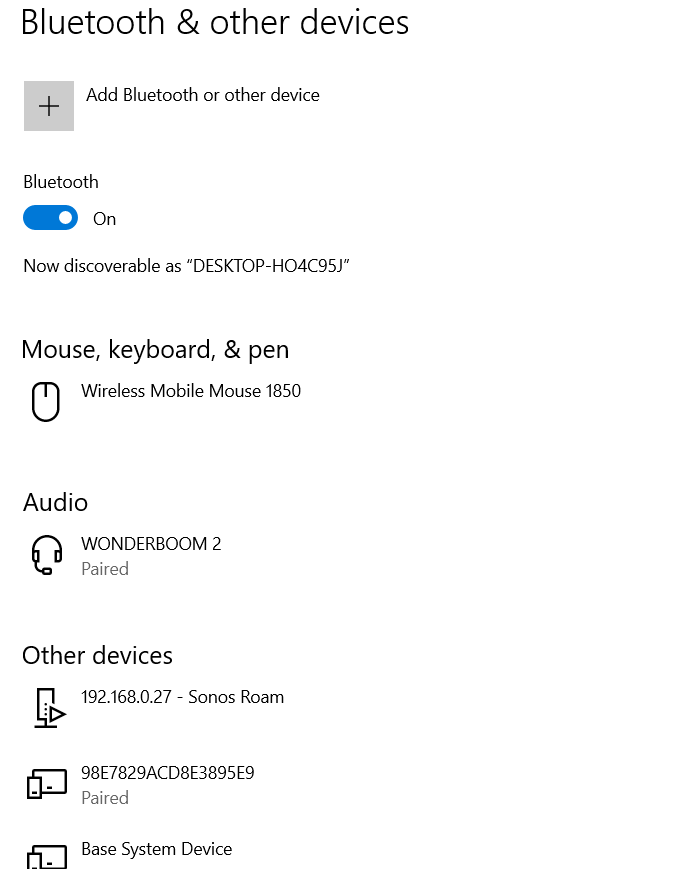
here’s a screenshot of the bluetooth system info for my laptop;


  • Lead Maestro
  • 10452 replies
  • May 11, 2021

Go through these instructions to make sure your computer’s Bluetooth is set up correctly:
https://support.microsoft.com/en-us/windows/pair-a-bluetooth-device-in-windows-2be7b51f-6ae9-b757-a3b9-95ee40c3e242#ID0EBD=Windows_10


Reboot the Roam by following these steps:

  1. Disconnect Roam from charging cables and remove it from wireless chargers.
  2. Hold the button on the back of Roam for at least five seconds until you hear the power-off tone and the light above the Sonos logo turns off.
  3. Wait 10 seconds.
  4. Press the button on the back of Roam to turn it back on.
     

After you reboot the Roam, try the Bluetooth pairing process again.
https://support.sonos.com/s/article/4989?language=en_US


  • Author
  • Contributor I
  • 8 replies
  • May 11, 2021

yup--tried it--exactly as prescribed...still doesn’t get “paired”--damn, what am i missing?


  • Lead Maestro
  • 10452 replies
  • Answer
  • May 11, 2021

So strange… not sure what it could be.


Try the troubleshooting steps in this article:
https://support.microsoft.com/en-us/windows/fix-bluetooth-problems-in-windows-10-723e092f-03fa-858b-5c80-131ec3fba75c


  • Author
  • Contributor I
  • 8 replies
  • May 11, 2021

will read--thanks for your interest and time! :) 


  • Author
  • Contributor I
  • 8 replies
  • May 14, 2021

Wow...Sonos released a bug-fix update and, voila, Bluetooth problem has been resolved!
v