Trending Lyricist I
Jan 6, 2023 3:27 PM UTC
Answered

Sonos Arc with FireTV 4k and Epson 7100 projector problem

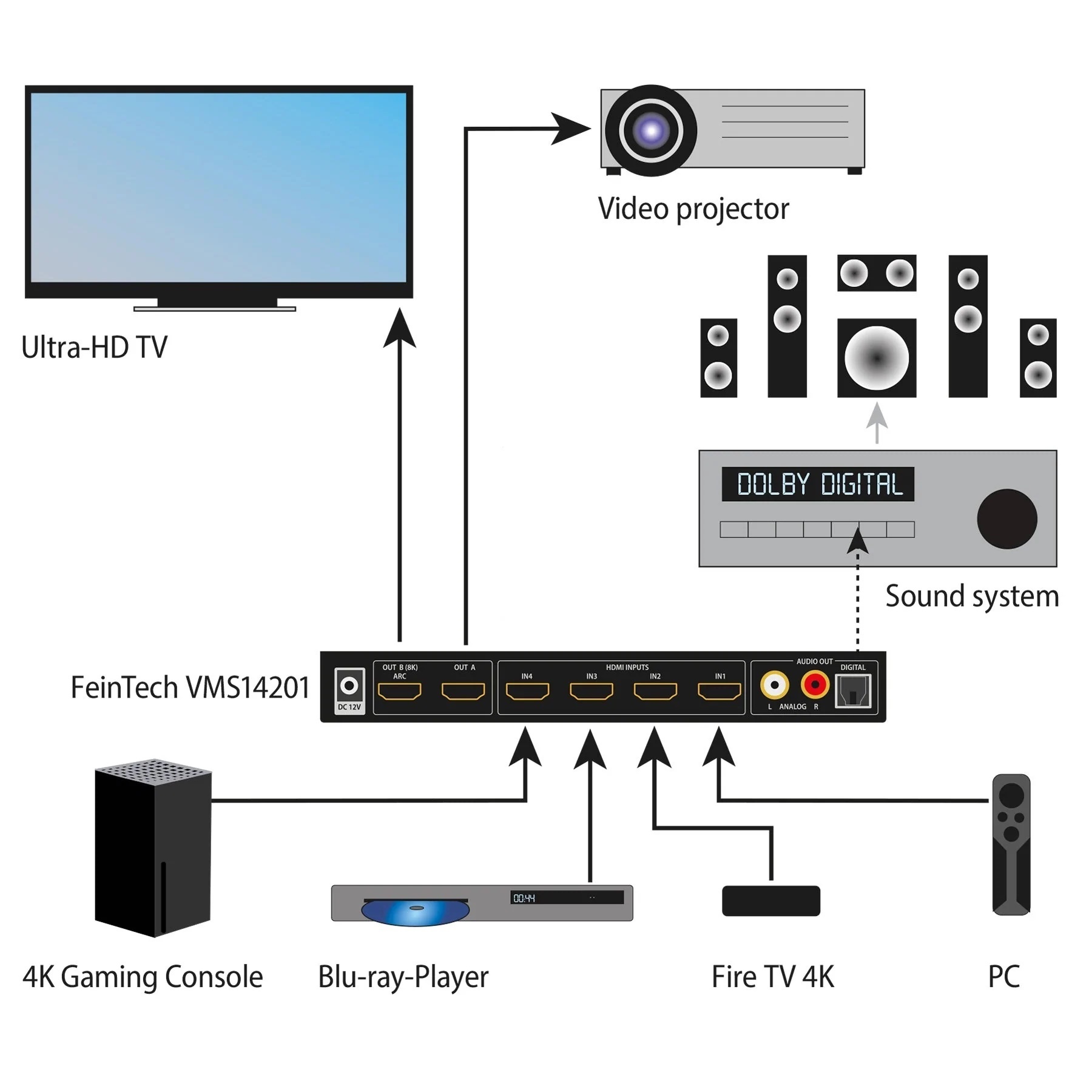
Hello all. Just got my Sonos Arc system. Connected to Epson TW-7100 4k Projector. Using the Feintech VMS14201 HDMI 2.1 Matrix Switch to connect Apple TV 4k and Fire TV 4k. But getting no sound with the HDMI-optical connector. Feintech def supports my projector model. Any help on solving this would much appreciated. Connected the system as in the diagram (attached). I would hate to have to return the system. 


This topic has been closed for further comments. You can use the search bar to find a similar topic, or create a new one by clicking Create Topic at the top of the page.
Trending Lyricist I
Jan 8, 2023 12:00 AM UTC

So, the TOSLINK/optical is working now. Here’s what happened. And I believe SONOS needs to address this shortcoming. 

I had a few years old Sony Bravia TV lying around. I decided to connect it to see what the “TV Setup” option does in the settings of the Sonos App for the Sonos Arc system I bought.

The TV Setup would always fail with the projector. The projector would show HDMI connected to the Sonos Arc in the Epson HDMI menu, but the Audio Out part of the TV Setup on the Sonos App would always throw errors. So the TV Setup was never successfully completed earlier.

Now, after I connected Sonos to an HDMI TV (not projector) and completed the TV Setup process successfully, I decided to reconnect the Apple TV source using the Feintech HDMI switch again with the Optical Out+HDMI dongle from Sonos. Voila! I now have 5.1 (Expanded EDID) on the Sonos Arc system using Optical Out from my HDMI switch.

So It shows me that only a successful TV Setup on the Sonos App fixes the Optical Out compatibility. It’s not a Feintech issue or another. 

This seems to me to be a software problem with Sonos. Is it a software bug then? Can anyone confirm or comment on this analysis?

 @John B what do you think?

28 replies

Jan 7, 2023 10:44 AM UTC

My suggestion was purely to eliminate some possibilities, as a diagnostic experiment. For that it doesn’t seem relevant to me that the projector has no optical out.

Translate
anipaloozaAuthorAnswer
Trending Lyricist I
Jan 8, 2023 12:00 AM UTC

So, the TOSLINK/optical is working now. Here’s what happened. And I believe SONOS needs to address this shortcoming. 

I had a few years old Sony Bravia TV lying around. I decided to connect it to see what the “TV Setup” option does in the settings of the Sonos App for the Sonos Arc system I bought.

The TV Setup would always fail with the projector. The projector would show HDMI connected to the Sonos Arc in the Epson HDMI menu, but the Audio Out part of the TV Setup on the Sonos App would always throw errors. So the TV Setup was never successfully completed earlier.

Now, after I connected Sonos to an HDMI TV (not projector) and completed the TV Setup process successfully, I decided to reconnect the Apple TV source using the Feintech HDMI switch again with the Optical Out+HDMI dongle from Sonos. Voila! I now have 5.1 (Expanded EDID) on the Sonos Arc system using Optical Out from my HDMI switch.

So It shows me that only a successful TV Setup on the Sonos App fixes the Optical Out compatibility. It’s not a Feintech issue or another. 

This seems to me to be a software problem with Sonos. Is it a software bug then? Can anyone confirm or comment on this analysis?

 @John B what do you think?
Translate
Ken_Griffiths
Jan 8, 2023 12:27 AM UTC

Just to add if you’re looking for a similar HDMI switch/extractor that supports Atmos Audio - then Feintech also sell this product:

https://feintech.eu/en/collections/hdmi-topseller/products/feintech-vax04101-hdmi-earc-pass-switch-4x1-for-soundbar

It works similar to the HDFury Arcana, but with a built-in HDMI switch.

Translate
Trending Lyricist I
Jan 8, 2023 12:36 AM UTC

Hey Ken. I will be returning the Feintech once I get the HDFury 4k Arcana. I’ve had too many problems with TOSLINK/Optical connectors to solve the audio issues. Not to mention their limitations with Dolby Atmos. I didn’t have a good experience with their support, either. Anyway, I have till Monday to decide once I get the Arcana in hand to test it out. I will be getting a separate HDMI switch to connect multiple sources. But Arcana’s ability to support/extrapolate to full eARC using HDMI (along with Atmos and more) seems more acceptable to my needs. 

But thanks for the suggestion. 

Translate
Ken_Griffiths
Jan 8, 2023 12:42 AM UTC

So, the TOSLINK/optical is working now. Here’s what happened. And I believe SONOS needs to address this shortcoming. 

I had a few years old Sony Bravia TV lying around. I decided to connect it to see what the “TV Setup” option does in the settings of the Sonos App for the Sonos Arc system I bought.

The TV Setup would always fail with the projector. The projector would show HDMI connected to the Sonos Arc in the Epson HDMI menu, but the Audio Out part of the TV Setup on the Sonos App would always throw errors. So the TV Setup was never successfully completed earlier.

Now, after I connected Sonos to an HDMI TV (not projector) and completed the TV Setup process successfully, I decided to reconnect the Apple TV source using the Feintech HDMI switch again with the Optical Out+HDMI dongle from Sonos. Voila! I now have 5.1 (Expanded EDID) on the Sonos Arc system using Optical Out from my HDMI switch.

So It shows me that only a successful TV Setup on the Sonos App fixes the Optical Out compatibility. It’s not a Feintech issue or another. 

This seems to me to be a software problem with Sonos. Is it a software bug then? Can anyone confirm or comment on this analysis?

 @John B what do you think?

I’m just wondering if simply toggling on ‘TV Autoplay’ in the Arc’s ‘room’ settings perhaps might have achieved the same outcome?

See ‘Settings/System/[Arc Room Name]/TV Autoplay’… it might be worth testing that next time if you ever have to setup the Arc again with the projector.

Translate
Trending Lyricist I
Jan 8, 2023 1:02 AM UTC

So, the TOSLINK/optical is working now. Here’s what happened. And I believe SONOS needs to address this shortcoming. 

I had a few years old Sony Bravia TV lying around. I decided to connect it to see what the “TV Setup” option does in the settings of the Sonos App for the Sonos Arc system I bought.

The TV Setup would always fail with the projector. The projector would show HDMI connected to the Sonos Arc in the Epson HDMI menu, but the Audio Out part of the TV Setup on the Sonos App would always throw errors. So the TV Setup was never successfully completed earlier.

Now, after I connected Sonos to an HDMI TV (not projector) and completed the TV Setup process successfully, I decided to reconnect the Apple TV source using the Feintech HDMI switch again with the Optical Out+HDMI dongle from Sonos. Voila! I now have 5.1 (Expanded EDID) on the Sonos Arc system using Optical Out from my HDMI switch.

So It shows me that only a successful TV Setup on the Sonos App fixes the Optical Out compatibility. It’s not a Feintech issue or another. 

This seems to me to be a software problem with Sonos. Is it a software bug then? Can anyone confirm or comment on this analysis?

 @John B what do you think?

I’m just wondering if simply toggling on ‘TV Autoplay’ in the Arc’s ‘room’ settings perhaps might have achieved the same outcome?

See ‘Settings/System/[Arc Room Name]/TV Autoplay’… it might be worth testing that next time if you ever have to setup the Arc again with the projector.

Hey Ken. Those options were greyed out until I had a successful TV Setup run with the old Sony Bravia. So I have a strong feeling this issue is in Sonos’ court to solve. 

Translate
Ken_Griffiths
Jan 8, 2023 1:10 AM UTC

Hey Ken. Those options were greyed out until I had a successful TV Setup run with the old Sony Bravia. So I have a strong feeling this issue is in Sonos’ court to solve. 

Did you have the Projector powered ‘on’ and playing audio-out to the ‘Sonos Optical-to-HDMI’ adapter and that in turn, plugged into the original Sonos 1.4+ HEAC supported HDMI cable to the Arc, as it should have recognised the Adapter was in situ, unless the Feintech device is a part of the problem here?

The test for me would be to see if it works when plugged in directly to a TV’s optical port and to see what happens in that particular case too, which is the ‘typical’ use for the setup with the Sonos adapter.

Translate
Ken_Griffiths
Jan 8, 2023 1:20 AM UTC

There must be (many) hundreds of people using the various Sonos soundbars with the ‘Optical-to-HDMI’ adapter and I’ve not seen folk in the community here mention they needed to get things working by initially plugging their Sonos device into a TV HDMI Arc/eARC port first to get the audio later playing over the optical connection… so I’m guessing something else is playing a role here and wondering if it’s something to do with either the Feintech audio extractor, or the Projector.. otherwise there would have been dozens of complaints in the community about the soundbar setup issue… at least those are my initial thoughts.

Translate
Trending Lyricist I
Jan 8, 2023 1:33 AM UTC

Hey Ken. Those options were greyed out until I had a successful TV Setup run with the old Sony Bravia. So I have a strong feeling this issue is in Sonos’ court to solve. 

Did you have the Projector powered ‘on’ and playing audio-out to the ‘Sonos Optical-to-HDMI’ adapter and that in turn, plugged into the original Sonos 1.4+ HEAC supported HDMI cable to the Arc, as it should have recognised the Adapter was in situ, unless the Feintech device is a part of the problem here?

The test for me would be to see if it works when plugged in directly to a TV’s optical port and to see what happens in that particular case too, which is the ‘typical’ use for the setup with the Sonos adapter.

Yes, of course it was powered on. And also correct on the other assumptions. Epson TW7100 doesn’t have an optical out. As most projectors actually. But that it suddenly started working after I completed the “TV Setup” process on the Sonos app using another TV seems to say something significant.

And no, I can’t speak to how many people may have this issue with this particular setup. Or how many people bother to visit these forums to find out a solution for these problems. That is for statisticians to solve. 

Translate
Ken_Griffiths
Jan 8, 2023 1:53 AM UTC

@anipalooza,

If you do decide to keep the current Feintech extractor and ever have to setup the Arc again with it in situ, then it will be interesting to see if the same thing happens next time around.

Also if you do want to report your findings to Sonos Support Staff, you can contact/chat to them via this LINK to make them aware. HTH

Translate