
Avid Contributor I
February 19, 2024

Mesh Network

Hello Community

There are a lot of threads about Mesh networks, but this is a specific question about range.

Due to on going connection issues I am looking at buying a mesh network.

I think most of those on the market will suffice for me, but I do have a slightly unusual setup for one piece of Sonos that I need to ensure will still work post the change over

I have a Gen 1 Play 5 in our home gym which is set up on the S1 app. The gym is just over 20m from the house/router (standrard wifi signal does not reach that far)

The following set up works, and is reasonably stable
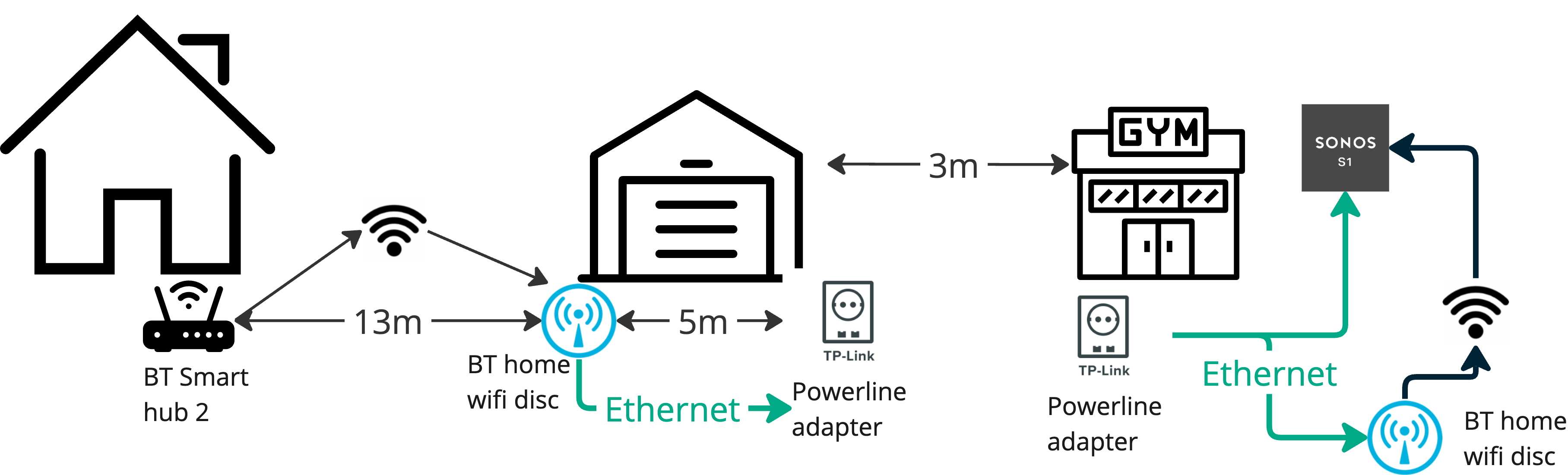
I have bridged the connection to the gym via the garage. A BT disc at the front of the garage is hardwired to a powerline adapter at the back of the garage. In the gym I have the reverse. I get Wifi in the gym which allows me to control the Play 5 and the Play 5 is hard wired to the powerline


I am looking at two Mesh options.  In speaking with Sonos, the TP Deco P9 was mentioned. This is recommended for thick walls (not needed in my case as such), but it seems like it would be a good option given the above set up. So;
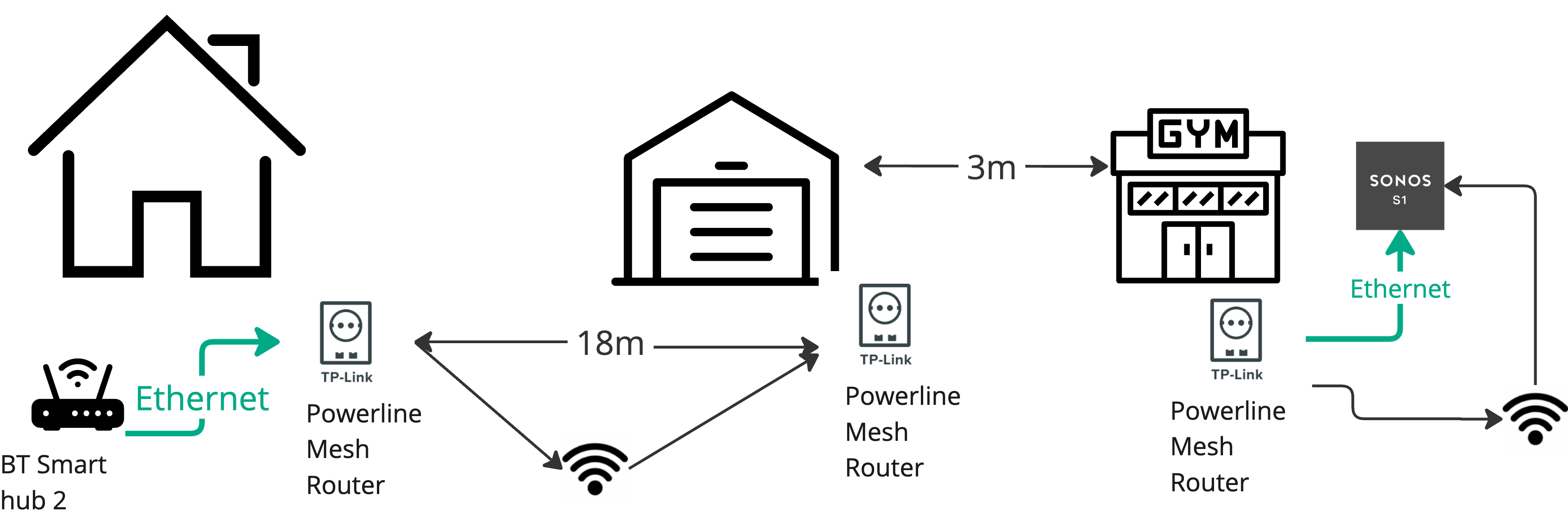
 

The downsides seems to be it only supports wifi 5 (how much of an issue is that:? and there would be a long distance between the main router and the device in the garage

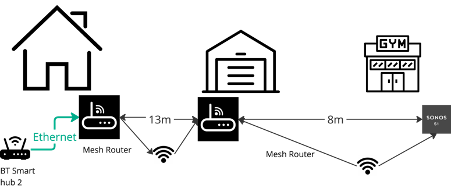
The other option is a standard 2 piece wifi (I have seen Asus Zenwifi XT8 or 9 is recommended in my reviews).  So this would be set up as follows:
 

I have a few of questions

  1. If I go with powerlines, I’d need to span a distance of 18m from the router to the back of the garage. Is that feasible? What is the maximum distances recommended between routers / units?
  2. If I went with the Asus 2 pack, would the single unit be sufficient for the whole house (about 2000 sq ft)
  3. If I leave the current set up, would I have issues with the S1 app on my phone on a different network? Also, I’ve read that it is recommended to “disconnect” the existing SSID, so how would that impact the current set up if left


As ever, any advice is gratefully received

Thanks

David

This topic has been closed for further comments. You can use the search bar to find a similar topic, or create a new one by clicking Create Topic at the top of the page.

18 replies

bockersjv
Local Superstar
February 19, 2024

I would avoid Powelines if at all possible.  Anything over 600 is unusable in my experience and the whole experience was truly frustrating.  Worked ok for periods but would fail at any SonosUpdate. 


Can you not just run Cat 6 armored cable between the mesh units rather thanm powerlines?  I just covered mine in gravel/mud and it’s worked for years.  

DavidJSAuthor
Avid Contributor I
February 19, 2024

I would avoid Powelines if at all possible.  Anything over 600 is unusable in my experience and the whole experience was truly frustrating.  Worked ok for periods but would fail at any SonosUpdate. 


Can you not just run Cat 6 armored cable between the mesh units rather thanm powerlines?  I just covered mine in gravel/mud and it’s worked for years.  

Not really - I have a block paved driveway between the house and the garage (not digging that up!), and the route directly to the gym is not conducive to running cables

I don’t need to worry about updates, as the machine is a gen1 and running on S1

Stanley_4
Grand Maestro
February 19, 2024

Maybe look into the Ubiquity Long Range line of Access Points?

They offer WiFi 6, 6e and 7 versions. Also building bridges but you likely won’t need that.


https://store.ui.com/us/en?category=all-wifi

DavidJSAuthor
Avid Contributor I
February 20, 2024

Maybe look into the Ubiquity Long Range line of Access Points?

They offer WiFi 6, 6e and 7 versions. Also building bridges but you likely won’t need that.


https://store.ui.com/us/en?category=all-wifi

Thanks - Looks promising as there are a number of different options there

DavidJSAuthor
Avid Contributor I
February 20, 2024

Maybe look into the Ubiquity Long Range line of Access Points?

They offer WiFi 6, 6e and 7 versions. Also building bridges but you likely won’t need that.


https://store.ui.com/us/en?category=all-wifi

Thanks - Looks promising as there are a number of different options there

Had a look and I’ll admit I’m getting out of my knowledge sphere here.

The specificsations mention Power over Ethernet, switches and gateway consoles.  So simple question

- How do I connect them up to my current router?

buzz
Grand Maestro
February 20, 2024

“PoE” or “Power over Ethernet” simply means that one end of an Ethernet connection powers electronics at the other end of the connection. This can reduce the gaggle of power supplies in an installation or the need for the services of a licensed electrician.

Some more terms: A “modem” connects to a wire or fiber in the street or a satellite feed and provides a single network connection. A single network connection is not very useful in a modern context. A “router” acts as an organizer to facilitate multiple computers to communicate with each other and the modem without stumbling over each other. Finally, an “Access Point” offers a wireless data path to clients. A “Gateway” packs all three functions into a single box that, unfortunately, we often refer to as the “router”.

A “switch” is similar to a multiple output power strip that allows multiple clients to use the same network wire. The switch is much more complicated than a simple power strip. For a power strip all outlets are equal. On the network each client must be able to send unique messages to specific clients.

A router is a take charge sort of device. Only one router can be active on a home network. As a convenience most home mesh systems contain a router. Simply connecting one of these devices to a Gateway, results in two routers competing for the same clients. Neither router wins, the owner loses. You must actively prevent this war. Usually, the best approach is to disable one router, but each situation  tends to be unique.

DavidJSAuthor
Avid Contributor I
February 20, 2024

Thanks @buzz 

I have read that is best to disable the existing router.

I does seem that the POE units have a range of 100m, which would be more than sufficient for my needs - I need about 20-25m

So, is this the solution?

Connect a base POE unit to my router via a POE injector?

Then disable my existing home network and use the new mesh network?

Thanks

melvimbe
February 20, 2024

Thanks @buzz 

I have read that is best to disable the existing router.

I does seem that the POE units have a range of 100m, which would be more than sufficient for my needs - I need about 20-25m

So, is this the solution?

Connect a base POE unit to my router via a POE injector?

Then disable my existing home network and use the new mesh network?

Thanks


I don’t get why you are looking at POE.  Your Play:5 can’t take power through the ethernet port, so it’s of no use to you.  A mesh network that can cover that 25 m distance is all you need.

Danny
DavidJSAuthor
Avid Contributor I
February 20, 2024

Thanks @buzz 

I have read that is best to disable the existing router.

I does seem that the POE units have a range of 100m, which would be more than sufficient for my needs - I need about 20-25m

So, is this the solution?

Connect a base POE unit to my router via a POE injector?

Then disable my existing home network and use the new mesh network?

Thanks


I don’t get why you are looking at POE.  Your Play:5 can’t take power through the ethernet port, so it’s of no use to you.  A mesh network that can cover that 25 m distance is all you need.

I was looking at PoE because of the recommendations on Ubiquity. They are all PoE units so I thought I might need one in the house to create a stong enough signal to span to the 25m to the gym and therefore just use wifi for the Play:5

I’m trying, without success to find out if the mesh networks will reach up to 25m from the base unit.  The only stats they mention are sq ft.  I just want to know the distance, not area!

buzz
Grand Maestro
February 20, 2024

The limit for any network wire is 100m. As far as the data is concerned there is no difference between PoE and regular. A PoE power injector is used when the network device requires PoE, but PoE power is not available on the connection. Switches that offer PoE are very convenient.

Typically, the gateway router is disabled, but this is not always possible because some cable TV services need the cable company’s Gateway router function. More and more companies are adopting RMR (Recurring Monthly Revenue) tactics and their equipment will have limited function unless the customer establishes an account. I’ll not mention any names, but one very capable mesh system insists on RMR or the units will stop updating and you cannot add to the system after one year.