Sonos App Resets All Sound Settings

  • June 18, 2024
  • 20 replies
  • 1607 views

Forum|alt.badge.img

The latest Sonos App update resets all sound eq settings to 0 and turns off trueplay tuning.

This topic has been closed for further comments. You can use the search bar to find a similar topic, or create a new one by clicking Create Topic at the top of the page.


20 replies

Forum|alt.badge.img+10
  • Headliner I
  • June 18, 2024

Not for me if you mean 80.03.06 


  • Contributor I
  • June 18, 2024

It did for mine. Resets all settings. True play was turned off. Not the first time. Wonder if a retune is required?


  • Contributor I
  • July 4, 2024

Yes, I am also facing similar issue with the app. It reset all EQ settings (Bass and Treble) to 0. Trueplay and spatial music setting is turned off automatically. It happens randomly but its happening more often now. Once i turn back ON these settings and change bass and treble values, most of the time I hear no change in sound profile. So, I have to force quit and then re-launch the app couple of times to hear a change in sound profile as I increase bass and treble values. It’s weird but this is exactly the issue I am facing. Not sure if anybody else noticed it. My app is on latest version 80.04.04


  • Lyricist I
  • July 14, 2024

Having the exact sane problem. Any one able to get around this ? 


  • Contributor I
  • July 14, 2024

I am able to get around this by force quitting the app couple of times and re-launching it. After doing it, check if EQ settings are back to what it was. 


  • Lyricist I
  • July 14, 2024

Thanks mk007 , that helped.
 

Anyone heard officially from Sonos on this ? Another app update ? 


Forum|alt.badge.img+1
  • Trending Lyricist I
  • August 31, 2024

I have the same problem as well is Sonos aware of this problem if they are will there be a fix soon 


  • Contributor I
  • August 31, 2024

After I recently updated app to version 80.07.03, Issue does not appear. It seems to have resolved for me. I would say check if your Sonos app is updated to 80.07.03 and if not, then update it and see if issue get fixed for you.


Forum|alt.badge.img+1
  • Trending Lyricist I
  • August 31, 2024

Hi just checked my version and it is 80.07.03

i had this problem before the last update I think it must be a bug in the app 


Forum|alt.badge.img+1
  • Trending Lyricist I
  • August 31, 2024

I don’t know if to delete app then re install from App Store if I done that would I have to set up all my speakers and sound bar again 


106rallye
Forum|alt.badge.img+18
  • September 1, 2024

The app is just a remote to the system. You can remove and reinstall it without your system noticing it.


Forum|alt.badge.img+11
  • Headliner I
  • September 8, 2024

Just so you aware this hasn’t been fixed yet, I’m on latest app version on iOS and I had the issue today, first time It’s happened to me so wasn’t aware of the issue until I saw this thread.


Forum|alt.badge.img+1
  • Trending Lyricist I
  • September 8, 2024

Hi 

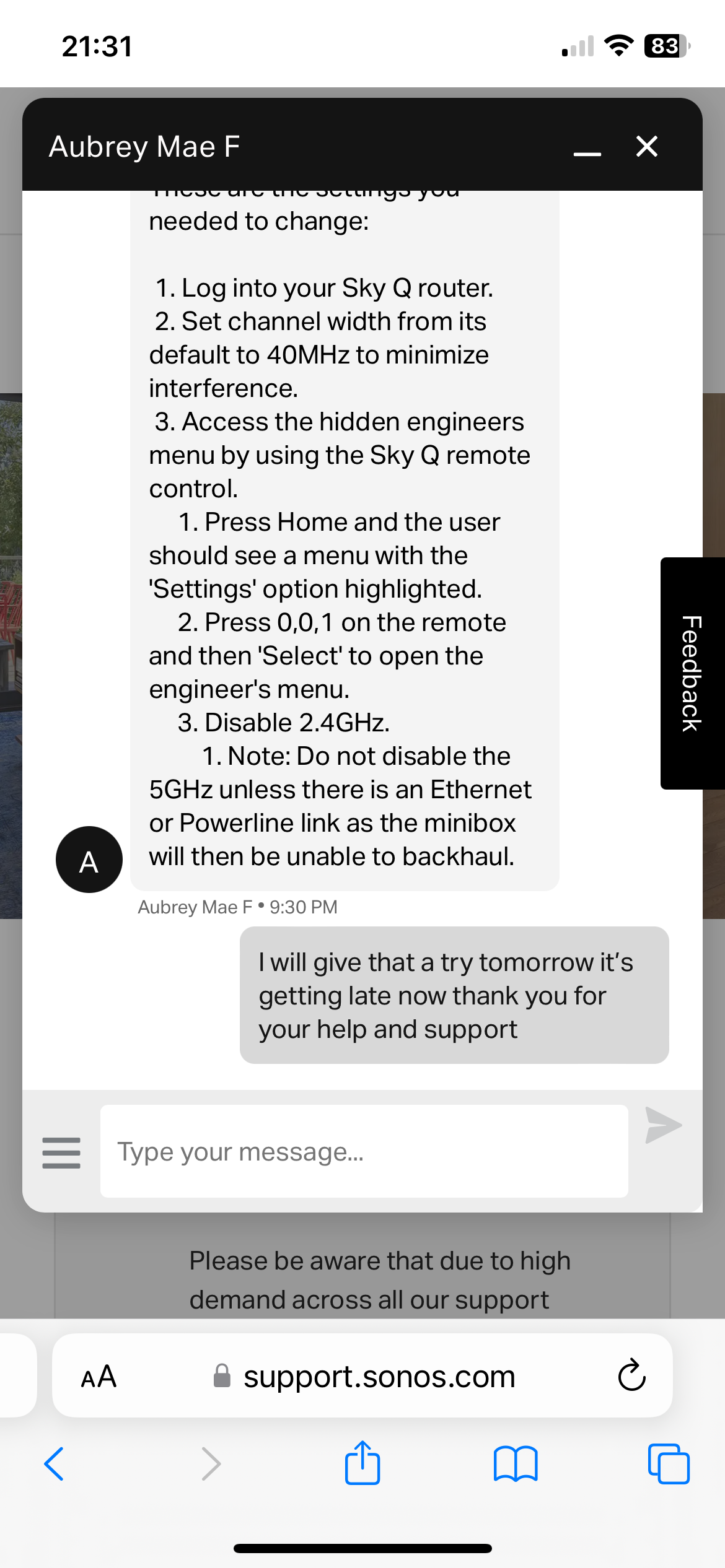
I did delete the app and reinstall still having same problem I had Sonos on a live chat told them my problem sent him a diagnostic he got back to me and said it’s my WiFi he said turn of 2.4 GHZ he said that’s what is interfering unfortunately I can’t get into my hub ATM it’s something I’m sorting once I do I will turn off and post on this thread how things are going 


Forum|alt.badge.img+11
  • Headliner I
  • September 8, 2024

Hi 

I did delete the app and reinstall still having same problem I had Sonos on a live chat told them my problem sent him a diagnostic he got back to me and said it’s my WiFi he said turn of 2.4 GHZ he said that’s what is interfering unfortunately I can’t get into my hub ATM it’s something I’m sorting once I do I will turn off and post on this thread how things are going 


What about Arc that only uses 2.4ghz WiFi, and routers that you can’t turn off the 2.4ghz band, that solution makes no sense from Sonos.


Forum|alt.badge.img+1
  • Trending Lyricist I
  • September 8, 2024

Sounds like he was pulling the wool over my eyes 

thanks for sharing I think it’s just bugs in the new app the old app worked perfectly had no problems 

they will lose a lot of loyal customers if they don’t fix this soon 


Forum|alt.badge.img+1
  • Trending Lyricist I
  • September 8, 2024


Forum|alt.badge.img+1
  • Trending Lyricist I
  • September 8, 2024

That’s what he sent me 


Forum|alt.badge.img+1
  • Trending Lyricist I
  • September 8, 2024

I have the beam gen2 just looked at specs in runs on 2.4 GHZ unbelievable we have no chance if there engineers are giving out advice like this 😡


Ken_Griffiths

I have the beam gen2 just looked at specs in runs on 2.4 GHZ unbelievable we have no chance if there engineers are giving out advice like this 😡

Isn’t it the case that only the Sky Q h boxes have the 2.4Ghz band disabled and you use the routers 2.4Ghz band instead, so all Sonos products just connect to the main router AP only - I thinks that’s what’s being referred to here because the Sky Q boxes repeat the WiFi signal like ‘extenders’ rather than acting like a mesh setup - see these older threads from Staff…

Edit: I don’t know that much about SkyQ other than they have been quite troublesome with Sonos for a very long time. You only have to search the forum here to see the past issues reported.


MoPac
Forum|alt.badge.img+18
  • Headliner II
  • September 8, 2024

 Sounds like the settings are never reaching the speaker.  mk007 stated he heard no difference when he changed EQ etc.  Makes me think the settings did not take.  Correct me if I’m wrong but aren’t the settings stored in the speaker?