Answer

Amazon Music

  • June 19, 2024
  • 9 replies
  • 294 views

Forum|alt.badge.img

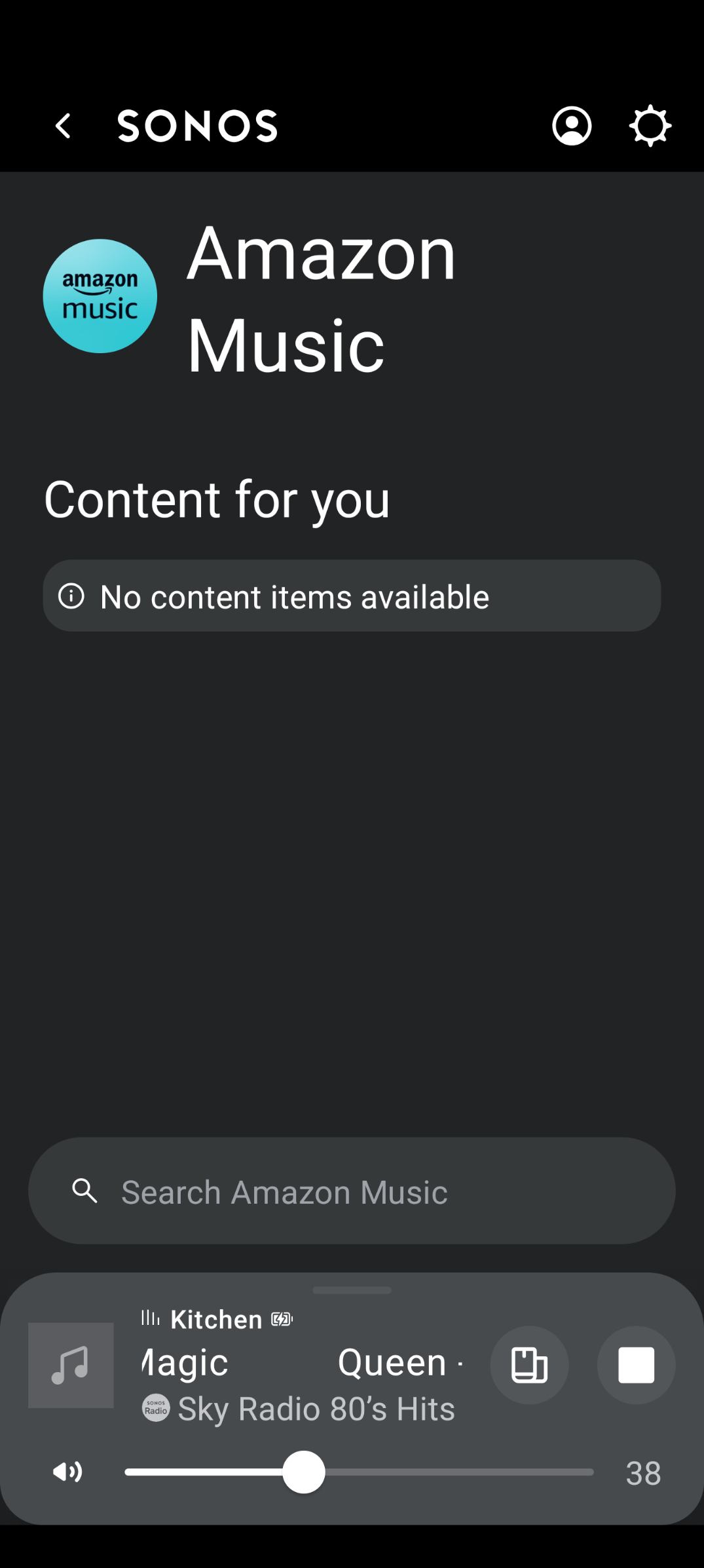
Is anyone experiencing any issues with Amazon Music? Since Saturday I am getting 'no content items available', then it will connect and work and then the next day the same message again. Done the usual, disconnect and reconnect the service, delete/ reinstall the Sonos app but still the same issue. YT music and all my other services are working fine. I will contact support but I thought I would ask here first. I am using a Pixel 8 pro but this is also happening on my wife's android phone. Cheers 
 

Best answer by furacaopr

From what I noticed, most of people complaining are from UK, maybe a regional issue. I haven't had issues with Amazon Music in Canada.

This topic has been closed for further comments. You can use the search bar to find a similar topic, or create a new one by clicking Create Topic at the top of the page.

9 replies

Forum|alt.badge.img+8
  • Prodigy I
  • June 20, 2024

Yes. There are at least two recent threads here about the skipping and similar issues. In Reddit, too. 
 

I’ve chatted to Support on three days but they said they have no reports of issues, don’t see any issues and everything is working fine. 
 

For me the issue started about a week ago.

Interestingly enough I was happily using Amazon Music for about six months and now I can’t add it back as it’s not supported in Sonos here in Finland. (I made the mistake of doing what chat support advised to try to remove the service and add it again - too bad it’s not available to add anymore).
 

Support didn’t know when AM had become unavailable in Finland or how I had been able to add it in January. Now I need to switch to something else. (Spotify started skipping yesterday similarly so it’s not going to be that)


Forum|alt.badge.img+11
  • Prodigy III
  • Answer
  • June 20, 2024

From what I noticed, most of people complaining are from UK, maybe a regional issue. I haven't had issues with Amazon Music in Canada.


Forum|alt.badge.img+3
  • Avid Contributor I
  • June 20, 2024

I am having the same issues, there are 2 other threads about it aswell,but no solutions for the Sonos app. You can use Amazon music with direct control via the amazon app as a workaround but it’s not ideal 


Forum|alt.badge.img+3
  • Avid Contributor I
  • June 20, 2024

I’ve just reset the app and so far so good. I still cannot  pin Amazon music to the Home Screen but it’s playing now


MoPac
Forum|alt.badge.img+18
  • Headliner II
  • August 26, 2024

 I just got No content items available when opening Amazon Music in the 80.x app.  Swiped out the app and reopened it.  Content showed.  Chose a playlist got Cannot load into queue.  Had a sandwich at which point it loaded into the queue anyway.  Yawn!!!  After the first track finished it jumped to a track about 10 tracks down the queue.  No… Shuffle was not on.  I’ll try Apple Music instead.  Just want my Atmos!


skullc
Forum|alt.badge.img+13
  • Prodigy III
  • August 26, 2024

Amazon Music working fine using old s2 app version 16.1 just tried it to play a playlist so it may be regional but it’s not just that if it’s working on 16.1


MoPac
Forum|alt.badge.img+18
  • Headliner II
  • August 26, 2024

 Just tried exact same playlist on Apple Music.  No skipping tracks.  Also the entire playlist loaded.  With Amazon the limit seems to be 500.

 Still got all the fun errors though.


MoPac
Forum|alt.badge.img+18
  • Headliner II
  • August 29, 2024

 Corry P:
Amazon Music is still skipping tracks.  I ran a test to see what was happening.  I started a playlist of Dolby Atmos tracks with the 80.x app and while it was playing I looked at the S2 app now playing screen on an old iPhone 7.  When the track skip happened an error popped up for a very short time then it moved to the next track.  The error was something like “The operation could not be completed” ( paraphrased ).  It wasn’t up there long enough to capture a screenshot.  
 

 Tried looking at the 80.x now playing screen while playing the same tracks.  There were skipped tracks but no error was displayed.

 Tried the suggestions to disable Amazon Music then enable it again.  Did the same process for the Sonos skill in Alexa.  All this was done before testing playback.

 Submitted diagnostics


MoPac
Forum|alt.badge.img+18
  • Headliner II
  • August 29, 2024

 Obviously an Amazon issue.