
Two songs, identical set up - yet the tags for one is not recognised by Sonos

  • August 14, 2022
  • 3 replies
  • 52 views

I have a number of songs where Sonos does not recognise the artist from the field in iTunes, and some more where it doesn’t recognise either the song name or artist - in which case it just shows up as a file name in the Sonos playlists.

Good examples below - two tracks from the same artist, Avicii (may he rest in peace). As you can see the set up in iTunes is identical - yet in Sonos, for one track the information is received fine, but not recognised at all for the othr. 
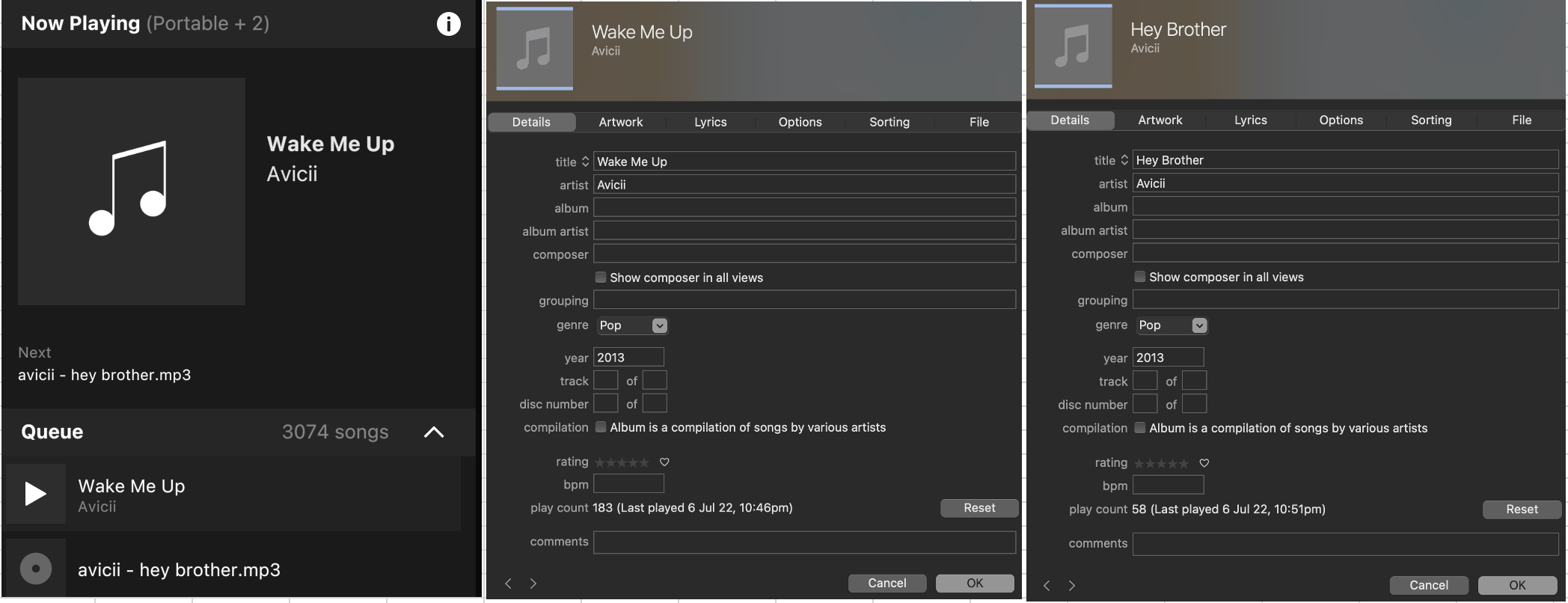
Thoughts/comments/suggestions?

This topic has been closed for further comments. You can use the search bar to find a similar topic, or create a new one by clicking Create Topic at the top of the page.

3 replies

Airgetlam
  • August 15, 2022

What’s missing from these screenshots are things like encoding, and bit rate. The tags look fine, but there are other things to consider. 


Ken_Griffiths

I don’t know why this would be the case, but one thought is to perhaps also look at the two tracks metadata using something like MP3Tag software and see if that reveals anything different in the two example tracks, as there are often many tags that the iTunes software does not display. So a different Tag editor/viewer is worth taking a look-see, I think. 


Airgetlam
  • August 15, 2022

And, frankly, there are possible DRM issues, depending, which I don’t think can be ‘seen’ by looking at the file info. It’s been a while, but at some point I had to delete a bunch of Apple Music files that were DRM’d and download fresh copies, which did not have DRM, back when Apple came to their senses.
