
Ryan S
Retired Sonos Staff
August 29, 2018

Introducing Sonos Amp
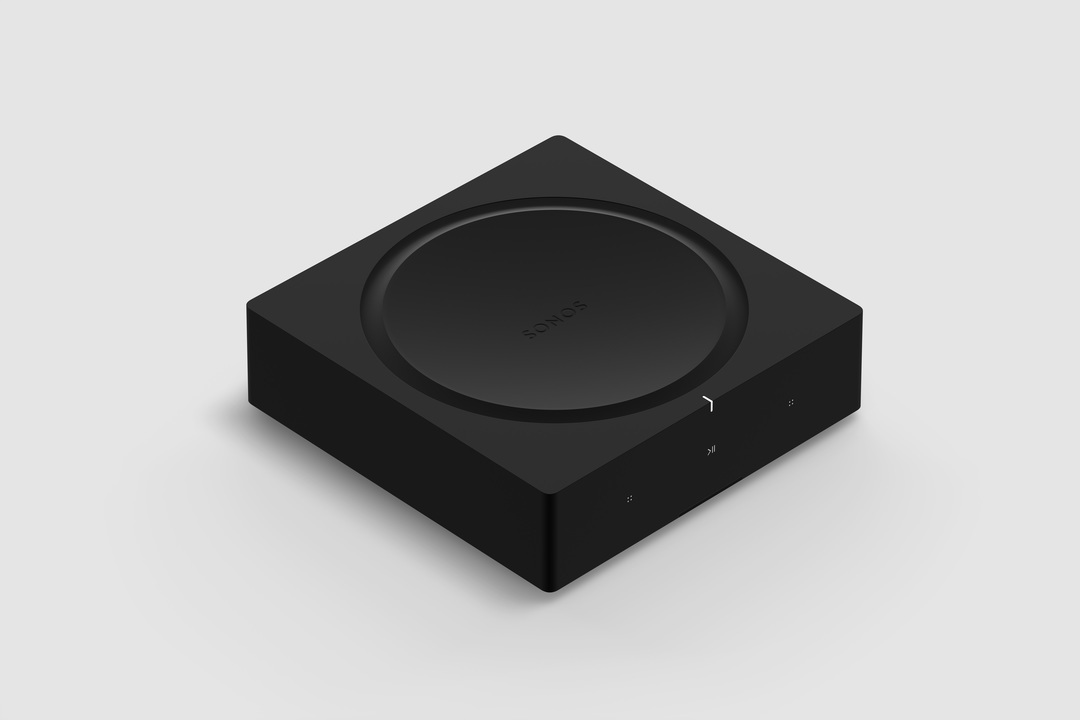
Related content:Hardware


Available starting February 2019, Sonos Amp is the all-new, versatile amplifier to power all your entertainment and bring the sonic content you love to every room of your home. The Amp has been redesigned with more than twice the power of the original Connect:Amp, with more versatility, and will enable new experiences through the platform.

Play your favorite streaming content on Sonos, connect to your TV through HDMI-ARC, or plug into any audio device, including a turntable to power your vinyl collection.

Sonos Amp will fit in any home environment, whether as a compact and elegant solution for in-rack AV installations, wall mounted, tucked under furniture, or on display in a room.

Details and Specs
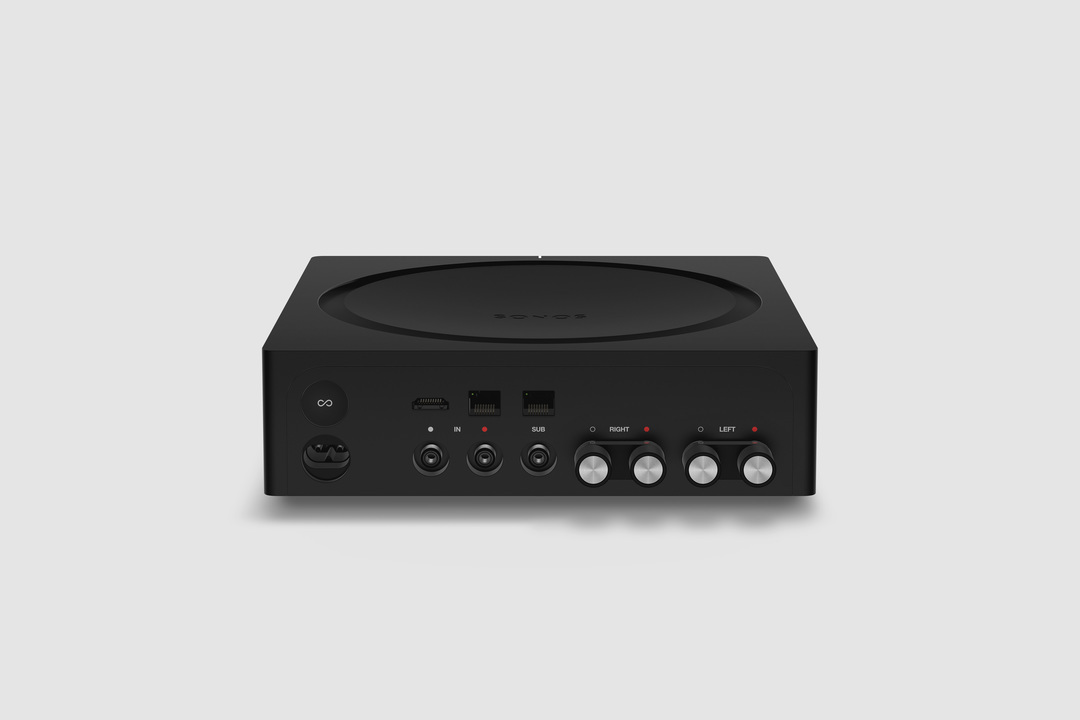


Physical Specs Amp comes in Matte black with black and silver banana plugs all in a standard rack fit size. The dimensions are 8.54 x 8.54 x 2.52 in. (217 mm (w) x 217 mm (d) x 64 mm (h)) and it weighs 4.6 lbs. (2.1 kg). Custom banana plugs that accept 10 - 18 AWG speaker wire and the Class-D digital amplifier sends a maximum of 125W per channel at 8 Ohms.

The subwoofer output is auto-detecting RCA with adjustable crossover (50 to 110Hz).

Capable of using two line-in sources, analog RCA audio input, and HDMI-ARC inputs. Amp plays Dolby Digital 5.1 or PCM stereo sound over HDMI-ARC.

Versatile Design


Use Sonos Amp to power your installed speakers as a separate Sonos room, or bond it with a pair of Sonos Ones, Play:1s, Play:3s, or Play:5s to become a surround sound setup that you can use with your TV. You can also use Amp to add your speakers as rears to a Sonos home-theater setup (by wirelessly bonding an Amp with Beam, Playbar, or Playbase) or use two Sonos Amps (one for the front right and left channels, the other for the rear channels) for surround sound.

The Sonos Amp drives left and right speakers, and it will create a phantom center channel when sent discrete audio for that channel.

Sonos Amp has all the features of Sonos in a powerful package:
  • Sonos supports over 100 services. Choose the ones you want and listen to music, podcasts, radio, and audiobooks. You can also play all the music stored on your computer or other devices.
  • Sonos has built a software platform that enables hundreds of partners and gives our customers unparalleled freedom of choice. Amp features AirPlay 2, access to home automation partners, and voice control when wirelessly connected with Amazon Echo or Alexa-enabled devices, including Sonos One and Beam.
  • Use the Sonos app on your phone or tablet, your TV remote, keypads, AirPlay 2, or your voice with Amazon Echo and Alexa-enabled devices.
  • New APIs and deeper integrations with our platform partners let you create seamless smart home control.
  • Sonos is a system. Start with Amp and expand into more rooms with additional speakers through WiFi.
  • Sonos regularly updates with new features, voice services, and API integrations, so your options are always up to date and improving.


Availability


General availability on February 5, 2019 for $599 USD (£599 GBP, €699 EUR). Early access for installed solutions professionals on December 1 in the United States and Canada. Sign up to be notified of availability on Sonos.com.

For more details, check out our blog post on the Sonos Amp here.

This topic has been closed for further comments. You can use the search bar to find a similar topic, or create a new one by clicking Create Topic at the top of the page.

364 replies

Contributor I
August 30, 2018
How many Proficient C625TT 75W, 8 Ohm speakers can I run off one of the new amps please, currently frustrated with the limit of 4 off my current Connects
Ryan S
Ryan SAuthor
Retired Sonos Staff
August 30, 2018
How many Proficient C625TT 75W, 8 Ohm speakers can I run off one of the new amps please, currently frustrated with the limit of 4 off my current Connects
The Amp has 125W per channel at 8 Ohm. When you attach two pairs of 8 Ohm of speakers to it, you'll now be functionally at 4 Ohm, which we wouldn't recommend exceeding. At that rating, you will be getting more power to your speakers than the Connect:Amp would drive, but we wouldn't recommend adding extra pairs on top.
Mark good posts by pressing the like button, and select the best answer on questions you've asked to help others find solutions.
Renowned Enthusiast II
August 30, 2018
Interestingly I have been using the Connect Amp with my Sony Bravia for years now and have never experienced any sync issues between audio and video. It is connected from the headphones jack on the Bravia to the audio input connection on the Connect Amp. Absolutely nobody has observed or mentioned an audio delay. If it is there it is not discernible.
(1) Play 1, (1) Play 3, (2) Play 5s Gen 1, (1) Play 5 Gen 2, (1) Connect Amp powering a pair of Wharfedale Diamond 10.1, (2) Echo Dots.
Headliner I
August 31, 2018
@attacama40, you actually don't need to wait for the Sonos Amp, as the Connect:amp + Beam should be able to accomplish what you're looking for. You can setup the Beam as your front soundbar, bond your Sub to that, and then have the connect:amp drive your ceiling speakers as surround sound. That will give you a 5.1 audio when the source from the TV is in Dolby Digital 5.1. When you listen to music sources, you can set it to play full stereo, so you'd be hearing stereo from your ceiling speakers (as well as the Beam) instead of ambient sounds.

Here are the setup instrunctions for using the Connect:amp for surrounds:
https://support.sonos.com/s/article/2237?language=en_US

For your scenario what the difference between the Connect:amp and Sonos Amp will be that the Sonos amp has more power and you would no longer need to wire all the units to the network, you could use wifi.

All that said, if your existing ceiling speakers are not in a good location for surround sound, and you don't want to move them, that may not be the best route to go. Another option to just get effectively 3.1 sound (no surround) would be to connect your TV directly to a Sonos Amp, no beam involved. In that case you'd get stereo from the ceiling speakers at all times. If you wanted to get sound coming from the front as well, you could then just get a passive soundbar (should work I think), passive bookshelf or in-wall speakers also connect to the speaker ports on the Sonos Amp to play those in stereo as well. That's pretty much like what Ken was suggesting in an earlier post.

And yes, whatever source you connect to the TV (blu ray, cable, streamer, etc) will pass through the tv to play on the audio system.


Hi Danny and thanks for taking the time. I've really been struggling with the connection logic on this one. Total brain fog.

And I think your configuration ticks the box.

Just to clarify a little more. The CCM684's & Sonos sub were fitted only about 10 days back for audio only (there was no plan for TV at that point). Then my creative wife suggested to add a TV. All good...but, the speakers are 90 degrees the wrong way for the TV location....one over the TV itself and one at the far end of the room away from the TV screen!!! Far from ideal ... for the TV that is.

I'm not keen to move them (but can at this point should it be necessary) as the room is not a main viewing room, we don't need to go full scale surround sound. But of course it would be a shame not to try to get some spatial event out of the TV ... so I thought buy a Beam! But I struggled to match the new idea to the original audio only one. And whilst I've installed conduit (which mitigates getting the cabling wrong to some extent) I,m worried about installing without fully understanding the end result.

So if I read you right, I can use the Beam to drive the Sonos sub for the TV but not the 684's?

Is there a pairing that would allow the Beam and Sub to work with the 684's just for music without Sonos setting changes? My wife struggles with vanilla Sonos usage!!! ... a work in progress!

The ideal end game for me would be audio stream to the 684's sub and Beam, even if a little odd configuration. And avoid setting or pairing issues.

Just to note, I've installed L-C-R audio cables AND RJ45 (and power) L & R just for future proofing ... total overkill but bricks and plaster flying! But the room is small and I don't want to drown it in tech clutter. And as the result of a previous Bose installation, there are LR and RR feeds in the wall somewhere that are available ... just in case things change. I know that sounds totally mad especially if not planning to actually use it to the full but there is a budget as well.

Just to clarify if I'm understanding correctly. I hope that makes sense. Thanks again
Contributor I
August 31, 2018
It looks nice and I could use it to replace my old ZP-100. But doing so would be a "waste" of money.

Back in 2006 I bought a bundle containing ZP-80, ZP-100 and a CR-100 controller. Of this bundle I've only retired the controller. The ZP-100 have been on top of a shelf in the kitchen hooked up to a pair of Dali speakers for more than 12 years and its still in daily use. I never had any electronic device last this long. For all I know it might run for another decade depending on how long it will continue to get firmware/software updates. This is why I never bothered to look for anything else to stream music. I'm happy to pay a few dollars more for something that just keeps working for years and years.

This is why I love Sonos and I hope the new amp is built in the same way. I'll be sure to check it out when it arrives next year.
melvimbe
August 31, 2018

Just to clarify a little more. The CCM684's & Sonos sub were fitted only about 10 days back for audio only (there was no plan for TV at that point). Then my creative wife suggested to add a TV. All good...but, the speakers are 90 degrees the wrong way for the TV location....one over the TV itself and one at the far end of the room away from the TV screen!!! Far from ideal ... for the TV that is.


So what was the reason for settting it up this way? The speakers (unless in mono) should be to the left and right of the direction you'd normally face. Since there's a TV in the room, that's almost always towards the TV. Even when not watching TV, that tends to be the focus. So I'm just wondering why the speakers are directed 90% opposite of that. Is this a workout room, or something lese that would warrant placing the speakers this way? Where the speakers placed this way perhaps because orientation of the ceiling rafters?

I don't think there is really anyway you could use these speakers with the TV in their current positions, unless you're going to just play mono audio (which is an option for the Sonos Amp). And maybe that's fine for the room, don't know.


So if I read you right, I can use the Beam to drive the Sonos sub for the TV but not the 684's?

Is there a pairing that would allow the Beam and Sub to work with the 684's just for music without Sonos setting changes? My wife struggles with vanilla Sonos usage!!! ... a work in progress!


A beam can only be attached to one room/zone at a time. Since it sounds like the 654s (connect:amp or Sonos amp really) will be a separate room since you likely won't be setting them up as surround sound, then you would not be able to set up the sub to work with the beam and the 684s at the same time. It can be done, but it won't really sound good to set it up this way.

But if the TV is not the main listening area, the beam w/o sub is probably just fine for the space.
Danny
Headliner I
August 31, 2018

Just to clarify a little more. The CCM684's & Sonos sub were fitted only about 10 days back for audio only (there was no plan for TV at that point). Then my creative wife suggested to add a TV. All good...but, the speakers are 90 degrees the wrong way for the TV location....one over the TV itself and one at the far end of the room away from the TV screen!!! Far from ideal ... for the TV that is.


So what was the reason for settting it up this way? The speakers (unless in mono) should be to the left and right of the direction you'd normally face. Since there's a TV in the room, that's almost always towards the TV. Even when not watching TV, that tends to be the focus. So I'm just wondering why the speakers are directed 90% opposite of that. Is this a workout room, or something lese that would warrant placing the speakers this way? Where the speakers placed this way perhaps because orientation of the ceiling rafters?

I don't think there is really anyway you could use these speakers with the TV in their current positions, unless you're going to just play mono audio (which is an option for the Sonos Amp). And maybe that's fine for the room, don't know.


So if I read you right, I can use the Beam to drive the Sonos sub for the TV but not the 684's?

Is there a pairing that would allow the Beam and Sub to work with the 684's just for music without Sonos setting changes? My wife struggles with vanilla Sonos usage!!! ... a work in progress!


A beam can only be attached to one room/zone at a time. Since it sounds like the 654s (connect:amp or Sonos amp really) will be a separate room since you likely won't be setting them up as surround sound, then you would not be able to set up the sub to work with the beam and the 684s at the same time. It can be done, but it won't really sound good to set it up this way.

But if the TV is not the main listening area, the beam w/o sub is probably just fine for the space.


Hi Danny, yes it was a solid plan that worked and got changed right at the tail spin. Original aim was to have a room without TV. So the speakers & sub were perfect layout wise (it's a small lounge ... typical 1920's bay window thing). Then the idea last Sunday to add TV!!! Just as the install was finished!!!.

Totally agree it's now become a mad layout ... for TV sound anyway. The in ceiling 684's has back boxes fabricated, whole 9 yards and sounded a treat.

So now the decision is several fold ....

1. leave as is and just use the existing install for audio - 684's, sub and Sonos CA

2. Add just the Sonos Beam for the TV (as you mention above) ... warming to that

3. Use a 'as supplied' sound bar that could come optionally with the TV

4. Do away with the current install and add Play ones at front together with the beam

I think on balance, just using the Beam for TV and keeping the ceiling speakers and bub (separate group) as you mentioned is the most sensible. I still have all the wiring installed LRC RR RL and sub should that fail to hit target, which I doubt.

Sometimes it just takes an independent set of eyes to look at something .... this is precisely what you have done and I think common sense is starting to shake out. A Sonos Beam it is. Many thanks for the time spent. Appreciated
Lyricist I
September 1, 2018
Does this support any Hi-Res?

What is the power rating into 4 ohm?
Nando010
Chromatic Producer I
September 1, 2018
So if I have a 5.1 set up playbase,sub and 2 play ones from what I understand this will not be any use to me for watching tv.
Thank you
Trending Lyricist I
September 1, 2018
Is it possible to use the new sonos amp with the sonos beam?
I mean a true 5.1 setup - no channel simulation! Especially question 4) is important:

1) a) Front left & right with wired third party speaker
1) b) Front left & right with 2 sonos one / play 5
2) Back left & right with 2 sonos one
3) Adding a sonos sub
4) Sonos Beam as a center - instead of simulated stereo
5) using Alexa with connected sonos beam/sonos one
6) only one group should be set in the room to get real 5.1