Answered

Bidirectional HDMI Arc usage with Sonos Amp and Additional Inputs?

  • April 5, 2026
  • 7 replies
  • 42 views

Sonos Components:

    - Sonos Amp (with 2 wired Bose Speakers as rears)

    - Sonos One Speakers (x2) (as fronts)

Ecosystem:

    - DJ Mixer (hosts 2 turntables with 6 aux RCA inputs)

    - Aurzen Roku TV Projector (with HDMI ARC port and 3.5 RCA output + Wireless options with Roku audio products + Bluetooth)

    - HDMI input Switch (Sony PS5, Nintendo Switch, Old VCR)

Disclaimer: I’m not necessarily looking for some crazy high tech solution here like Dolby Atmos so please bear that in mind, although I may be open to it. I’ve put the questions I’m looking for answers on in bold.

Hello,

I’ve been using the Sonos Amp with a couple of satellite Sonos Ones for years, primarily for the purpose of playing vinyl. Additionally, I’ve historically had a Roku/TCL television hooked up to my Sonos Amp via HDMI ARC. Easy peasy. However, recently bought a house with this amazing room for all of my vinyl. I decided to ditch the TV for the Roku Projector, and have it mounted from my ceiling facing a wall with a 100 inch projection screen. I then bought an HDMI switch to host my PS5, Nintendo, etc, and run a long cable up the wall and across the ceiling via conduit/housing to reach the projector. So far so good, I can now view this stuff on my projector through the Roku OS/interface.

Next objective: improve audio. The speaker on the projector is bare minimum so let’s make it better, okay? 

1st (Easy) option: Run a 25 foot RCA cable through the existing conduit from 3.5 mm output on the projector to the RCA L/R on the DJ mixer, thus making it another option for my “Line/In” component on the Sonos Amp. I now have 2 rears and 2 fronts. Hold that thought for a minute.

2nd (unsure and please don’t laugh at me) option: Connect the HDMI ARC port directly to the Sonos Amp HDMI ARC port. One problem though, I now lose my HDMI inputs (PS5 etc). Is there something like an HDMI extractor or matrix that I can use so that I can have my PS5 back in the mix, sending video to the projector, while the audio from the projector, etc is sent out to the HDMI ARC port my Sonos Amp?

3rd (unsexy option): Buy Roku wireless speakers + soundbar + sub, except at this point the soundbar and sub are for all practical purposes, discontinued. Booo… and no thank you. Back to my existing Sonos set up….

4th (luxury option): Buy the Arc Ultra sound bar (or Beam Gen 2?) to receive bluetooth from projector, and build from there (subs + R/F satellites), keeping the amp/ones separate for the dj mixer/vinyl/etc. Does this support this Atmos sound everyone talks about?

5th option: Get a different projector with separate hdmi/hdmi+arc ports.

I apologize as I realize this has been covered probably somewhere here or on the internet, but I’ve been scouring the internet for 2 days, and need to move on with my life.

Thanks

Best answer by Airgetlam

Not sure I processed all of that, but a couple of comments. Any HDMI connection to a device that has HDMI-ARC (your projector) will carry the Audio signal. You only need ARC to connect to your speaker. Technically, the ARC signal, generated most often by the electronics in the display device, is sent back out on a different set of pins to the speaker. The electronics in the display device will take any HDMI input, and redirect the audio signal out via that one ARC port. Therefore, you can place any switch in front of an HDMI input you want, the projector will reflect the signal it receives out via the ARC enabled port, which you hang the Sonos (or any ARC device).

Blietooth is stereo, not any 5.1 signal, so if you were to connect your display device to your Sonos via Bluetooth (be it an Arc or a Beam), you’ll only get stereo from it. You must have a wide bandwidth connection to feed Sonos any extra channels, that is an ARC (or optical) connection, there is no wireless connection currently that carries that amount of data.

Does that answer your questions?


Edit: changed stupid autocorrect from ‘and’ to ‘bandwidth’, which I thought I’d typed. 

7 replies

Airgetlam
  • Answer
  • April 5, 2026

Not sure I processed all of that, but a couple of comments. Any HDMI connection to a device that has HDMI-ARC (your projector) will carry the Audio signal. You only need ARC to connect to your speaker. Technically, the ARC signal, generated most often by the electronics in the display device, is sent back out on a different set of pins to the speaker. The electronics in the display device will take any HDMI input, and redirect the audio signal out via that one ARC port. Therefore, you can place any switch in front of an HDMI input you want, the projector will reflect the signal it receives out via the ARC enabled port, which you hang the Sonos (or any ARC device).

Blietooth is stereo, not any 5.1 signal, so if you were to connect your display device to your Sonos via Bluetooth (be it an Arc or a Beam), you’ll only get stereo from it. You must have a wide bandwidth connection to feed Sonos any extra channels, that is an ARC (or optical) connection, there is no wireless connection currently that carries that amount of data.

Does that answer your questions?


Edit: changed stupid autocorrect from ‘and’ to ‘bandwidth’, which I thought I’d typed. 


  • Author
  • Contributor I
  • April 5, 2026

Not sure I processed all of that, but a couple of comments. Any HDMI connection to a device that has HDMI-ARC (your projector) will carry the Audio signal. You only need ARC to connect to your speaker. Technically, the ARC signal, generated most often by the electronics in the display device, is sent back out on a different set of pins to the speaker. The electronics in the display device will take any HDMI input, and redirect the audio signal out via that one ARC port. Therefore, you can place any switch in front of an HDMI input you want, the projector will reflect the signal it receives out via the ARC enabled port, which you hang the Sonos (or any ARC device).

Blietooth is stereo, not any 5.1 signal, so if you were to connect your display device to your Sonos via Bluetooth (be it an Arc or a Beam), you’ll only get stereo from it. You must have a wide bandwidth connection to feed Sonos any extra channels, that is an ARC (or optical) connection, there is no wireless connection currently that carries that amount of data.

Does that answer your questions?


Edit: changed stupid autocorrect from ‘and’ to ‘bandwidth’, which I thought I’d typed. 

Definitely answers my 2nd question, and am reasonably certain that you explained my first question perfectly, but probably need to time to think about it as I’m not sure how to integrate a new switch into my current set up. Appreciate your response!


  • Author
  • Contributor I
  • April 5, 2026

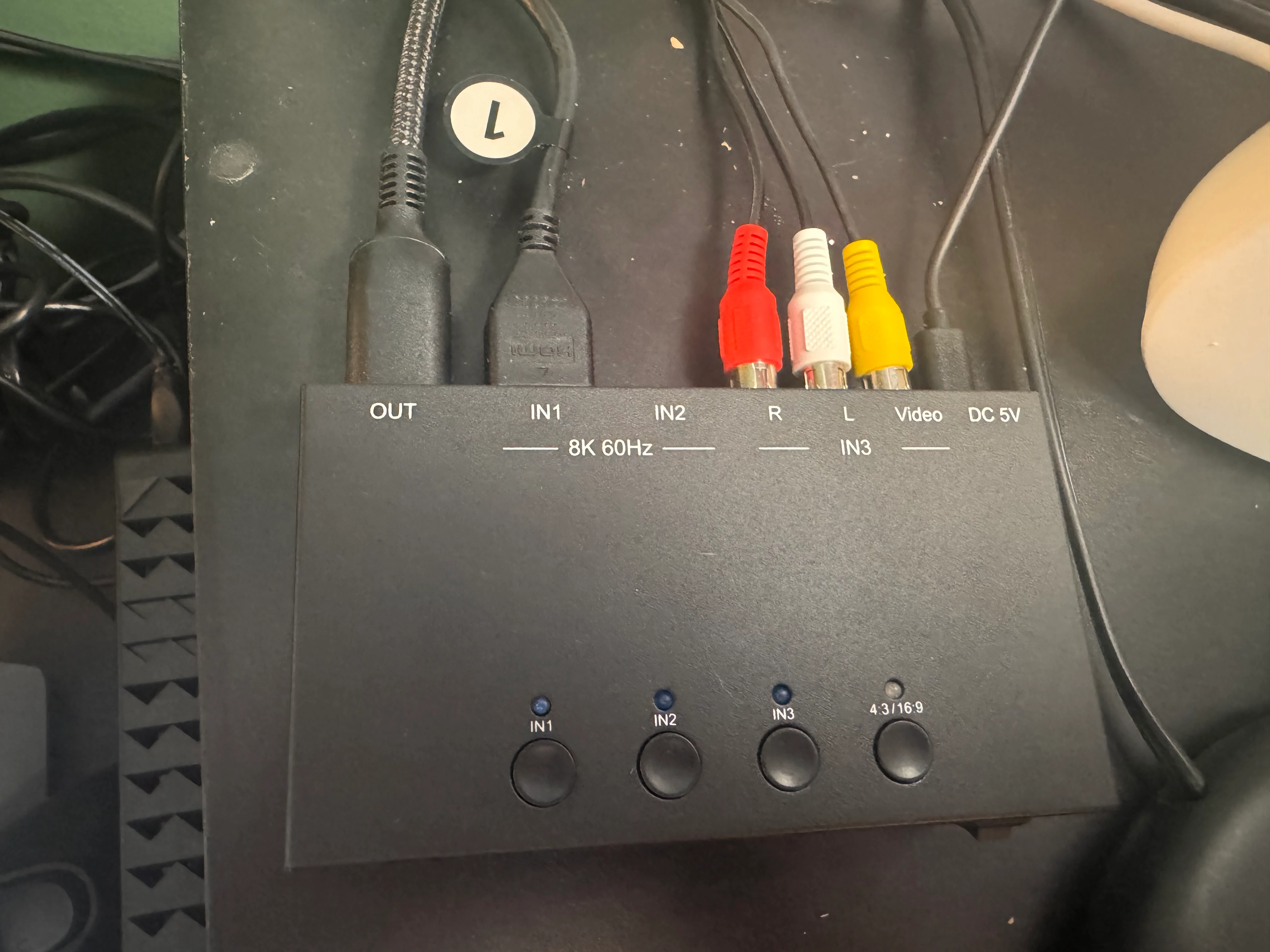
So above is the input that I have going to the projector, where the “OUT” is the projector. I could theoretically then put another switch of some sort that would have an HDMI IN from this device, an HDMI out to the projector and an ARC out to the Sonos Amp?


  • Author
  • Contributor I
  • April 5, 2026

Oh yes, now I think I’ve see a few options out there that will do the trick. Thanks, man.


  • Author
  • Contributor I
  • April 5, 2026

Airgetlam
  • April 5, 2026

Just remember (and I am not certain about that switch…), generally speaking, unless it is switching that analog input (the white and red RCA, or L/R inputs) to a digital output to be sent via HDMI, you’re in some trouble. I’d be tempted to replace that, if you can, with a switch that only handles HDMI, and switch that RCA connection to an HDMI connection. I am not sure what that RCA connection is to. 
 

The challenge will be your DJ setup, I suspect, Sonos isn’t really designed for DJ use in any way. All Sonos analog (RCA) inputs have that 75ms delay on them. Digital inputs remove that, until you group a second ‘Sonos room’ with the home theater room. It’s a feature of the software. You can delay the digital inputs somewhat, but the closer you get to any ‘other’ room, the less video/voice sync  you’ll get. I’d keep away from using Sonos for any DJ type project. 


  • Author
  • Contributor I
  • April 5, 2026

The analog RCA stuff is a very old VCR so I’m not super worried about that. But I think you’re right, replacing that whole thing might ultimately be the way to go.

The “DJ” stuff is just for home listening, I don’t go out and play my records anymore, and it seems to work pretty well for me, so not too worried about any slight ms delays. It did get set to like a 2-3 second delay somehow at one point, and was able to turn that off that drove me crazy. Thanks for the tip though, will keep an eye out for any issue.