Question

Desktop app updates and then says it failed. But it worked.

  • June 7, 2026
  • 20 replies
  • 99 views

Forum|alt.badge.img+4

I guess it is by design as it has always done it but has always updated correctly.  Is that just bad design or what?    

20 replies

Airgetlam

Not sure. Which desktop app, S1 or S2? Are we talking Mac or Windows? Are you aware both haven’t received functional updates in years, having had their setup functions removed, in favor of the mobile and web app?  Did you call Sonos Support to discuss it?
 

As far as I’m aware, both desktop apps, Windows OS and MacOS, are only receiving bug fixes, not functionality updates. 


MoPac
Forum|alt.badge.img+19
  • Headliner III
  • June 7, 2026

Mine is Windows 10.  It tells me the update failed every time yet it works OK.  Just ignore the error unless of course it doesn’t work.


  • Lyricist II
  • June 7, 2026

I guess it is by design as it has always done it but has always updated correctly.  Is that just bad design or what?    

Bad design for sure. 


AjTrek1
  • June 7, 2026

Bad design or not; it really doesn’t matter. As has been said the Sonos desktop apps haven’t received any updates for at least two years.

I can’t verify the exact date but their functionality will cease on all platforms in the not too distant future. It will stop functioning on macOS with the introduction of macOS 27.xxxxx. My suggestion is to start familiarizing oneself with the Sonos web app.

Personally, my use of the desk top app is nil. Likewise most likely for the web version as well. 😂


Forum|alt.badge.img+3
  • Enthusiast II
  • June 7, 2026

I am personally thankful that the desktop Apps have been left alone since the App upgrade debacle in May 2024. Fortunately the untouched Windows desktop Apps have continued to give access to useful functions that Sonos chose to remove in the great App update, or to work around bugs / design choices in the new App.  For over 18 months it was the only way in the new Sonos World to save the current queue as a playlist, and even after Sonos did reinstate this basic function in the App it was done in such a bad way (ie allowing duplicate playlist names to be created) that the Windows App is still my preferred option. 

The Windows App is still currently the only way to revert back to playing the loaded queue after listening to the radio or TV. Apparently this ability was removed from the mobile App by design, and there seems no appetite to reinstate it. 
 

And finally for me the Windows App is the only way I can load and play imported playlists from my music library, which seems to be another bug or design choice in the mobile App. 


MoPac
Forum|alt.badge.img+19
  • Headliner III
  • June 7, 2026

Bad design or not; it really doesn’t matter. As has been said the Sonos desktop apps haven’t received any updates for at least two years.

I can’t verify the exact date but their functionality will cease on all platforms in the not too distant future. It will stop functioning on macOS with the introduction of macOS 27.xxxxx. My suggestion is to start familiarizing oneself with the Sonos web app.

Personally, my use of the desk top app is nil. Likewise most likely for the web version as well. 😂

Can the Sonos Web App update the local library?  Can the Sonos Web App add new shares?


  • Lyricist II
  • June 8, 2026

Bad design or not; it really doesn’t matter. As has been said the Sonos desktop apps haven’t received any updates for at least two years.

I can’t verify the exact date but their functionality will cease on all platforms in the not too distant future. It will stop functioning on macOS with the introduction of macOS 27.xxxxx. My suggestion is to start familiarizing oneself with the Sonos web app.

Personally, my use of the desk top app is nil. Likewise most likely for the web version as well. 😂

It does matter as it is software that Sonos still provides for download. The app still asks for updates so while it does not get new features it is still maintained by Sonos even if just minimally. 
 

Sonos reps have communicated on Reddit that Sonos is still evaluating what to do with the Mac app ie your assertion that it is dead on the Mac may not be true and besides the current app will continue to function until Fall 2027. 


AjTrek1
  • June 8, 2026

Bad design or not; it really doesn’t matter. As has been said the Sonos desktop apps haven’t received any updates for at least two years.

I can’t verify the exact date but their functionality will cease on all platforms in the not too distant future. It will stop functioning on macOS with the introduction of macOS 27.xxxxx. My suggestion is to start familiarizing oneself with the Sonos web app.

Personally, my use of the desk top app is nil. Likewise most likely for the web version as well. 😂

Can the Sonos Web App update the local library?  Can the Sonos Web App add new shares?

Sarcasm aside… my point is that by all accounts the desktop app is going away and most likely so for macOS. The community has been lobbying for Sonos to acquiesce and reverse course ever since setup functionality was removed.

When the removal of setup occurred my biggest complaint was having to deal with the smaller screens of a cell phone and/or tablet. However, I had to adjust. The alternative was to leave Sonos. Obviously that didn’t happen as I’m still with Sonos and more heavily invested today than before.

To date Sonos hasn’t even hinted that they may reconsider keeping the desktop app. Therefore whatever functionality the web app has or doesn’t have… that’s it. We have to adjust or look for other alternatives…whatever they may be assuming there’s something better. For my money there isn’t but that’s me.

In my DECADES of life there have been many changes in electronics (good and bad) that I have dealt with. If you live long enough you’ll find even some of the good changes may not always be welcomed with enthusiasm.

IMHO (not to offend anyone) to continue trying to find ways to object and complain about the inevitable demise of the desktop app is an exercise in futility. My advice is to move forward, put the unpleasant change behind you and continue to enjoy your Sonos. Besides we still have our cell phone and tablets for Sonos heavy lifting and snappier response times (if the latter is another sticking point) 😊


MoPac
Forum|alt.badge.img+19
  • Headliner III
  • June 8, 2026

I guess I got used to using the desktop app for library updates because the new music was added in the computer room.  So I figured while I’m here I’ll update the library.  Seemed faster than doing it on the phone.  Maybe it seemed faster because I was doing backups of the new music & playlists while the library was updating.  I will miss the desktop app.


Stanley_4
  • Grand Maestro
  • June 8, 2026

I guess I got used to using the desktop app for library updates because the new music was added in the computer room.  So I figured while I’m here I’ll update the library.  Seemed faster than doing it on the phone.  Maybe it seemed faster because I was doing backups of the new music & playlists while the library was updating.  I will miss the desktop app.

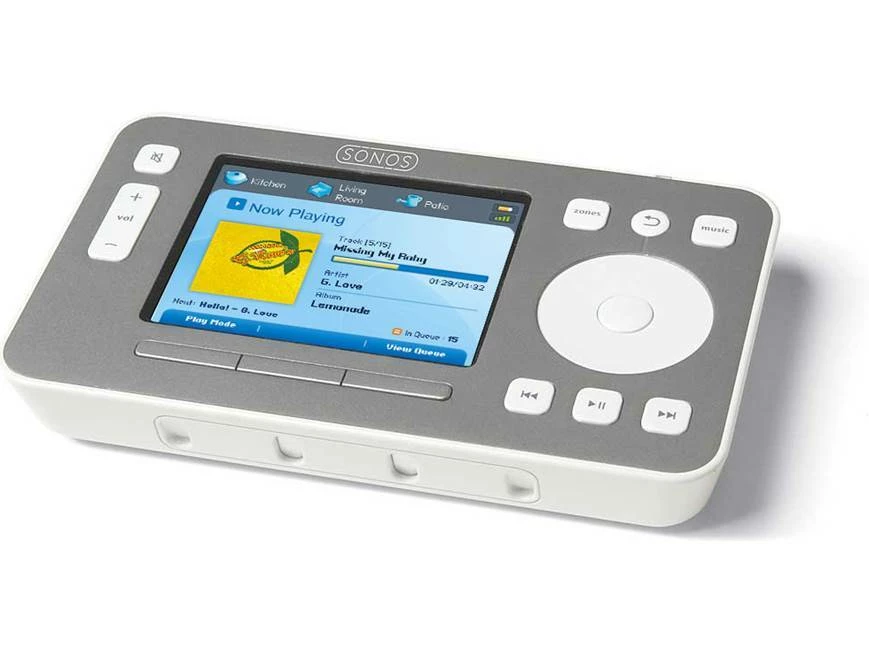
Sigh still missing my CR-100.

I do wish Sonos would hire back some retired geezers to provide input on what works for 20 somethings versus the 70 plus user.


MoPac
Forum|alt.badge.img+19
  • Headliner III
  • June 8, 2026

I guess I got used to using the desktop app for library updates because the new music was added in the computer room.  So I figured while I’m here I’ll update the library.  Seemed faster than doing it on the phone.  Maybe it seemed faster because I was doing backups of the new music & playlists while the library was updating.  I will miss the desktop app.

Sigh still missing my CR-100.

I do wish Sonos would hire back some retired geezers to provide input on what works for 20 somethings versus the 70 plus user.

What’s a CR 100?


Stanley_4
  • Grand Maestro
  • June 8, 2026

Sheesh... Kids these days.

CR-100

Sonos CR-100 Controller

https://www.crutchfield.com/p_616CR100/Sonos-Controller-CR100.html

And get off my grass!  :-)


Airgetlam
  • June 8, 2026

One of the three no longer supported products…the CR-100, the CR-200 (both remotes, with limited memory chips) and the WD100, a dock that featured a 30 pin connector for connecting the old Apple devices (which Apple discontinued by moving to Lightning, then USB-C). Those are the only devices Sonos no longer supports, in either S1 or S2. All of their sound generating devices are still supported.

And no, this isn’t directed at you ;)


MoPac
Forum|alt.badge.img+19
  • Headliner III
  • June 8, 2026

Sheesh... Kids these days.

CR-100

Sonos CR-100 Controller

https://www.crutchfield.com/p_616CR100/Sonos-Controller-CR100.html

And get off my grass!  :-)

I shooo ain’t no kid.  Looks like a nifty device for its day.


Stanley_4
  • Grand Maestro
  • June 8, 2026

I tried the CR-200 and while it was very functional and pocket-sized the touch screen was too small for my fingers. It also wasn't as intuitive to use as the 100.

Didn't the CR-100 also rely on a direct connection to a Sonos device to function? Maybe the same as the direct (no home Wi-Fi used)  connection from controller to device? Both long discontinued. 


  • June 8, 2026

Yes, the CR-100 & CR-200 were direct connection. The original android controller allowed direct connection too. Way faster than waiting to scan for devices over wifi. I used some dedicated android tablets in charging cradles after the CR-100 & CR-200 were killed. They worked great.


Airgetlam
  • June 8, 2026

Technically, I ‘think’ both used a SonosNet connection to communicate. Never had one, though, that’s based on what I’ve read over the years. 


  • June 8, 2026

Technically, I ‘think’ both used a SonosNet connection to communicate. Never had one, though, that’s based on what I’ve read over the years. 

They used SonosNet for the direct connection. 


Airgetlam
  • June 8, 2026

Interesting that the chipset used wouldn’t connect directly to WiFi. On the other hand, that may have been a choice at the time of development that made sense. Unless the original designer pops in and comments (or maybe the Project Manager), we’ll never know. 


  • June 9, 2026

Original Sonos system didn’t use home WiFi. It was ethernet and Sonosnet only.