Question

Rollout of "Disable SonosNet" feature - completion date?

  • June 5, 2026
  • 34 replies
  • 321 views

Show first post

34 replies

Stanley_4
  • Grand Maestro
  • June 6, 2026

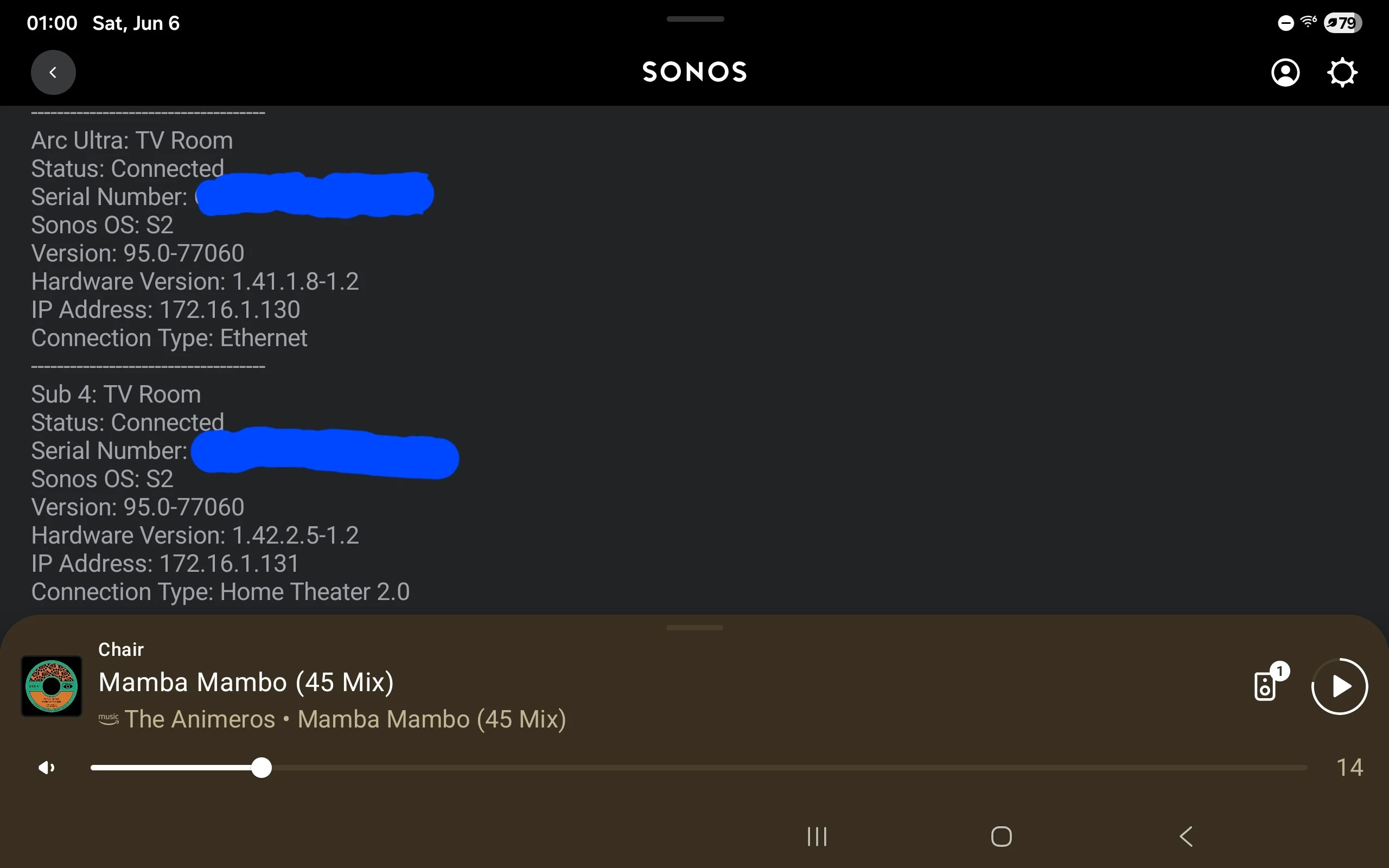
My Disable Sonosnet option became available about an hour ago. So did the enhanced connection descriptions in the General / About Your System section. 

Toggled Sonosnet off and waited for it to process. Hooked Ethernet to two of my soundbars, Beam gen 1 and an Arc Ultra. Both showed the new Ethernet connection while the Subs and Surrounds show "Home Theater ..." as the connection type.

Mininal testing as the spouse is sleeping (1:00 AM here) but I'll be able to do more testing later today.


  • Author
  • Contributor I
  • June 6, 2026

I’ve had Apple App Store app version 8.5.012 since the day it was available.

I have not yet received the feature to disable SonosNet.

When will the rollout of the feature to disable SonosNet be complete?


The new version was only released on 27th May, on a phased rollout. If that rollout is happening over a 30-day period, you may still have a few more weeks to wait. 
 

It would, though, be very helpful for Sonos to indicate a rollout timeframe, on all phased releases. 

Did I miss that it was a 30-day rollout in the announcement? That is 100% the information I am looking for. I tried asking Sonos Support, and the unhelpful Kenneth Bryan M was quick to send me instructions on how to disable SonosNet. I told him to go back and read my question. 😡


106rallye
Forum|alt.badge.img+18
  • June 6, 2026

The announcement is here 

Not sure where the 30 days come from, but it seems logical that the roll out would be complete before the next update - updates seem to be on a monthly cycle.

Not very chic to publish names of Sonos employees that might not have understood you right.


  • Author
  • Contributor I
  • June 6, 2026

Not very chic to publish names of Sonos employees that might not have understood you right.

Sonos does not provide last names, so Kenneth maintains his anonymity as far as the public is concerned. Here’s the chat transcript. You tell me whether I received excellent support, and whether my question was poorly worded. My opinion is that Kenneth provided poor support, and Sonos needs to know that.

Me: Kenneth, when will the rollout of the feature to
disable SonosNet be complete? I've been waiting
since day 1 of the app update.

Kenneth: Hello D! Thank you for reaching out. I
understand you are experiencing some difficulties
regarding the SonosNet feature, and I want to
assure you that I will do my best to provide clear
guidance and support.


Me: I'm not experiencing any difficulties at all. I want
to know when the rollout to disable SonosNet will
be complete.

Kenneth: 1. Open the Sonos app.
2. Navigate to System Settings > Network > SonosNet, select Disable SonosNet.
3. Follow the in-app steps to complete the process.


Forum|alt.badge.img+18
  • Local Superstar
  • June 6, 2026

All anecdotal or incorrect usage by forum members then... Bit like pairs/groups/rooms and so on, all get incorrectly used and so confuse…

That's technology for you though 🤠!

No. The term and usage came from a moderator, not a user.

So, without reference to that post, anecdotal... 🤷🏼‍♂️

The reference was from the support info page, and also the Sonos Network Best Practices, co authored by Sonos network engineers, both in the above link. I still refer to any Sonos Network created by Sonos devices as a ‘SonosNet’.

Might as well argue about how many angels dance on the head of a pin, it’s about as topical, and the answer is also just as useless.  Mods/users, anecdotal/documented, official decree/unofficial rumor?  Who give a flying fig?  

The angels may care if the flying figs invade their dance floor?


Stanley_4
  • Grand Maestro
  • June 6, 2026

I don't have links to the actual posts so to keep some folks happy please consider this anecdotal.

I think I recall (but without links I'm sure I am wrong) that the download window for auto-updates was two weeks. There are ways to force that process earlier. 

Once downloaded unsubstantiated rumor (since I'm not posting links to it) has it the features are unlocked and made available over a second two week (from the original update availibility)  window.

Quite frustrating, reminds me of childhood Christmases where I knew what was in my present but dare not open it early, wasn't even allowed to shake the box.


Forum|alt.badge.img+18
  • Local Superstar
  • June 6, 2026

Its worth remembering ‘a watched kettle never boils’

99% of users wont even know about the updates, they are just auto updating. For the small percentage of impatient users reminiscing of previous Christmases and/or staring at kettles, maybe a flag in the App could be toggled ‘Early Adopter’, if enabled Optimizely could consider a user with this enabled, the user is prioritised in queue, if other pre reqs. are met.


Stanley_4
  • Grand Maestro
  • June 6, 2026

106rallye
Forum|alt.badge.img+18
  • June 6, 2026

@LunchMunch Complaints about Sonos’ service can be made without using (partial, OK) names. If deemed necessary Sonos can look up who helped you.

From your post it does seem your question was read poorly.