I’m having an issue with my Sonos system after setting everything up.
The speakers were successfully added and were working fine initially, but now they are no longer showing up in the Sonos app under “System” or “Devices”. I can still see some signs that they are connected to the network, but they don’t appear in the app anymore.
I have already tried:
Restarting the speakers
Reinstalling the Sonos app
Rebooting the router
Checking the WiFi connection
But nothing has worked so far.
Has anyone experienced something similar where devices go “missing” from the app even though they are still connected? Any advice on how to restore them would be really appreciated.
Thanks in advance!
Best answer by AjTrek1
Question(s):
Are you using an ISP provided device that has a combined router and Modem in conjunction with your own router? If so the router side of the ISP provided box needs to be placed in Bridge mode. If not you’ll have two networks and Sonos will be hopping between them thus resulting in speakers disappearing at times.
Are the 2.4Ghz and 5Ghz WiFi bands assigned different SSID’s? If so I recommend assigning the same SSID to all bands.
Do you have any type of Smart Connect or Band steering engaged wherein your router assigns devices to a particular band? If so please disengage it and allow Sonos and other devices to pick the band they want.
Do you have Airtime Fairness active in your router? If so turn it off.
If any of the above apply to your network and need to be changed…before you do anything unplug all Sonos and power down portable speakers.DO NOT FACTORY RESET ANY SONOS PRODUCT.
After making the changes:
Connect your device
Delete and reinstall the Sonos App
Plug in your Sonos 1x1 and let them come back
Power up your Sonos portable devices and let them comeback.
Open the app and select “Join an Existing System”, follow the prompts and sign-in with your credentials.
Test your Sonos
If you have questions about the above please post them. If none of the above applies please tell us more about your network.
EDIT:
Wire a Sonos Speaker to your router
The purpose (in your case) to wire a speaker to your router is to create the proprietary SonosNet.
It is a hidden 2.4Ghz band that allows Sonos products of a particular vintage to join and bypass your home Wi-Fi.
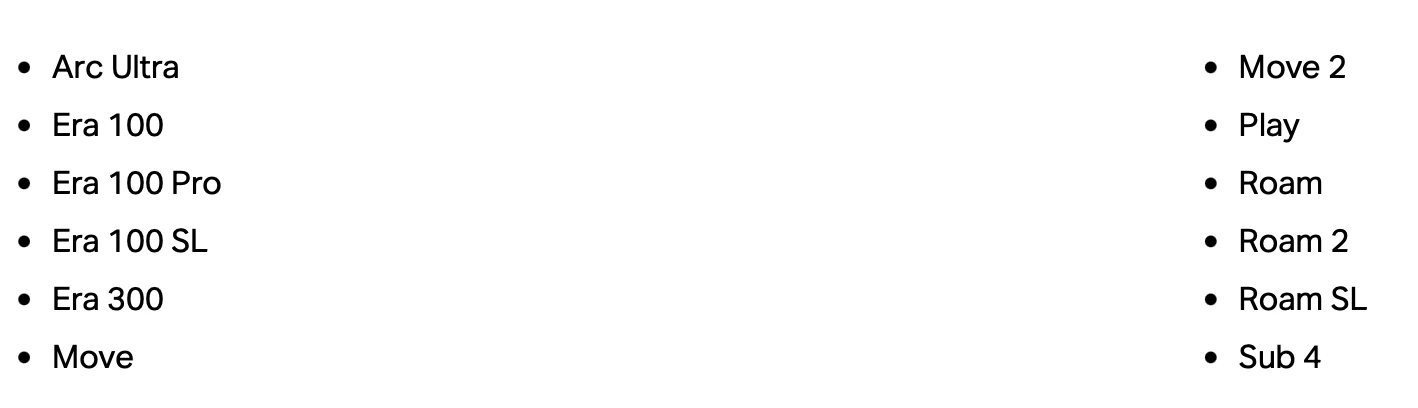
Even if you have a speaker that can be wired to create the SonosNet the speakers below will ignore it and opt to connect to your home Wi-Fi.
So if all your Sonos consists of the speakers listed below there’s no point to try and wire one to your router.
I can still see some signs that they are connected to the network, but they don’t appear in the app anymore.
Try play.sonos.com if you think your players are connected to your network. If they are, and the App on your phone cant find them, it suggests your phone is on a different network maybe? A cellular network or different WiFi network?
I’m having an issue with my Sonos system after setting everything up.
The speakers were successfully added and were working fine initially, but now they are no longer showing up in the Sonos app under “System” or “Devices”. I can still see some signs that they are connected to the network, but they don’t appear in the app anymore.
I have already tried:
Restarting the speakers
Reinstalling the Sonos app
Rebooting the router
Checking the WiFi connection
But nothing has worked so far.
Has anyone experienced something similar where devices go “missing” from the app even though they are still connected? Any advice on how to restore them would be really appreciated.
Thanks in advance!
Do you have your wireless radios separate? If so, make sure your phone and speakers are on the same radio. If they are, try resetting the app on your phone to see if that helps.
For troubleshooting, try hardwiring a main speaker to your router. If your speakers show up in the app, you have some WiFi interference in your home.
Are you using an ISP provided device that has a combined router and Modem in conjunction with your own router? If so the router side of the ISP provided box needs to be placed in Bridge mode. If not you’ll have two networks and Sonos will be hopping between them thus resulting in speakers disappearing at times.
Are the 2.4Ghz and 5Ghz WiFi bands assigned different SSID’s? If so I recommend assigning the same SSID to all bands.
Do you have any type of Smart Connect or Band steering engaged wherein your router assigns devices to a particular band? If so please disengage it and allow Sonos and other devices to pick the band they want.
Do you have Airtime Fairness active in your router? If so turn it off.
If any of the above apply to your network and need to be changed…before you do anything unplug all Sonos and power down portable speakers.DO NOT FACTORY RESET ANY SONOS PRODUCT.
After making the changes:
Connect your device
Delete and reinstall the Sonos App
Plug in your Sonos 1x1 and let them come back
Power up your Sonos portable devices and let them comeback.
Open the app and select “Join an Existing System”, follow the prompts and sign-in with your credentials.
Test your Sonos
If you have questions about the above please post them. If none of the above applies please tell us more about your network.
EDIT:
Wire a Sonos Speaker to your router
The purpose (in your case) to wire a speaker to your router is to create the proprietary SonosNet.
It is a hidden 2.4Ghz band that allows Sonos products of a particular vintage to join and bypass your home Wi-Fi.
Even if you have a speaker that can be wired to create the SonosNet the speakers below will ignore it and opt to connect to your home Wi-Fi.
So if all your Sonos consists of the speakers listed below there’s no point to try and wire one to your router.