Answered

How to create playlists

  • May 30, 2026
  • 8 replies
  • 47 views

1. How can I create ad-free playlists of various genres? 
2. Does Sonos still block playing downloaded music from my iPhone? 

Best answer by Airgetlam

‘Ad free’ depends on the service streaming the content. 
 

Apple blocked the streaming of music for various vendors several years ago. You can, if your Sonos speakers allow it, use AirPlay 2 to connect your iPhone, and use the ‘player’ installed on your iPhone, such as ‘Music’ by Apple. Sonos controller (the app on your iPhone’ is not a player, it is merely a remote control. 

I would consider moving the music (or as I’ve done, copied) from your iPhone to a desktop (Mac or Windows), or NAS. Neither Apple nor Google have blocked SMB access (the method Sonos uses to access data from those devices). 

8 replies

Airgetlam
  • Answer
  • May 30, 2026

‘Ad free’ depends on the service streaming the content. 
 

Apple blocked the streaming of music for various vendors several years ago. You can, if your Sonos speakers allow it, use AirPlay 2 to connect your iPhone, and use the ‘player’ installed on your iPhone, such as ‘Music’ by Apple. Sonos controller (the app on your iPhone’ is not a player, it is merely a remote control. 

I would consider moving the music (or as I’ve done, copied) from your iPhone to a desktop (Mac or Windows), or NAS. Neither Apple nor Google have blocked SMB access (the method Sonos uses to access data from those devices). 

Airgetlam
  • May 30, 2026

Oh, creating a playlist is covered here


  • Author
  • Contributor I
  • May 30, 2026

Thanks, Bruce. I don’t know where/how to find Air Play. 

And when I look at the song currently playing, I see 3 dots at the lower right, but that only gives me options to save to Sonos favorites, search, crossfade, or sleep timer. I don’t see anything that says create/add a playlist. 


Airgetlam
  • May 30, 2026

Having issues posting a screenshot…hang on a sec (minute or two)


Airgetlam
  • May 30, 2026


Airgetlam
  • May 30, 2026

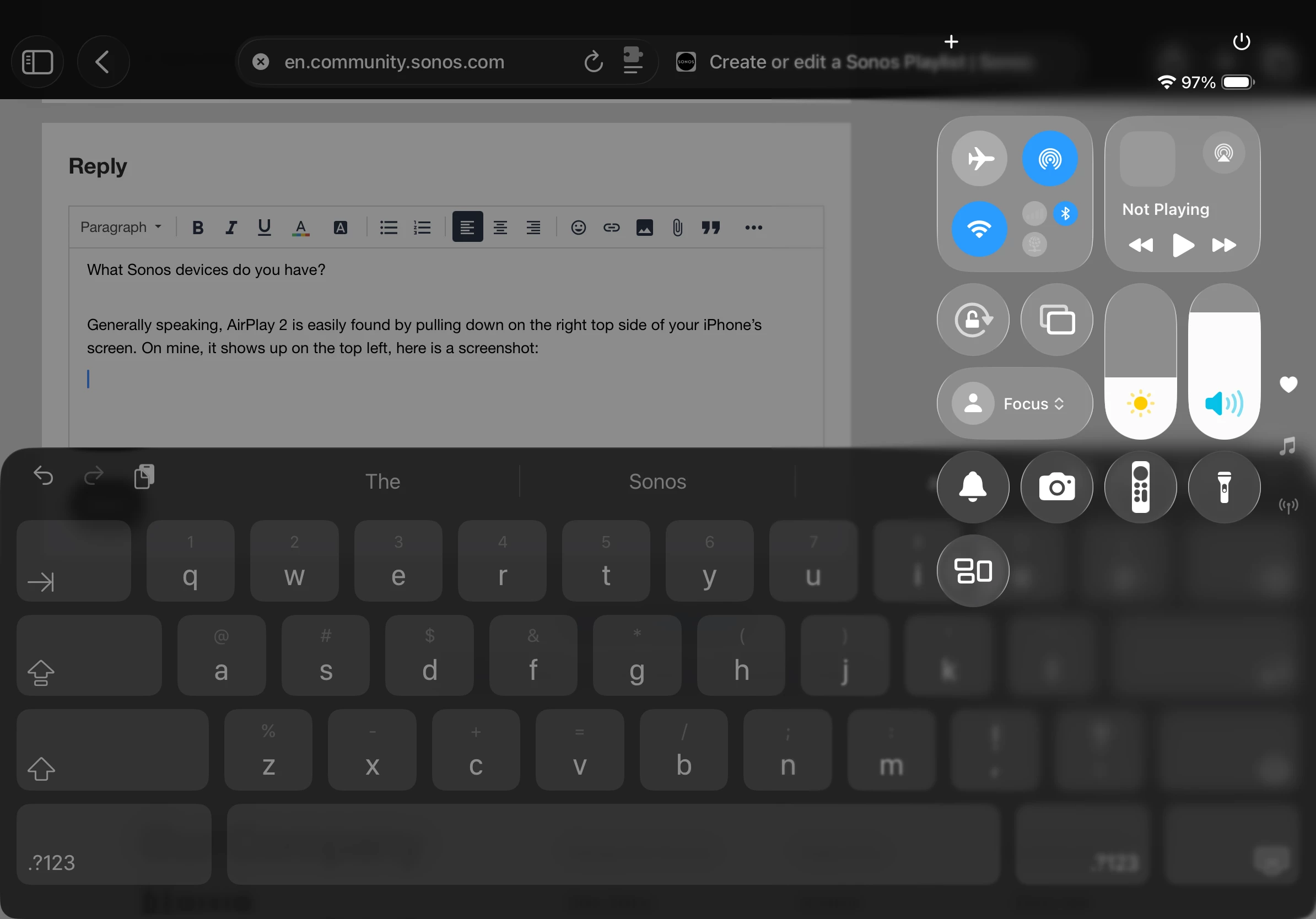
Ok, now that’s posted, explanations. Pull down on the top left of your iPhone, uou’ll see much as I’ve posted from my iPad.


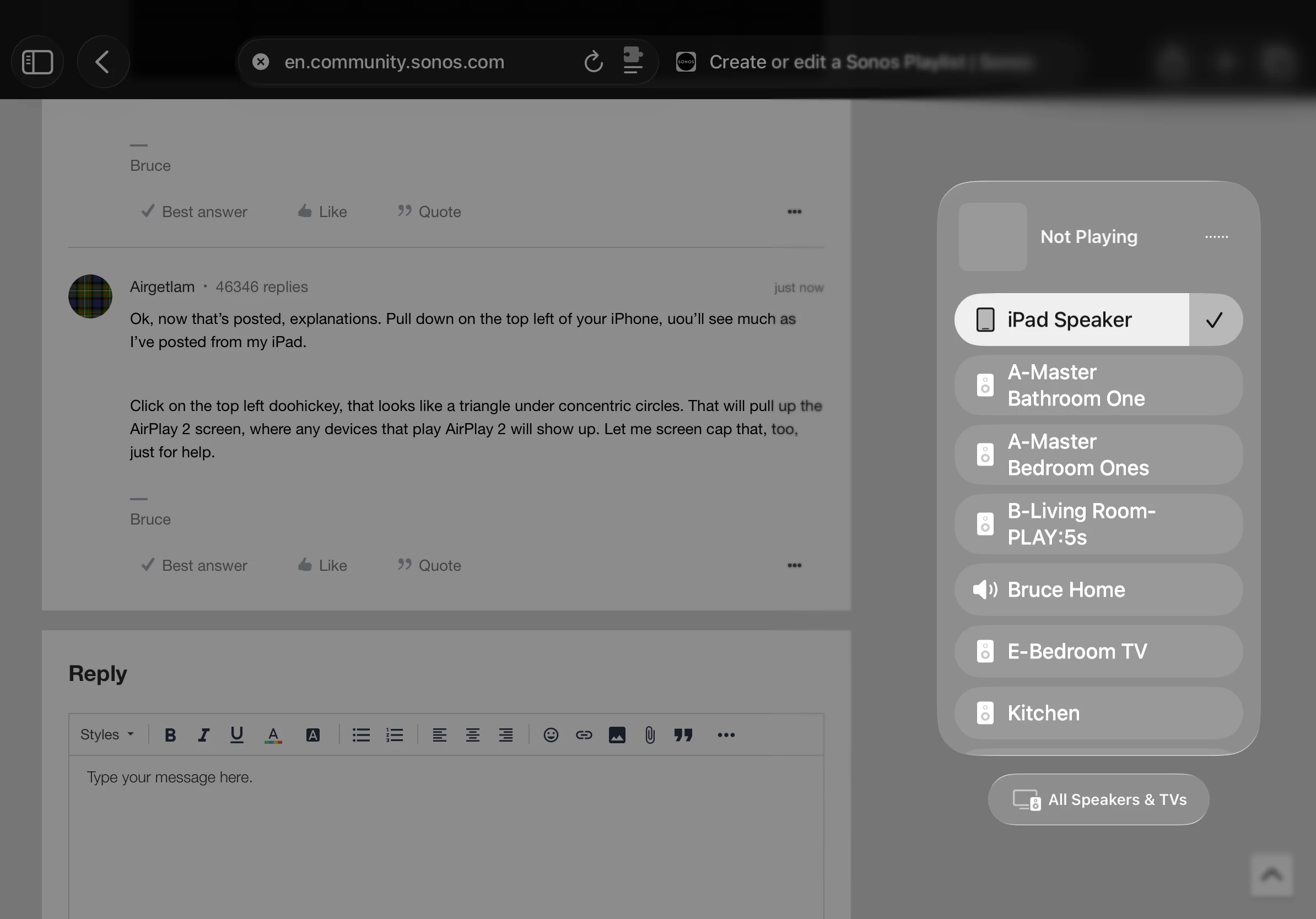
Click on the top left doohickey, that looks like a triangle under concentric circles. That will pull up the AirPlay 2 screen, where any devices that play AirPlay 2 will show up. Let me screen cap that, too, just for help.


Airgetlam
  • May 30, 2026

Ok, you can see both my iPad, a bunch of capable Sonos speakers, and other devices that can accept AirPlay 2 there. When you choose one of them, all sounds that normally come from your iPhone will be sent there. OS sounds, and music playing. 


Airgetlam
  • May 30, 2026

What song are you playing, and what’s the source?